Dell Inspiron 17 7737 Quick User Guide
Summary
This Quick Start Guide for the Dell Inspiron 7737 notebook provides multilingual setup instructions covering power adapter connection, Windows setup completion, security and update settings, and network connectivity. It includes detailed keyboard shortcut key documentation for multimedia playback, brightness and volume controls, wireless toggle, keyboard backlight toggle, and Windows 8 charms access. Hardware features are documented with numbered diagrams, and guidance on My Dell and product registration via dell.com/support is provided. Designed for home users with a large-screen notebook.
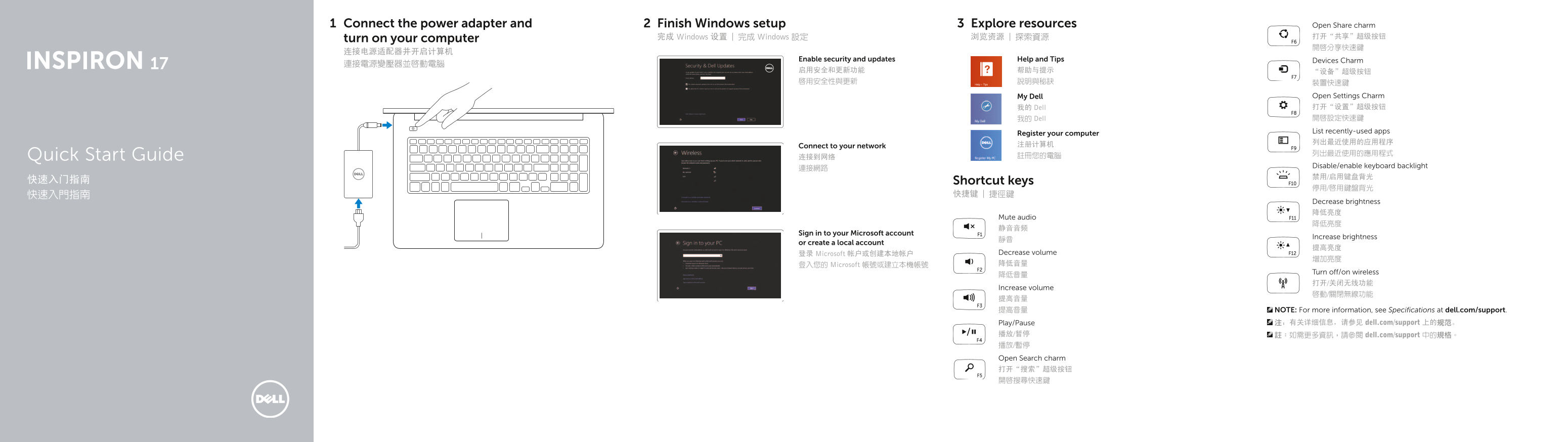
Page 1 Text Content
Connect the power adapter and Finish Windows setup Explore resources Open Share charm
完成 Windows 设置 | 完成 Windows 設定 浏览资源 | 探索資源 打开“共享”超级按钮
turn on your computer
Enable security and updates Help and Tips Devices Charm
My Dell Open Settings Charm 我的 Dell 打开“设置”超级按钮 我的 Dell 開啟設定快速鍵 List recently-used apps
Register your computer
Connect to your network 注册计算机
Quick Start Guide 连接到网络 註冊您的電腦
Disable/enable keyboard backlight
快速入门指南 Shortcut keys
Decrease brightness 降低亮度
Mute audio
Sign in to your Microsoft account
Increase brightness
or create a local account
登录 Microsoft 帐户或创建本地帐户 Decrease volume
登入您的 Microsoft 帳號或建立本機帳號 降低音量
Turn off/on wireless
Increase volume
提高音量 提高音量 NOTE: For more information, see Specifications at dell.com/support.
Play/Pause 注:有关详细信息,请参见 dell.com/support 上的规范。
播放/暂停 註:如需更多資訊,請參閱 dell.com/support 中的規格。 播放/暫停 Open Search charm 打开“搜索”超级按钮 開啟搜尋快速鍵
Page Summary Contents For Dell Inspiron 17 7737 Quick User Guide
Manual Details
| Brand | Dell |
|---|---|
| Pages | 2 |
| File Size | 213.32 KB |
| Published | July 02, 2026 |
Enter the captcha to get the download link:

Frequently Asked Questions
Where can I find detailed hardware specifications?
For more information, please see Specifications at dell.com/support.
What are the available ports on this model?
Ports include HDMI, network port, multiple USB 3.0 ports (some with PowerShare), an optical drive, and a media-card reader.
How do I adjust sound or display settings?
You can decrease/increase brightness and audio volume easily using various quick keys shortcuts.
What specific regulatory information is available for this device?
Regulatory details are provided at dell.com/regulatory_compliance, while product support manuals are at dell.com/support/manuals.