Dell Inspiron 14 AMD M4040 Quick User Guide
Summary
This multilingual quick reference guide covers Dell Inspiron 14R/M421R/15R/M521R laptops. It provides computer features information, port location diagrams for USB 3.0, HDMI, VGA, card reader, optical drive, and audio connectors, plus regulatory and support information. Target users are consumers and business users setting up Dell Inspiron laptops.
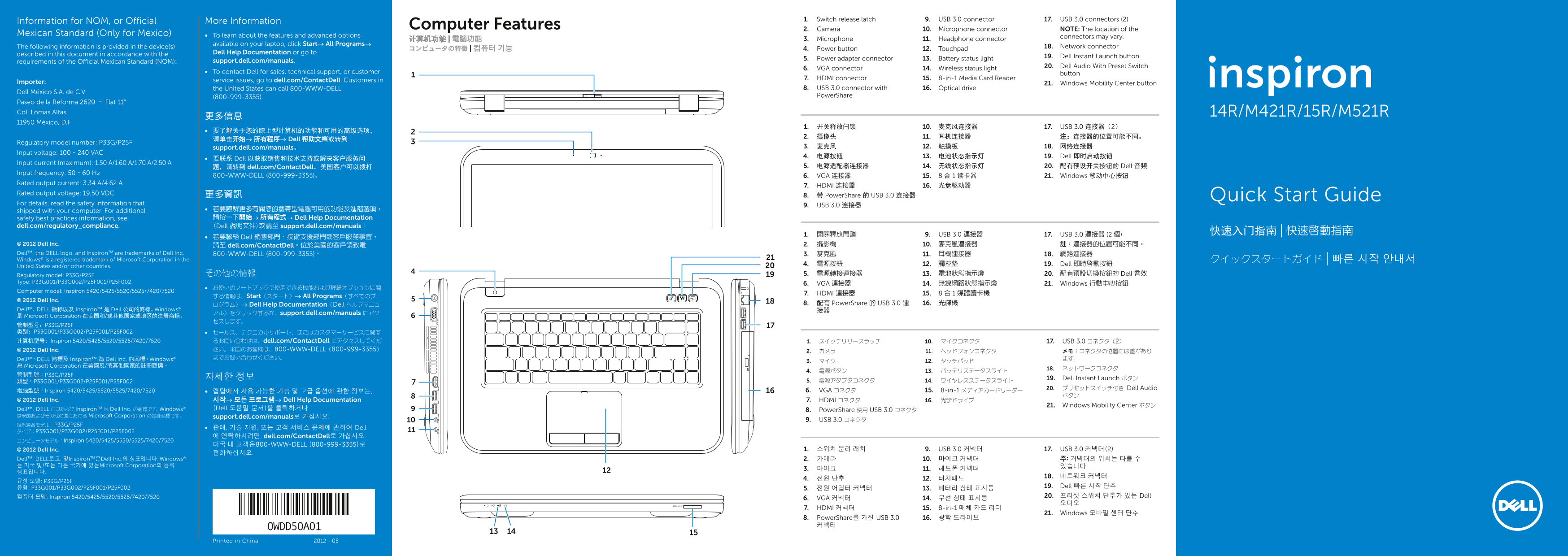
Page 1 Text Content
1. Switch release latch 9. USB 3.0 connector 17. USB 3.0 connectors (2)
Information for NOM, or Official More Information
Computer Features 2. Camera 10. Microphone connector NOTE: The location of the
Mexican Standard (Only for Mexico) To learn about the features and advanced options
connectors may vary.
计算机功能 | 電腦功能 3. Microphone 11. Headphone connector
available on your laptop, click Start→ All Programs→
The following information is provided in the device(s) 18. Network connector
コンピュータの特徴 | 컴퓨터 기능 4. Power button 12. Touchpad
described in this document in accordance with the Dell Help Documentation or go to
19. Dell Instant Launch button
5. Power adapter connector 13. Battery status light
requirements of the Official Mexican Standard (NOM): support.dell.com/manuals.
20. Dell Audio With Preset Switch
6. VGA connector 14. Wireless status light
To contact Dell for sales, technical support, or customer button
7. HDMI connector 15. 8-in-1 Media Card Reader
Importer: service issues, go to dell.com/Contact Dell. Customers in
21. Windows Mobility Center button
the United States can call 800-WWW-DELL 8. USB 3.0 connector with 16. Optical drive
Dell México S.A. de C.V.
(800-999-3355). Power Share
Paseo de la Reforma 2620 – Flat 11° Col. Lomas Altas 14R/M421R/15R/M521R
11950 México, D.F.
1. 开关释放闩锁 10. 麦克风连接器 17. USB 3.0 连接器(2)
请单击开始→ 所有程序→ Dell 帮助文档或转到
Regulatory model number: P33G/P25F
support.dell.com/manuals。 3. 麦克风 12. 触摸板 18. 网络连接器
Input voltage: 100–240 VAC
4. 电源按钮 13. 电池状态指示灯 19. Dell 即时启动按钮
要联系 Dell 以获取销售和技术支持或解决客户服务问
Input current (maximum): 1.50 A/1.60 A/1.70 A/2.50 A
题,请转到 dell.com/Contact Dell。美国客户可以拨打 5. 电源适配器连接器 14. 无线状态指示灯 20. 配有预设开关按钮的 Dell 音频
Input frequency: 50–60 Hz
800-WWW-DELL (800-999-3355)。 6. VGA 连接器 15. 8 合 1 读卡器 21. Windows 移动中心按钮
Rated output current: 3.34 A/4.62 A
7. HDMI 连接器 16. 光盘驱动器
Rated output voltage: 19.50 VDC 更多資訊
8. 带 Power Share 的 USB 3.0 连接器 Quick Start Guide
For details, read the safety information that
9. USB 3.0 连接器
shipped with your computer. For additional 若要瞭解更多有關您的攜帶型電腦可用的功能及進階選項, safety best practices information, see 請按一下開始→ 所有程式→ Dell Help Documentation
dell.com/regulatory_compliance. (Dell 說明文件)或請至 support.dell.com/manuals。
1. 開關釋放閂鎖 9. USB 3.0 連接器 17. USB 3.0 連接器 (2 個)
若要聯絡 Dell 銷售部門、技術支援部門或客戶服務事宜,
© 2012 Dell Inc. 2. 攝影機 10. 麥克風連接器 註:連接器的位置可能不同。
請至 dell.com/Contact Dell。位於美國的客戶請致電
Dell™, the DELL logo, and Inspiron™ are trademarks of Dell Inc. 800-WWW-DELL (800-999-3355)。 3. 麥克風 11. 耳機連接器 18. 網路連接器 Windows® is a registered trademark of Microsoft Corporation in the クイックスタートガイド | 빠른 시작 안내서
4. 電源按鈕 12. 觸控墊 19. Dell 即時啟動按鈕
United States and/or other countries.
Regulatory model: P33G/P25F その他の情報 5. 電源轉接連接器 13. 電池狀態指示燈 20. 配有預設切換按鈕的 Dell 音效
Type: P33G001/P33G002/P25F001/P25F002
6. VGA 連接器 14. 無線網路狀態指示燈 21. Windows 行動中心按鈕
Computer model: Inspiron 5420/5425/5520/5525/7420/7520
7. HDMI 連接器 15. 8 合 1 媒體讀卡機
する情報は、Start(スタート)→ All Programs(すべてのプ
© 2012 Dell Inc.
ログラム)→ Dell Help Documentation(Dell ヘルプマニュ 8. 配有 Power Share 的 USB 3.0 連 16. 光碟機
Dell™、DELL 徽标以及 Inspiron™ 是 Dell 公司的商标。Windows® 接器
アル)をクリックするか、support.dell.com/manuals にアク
是 Microsoft Corporation 在美国和/或其他国家或地区的注册商标。
管制型号:P33G/P25F 类别:P33G001/P33G002/P25F001/P25F002 セールス、テクニカルサポート、またはカスタマーサービスに関す 计算机型号:Inspiron 5420/5425/5520/5525/7420/7520 るお問い合わせは、dell.com/Contact Dell にアクセスしてくだ 1. スイッチリリースラッチ 10. マイクコネクタ 17. USB 3.0 コネクタ(2)
© 2012 Dell Inc. さい。米国のお客様は、800-WWW-DELL(800-999-3355) 2. カメラ 11. ヘッドフォンコネクタ メモ:コネクタの位置には差があり Dell™、DELL 徽標及 Inspiron™ 為 Dell Inc. 的商標。Windows® までお問い合わせください。 ます。
為 Microsoft Corporation 在美國及/或其他國家的註冊商標。
자세한 정보 19. Dell Instant Launch ボタン
20. プリセットスイッチ付き Dell Audio
電腦型號:Inspiron 5420/5425/5520/5525/7420/7520 랩탑에서 사용 가능한 기능 및 고급 옵션에 관한 정보는, 6. VGA コネクタ 15. 8-in-1 メディアカードリーダー
© 2012 Dell Inc. 시작→ 모든 프로그램→ Dell Help Documentation 7. HDMI コネクタ 16. 光学ドライブ
21. Windows Mobility Center ボタン
Dell™、DELL ロゴおよび Inspiron™ は Dell Inc. の商標です。Windows® (Dell 도움말 문서)을 클릭하거나 8. Power Share 使用 USB 3.0 コネクタ
は米国およびその他の国における Microsoft Corporation の登録商標です。 support.dell.com/manuals로 가십시오.
9. USB 3.0 コネクタ
판매, 기술 지원, 또는 고객 서비스 문제에 관하여 Dell
에 연락하시려면, dell.com/Contact Dell로 가십시오.
コンピュータモデル:Inspiron 5420/5425/5520/5525/7420/7520
미국 내 고객은800-WWW-DELL (800-999-3355)로
© 2012 Dell Inc. 1. 스위치 분리 래치 9. USB 3.0 커넥터 17. USB 3.0 커넥터(2)
Dell™, DELL로고, 및Inspiron™은Dell Inc.의 상표입니다. Windows® 2. 카메라 10. 마이크 커넥터 주: 커넥터의 위치는 다를 수 는 미국 및/또는 다른 국가에 있는Microsoft Corporation의 등록 있습니다.
유형: P33G001/P33G002/P25F001/P25F002 19. Dell 빠른 시작 단추
컴퓨터 모델: Inspiron 5420/5425/5520/5525/7420/7520 20. 프리셋 스위치 단추가 있는 Dell
6. VGA 커넥터 14. 무선 상태 표시등
7. HDMI 커넥터 15. 8-in-1 매체 카드 리더
21. Windows 모바일 센터 단추
8. Power Share를 가진 USB 3.0 16. 광학 드라이브 커넥터
Printed in China 2012 - 05
Page Summary Contents For Dell Inspiron 14 AMD M4040 Quick User Guide
Manual Details
| Brand | Dell |
|---|---|
| Pages | 2 |
| File Size | 1.18 MB |
| Published | June 25, 2026 |
Enter the captcha to get the download link:

Frequently Asked Questions
How do I find detailed manual information for this device?
Go to support.dell.com/manuals, or visit dell.com/ContactDell for assistance.
What are the connections available on the laptop?
The laptop includes ports such as VGA, HDMI, 8-in-1 Media Card Reader, USB 3.0 connectors (with and without PowerShare), and microphone/headphone connectors.
Can I check product compatibility or features?
To learn about available features and advanced options for your specific model, click 'Start' > 'All Programs' > 'Dell Help Documentation'.