Dell Inspiron 11 3135 Quick Start Guide
Summary
Dell Inspiron 3135 Quick Start Guide with multilingual Windows 8 charm-based navigation (Search/Share/Devices/Settings charms), shortcut keys for brightness/volume/wireless/display, My Dell, security updates, network connection, and features including camera, USB ports, and HDMI.
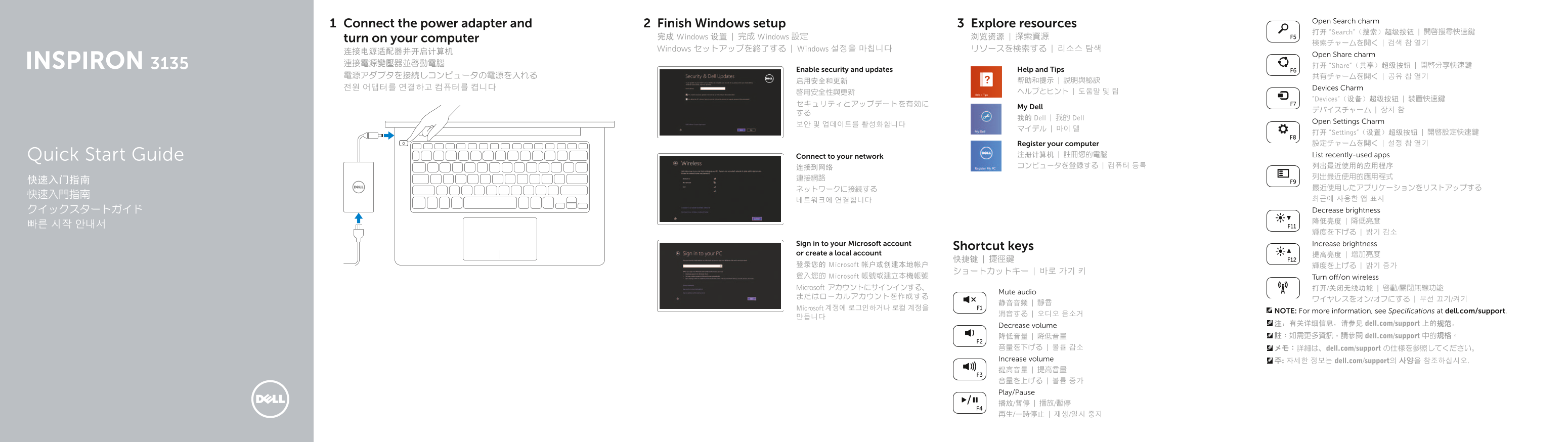
Page 1 Text Content
Open Search charm
Connect the power adapter and Finish Windows setup Explore resources
打开 “Search“(搜索)超级按钮 | 開啟搜尋快速鍵
turn on your computer 完成 Windows 设置 | 完成 Windows 設定 浏览资源 | 探索資源
Windows セットアップを終了する | Windows 설정을 마칩니다 リソースを検索する | 리소스 탐색
Open Share charm
連接電源變壓器並啟動電腦 打开 “Share“(共享)超级按钮 | 開啟分享快速鍵
Enable security and updates Help and Tips
전원 어댑터를 연결하고 컴퓨터를 켭니다 Devices Charm
“Devices“(设备)超级按钮 | 裝置快速鍵
My Dell
我的 Dell | 我的 Dell
Open Settings Charm
打开 “Settings“(设置)超级按钮 | 開啟設定快速鍵 Register your computer 設定チャームを開く | 설정 참 열기
Quick Start Guide Connect to your network 注册计算机 | 註冊您的電腦 List recently-used apps 连接到网络 コンピュータを登録する | 컴퓨터 등록 列出最近使用的应用程序
네트워크에 연결합니다 최근에 사용한 앱 표시 クイックスタートガイド Decrease brightness 降低亮度 | 降低亮度
Sign in to your Microsoft account Increase brightness
Shortcut keys
or create a local account 提高亮度 | 增加亮度
登录您的 Microsoft 帐户或创建本地帐户 輝度を上げる | 밝기 증가
登入您的 Microsoft 帳號或建立本機帳號 Turn off/on wireless Microsoft アカウントにサインインする、 打开/关闭无线功能 | 啟動/關閉無線功能
Mute audio
Microsoft 계정에 로그인하거나 로컬 계정을
NOTE: For more information, see Specifications at dell.com/support.
Decrease volume 注:有关详细信息,请参见 dell.com/support 上的规范。 降低音量 | 降低音量 註:如需更多資訊,請參閱 dell.com/support 中的規格。
音量を下げる | 볼륨 감소 メモ:詳細は、dell.com/support の仕様を参照してください。 Increase volume 주: 자세한 정보는 dell.com/support의 사양을 참조하십시오. 提高音量 | 提高音量 音量を上げる | 볼륨 증가 Play/Pause 播放/暂停 | 播放/暫停 再生/一時停止 | 재생/일시 중지
Page Summary Contents For Dell Inspiron 11 3135 Quick Start Guide
Manual Details
| Brand | Dell |
|---|---|
| Pages | 2 |
| File Size | 326.02 KB |
| Published | July 03, 2026 |
Enter the captcha to get the download link:

Frequently Asked Questions
What are the available ports on this model?
The device features several ports, including two USB 3.0 ports, two USB 2.0 ports, a headset port, an HDMI port, a network port, and a media card reader.
How do I reset the security cables?
The manual lists one physical slot for a safety cable (security slot) located near the right-click area of the device.
Where can I find support or more detailed specifications?
For product support, manuals, and specific regulatory details, please visit dell.com/support.