Dell E2722HS Monitor Teardown Instructions
Summary
This mechanical instruction manual provides detailed disassembly procedures for the Dell E2722H and E2722HS monitors. It includes step-by-step instructions with diagrams for removing the base assembly, rear cover, mainframe, mainboard, and power board, as well as disconnecting cables and removing panels. The manual also contains product material information regarding substances used in the monitor. It is intended for trained service technicians performing repair or maintenance on these display models.
Page 1 Text Content
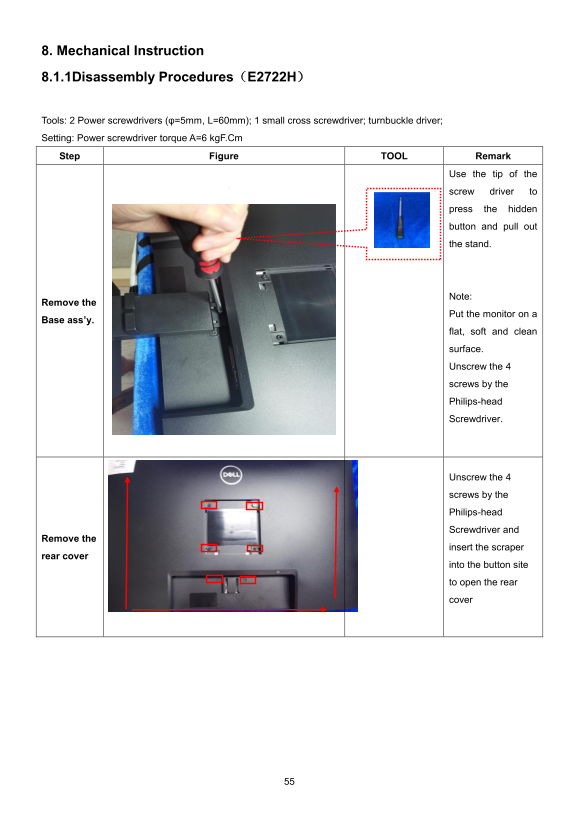
8. Mechanical Instruction 8.1.1Disassembly Procedures(E2722H)
Tools: 2 Power screwdrivers (φ=5mm, L=60mm); 1 small cross screwdriver; turnbuckle driver;
Setting: Power screwdriver torque A=6 kg F.Cm
Step Figure TOOL Remark
Use the tip of the
screw driver to
press the hidden
button and pull out
the stand.
Note:
Remove the
Put the monitor on a
Base ass’y.
flat, soft and clean
surface.
Unscrew the 4
screws by the
Philips-head
Screwdriver.
Unscrew the 4
screws by the
Philips-head
Screwdriver and
Remove the
insert the scraper
rear cover
into the button site
to open the rear
cover
Page Summary Contents For Dell E2722HS Monitor Teardown Instructions
Manual Details
| Brand | Dell |
|---|---|
| Pages | 7 |
| File Size | 931.52 KB |
| Published | June 20, 2026 |
Enter the captcha to get the download link:

Frequently Asked Questions
What tools are required to disassemble the monitor?
Use a 5mm and 60mm power screwdriver, small cross screwdriver, turnbuckle driver, and a penknife.
How do I remove the stand and rear cover?
Press the hidden button with the screwdriver tip to pull out the stand, then unscrew the 4 screws to remove the rear cover.
What materials need special disposal treatment?
Capacitors, PCBs, plastic, cables, and the LCD screen (>100 cm2) must be disposed of separately.
Which monitor models use these disassembly procedures?
The instructions apply to the E2722H and E2722HS models.