Dell E2016HV Monitor Teardown Instructions
Summary
This technical documentation provides comprehensive documentation for the DELL E-Series (Applicable for EXX16, EXX18) 1. Disassemble Procedures S1. The document covers technical documentation and operational guidance. This documentation is intended for general users and IT support. The manual provides detailed guidance to ensure proper operation and maintenance of the DELL E-Series (Applicable for EXX16, EXX18) 1. Disassemble Procedures S1. Users will find step-by-step instructions and technical details necessary for effective utilization of the product.
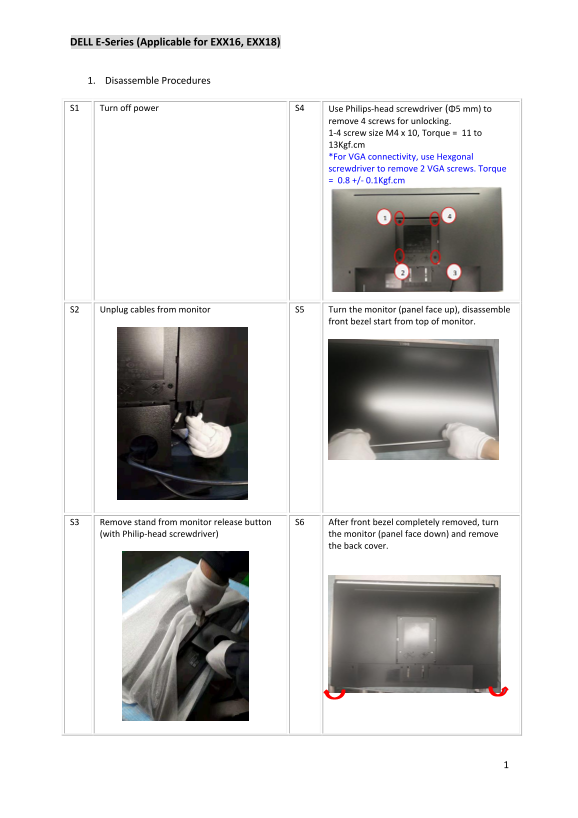
Page 1 Text Content
DELL E-Series (Applicable for EXX16, EXX18)
1. Disassemble Procedures
S1 Turn off power S4 Use Philips-head screwdriver (Φ5 mm) to
remove 4 screws for unlocking. 1-4 screw size M4 x 10, Torque = 11 to 13Kgf.cm *For VGA connectivity, use Hexgonal screwdriver to remove 2 VGA screws. Torque = 0.8 +/- 0.1Kgf.cm
S2 Unplug cables from monitor S5 Turn the monitor (panel face up), disassemble
front bezel start from top of monitor.
S3 Remove stand from monitor release button S6 After front bezel completely removed, turn (with Philip-head screwdriver) the monitor (panel face down) and remove
the back cover.
Page Summary Contents For Dell E2016HV Monitor Teardown Instructions
Manual Details
| Brand | Dell |
|---|---|
| Pages | 3 |
| File Size | 651.43 KB |
| Published | June 16, 2026 |
Enter the captcha to get the download link:

Frequently Asked Questions
What tools are needed to disassemble the monitor?
You need Philips-head screwdrivers (Φ5 mm and Φ3 mm), a hexagonal screwdriver for VGA connectivity, a soldering iron, and a knife.
How do I remove the back cover?
First, remove the front bezel by turning the panel face up and using a Philips-head screwdriver. Then, turn the monitor face down and remove the back cover.
Which components require special disposal?
The monitor contains electrolyte capacitors (height > 25mm) and printed circuit boards (surface > 10 sq cm) that require separate disposal.
What is the torque specification for the power board screws?
For the power board screws, the torque should be 5.5 kgf +/- 0.5 kgf.