Dell 1320C Color Laser Printer Statement of Volatility
Summary
Essential guide for the Dell 1320c Color Laser Printer, detailing crucial power management and component functionality. This documentation outlines which system board components are volatile or non-volatile (NV), helping users understand data retention when power is removed. Ideal for technical staff and advanced operators who require detailed knowledge to safely troubleshoot hardware and maintain optimal printer performance.
Page 1 Text Content
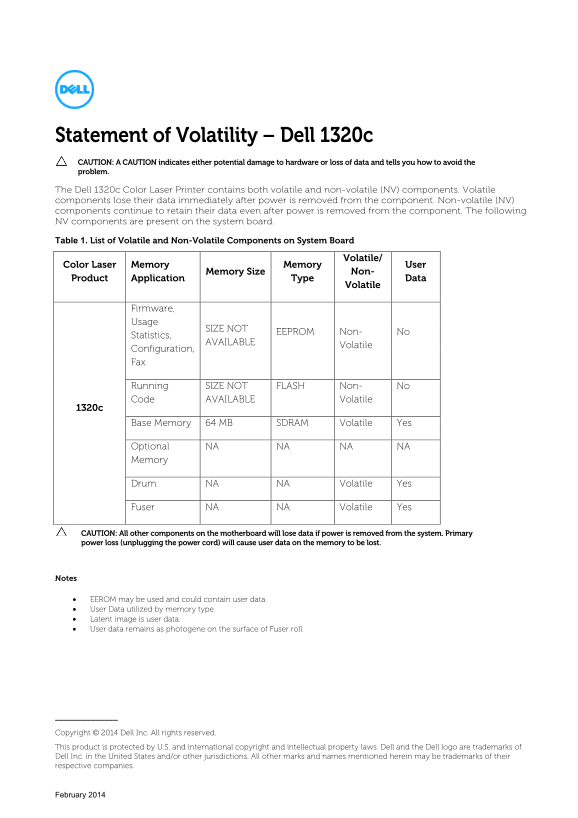
Statement of Volatility – Dell 1320c CAUTION: A CAUTION indicates either potential damage to hardware or loss of data and tells you how to avoid the problem. The Dell 1320c Color Laser Printer contains both volatile and non-volatile (NV) components. Volatile components lose their data immediately after power is removed from the component. Non-volatile (NV) components continue to retain their data even after power is removed from the component. The following NV components are present on the system board. Table 1. List of Volatile and Non-Volatile Components on System Board
Volatile/
Color Laser Memory Memory User
Memory Size Non-
Product Application Type Data
Volatile
Firmware, Usage
SIZE NOT
EEPROM Non- No
Statistics,
AVAILABLE
Volatile
Configuration, Fax
Running SIZE NOT FLASH Non- No Code AVAILABLE Volatile
Base Memory 64 MB SDRAM Volatile Yes
Optional NA NA NA NA Memory
Drum NA NA Volatile Yes
Fuser NA NA Volatile Yes
CAUTION: All other components on the motherboard will lose data if power is removed from the system. Primary power loss (unplugging the power cord) will cause user data on the memory to be lost.
Notes:
• EEROM may be used and could contain user data. • User Data utilized by memory type. • Latent image is user data. • User data remains as photogene on the surface of Fuser roll.
Copyright © 2014 Dell Inc. All rights reserved. This product is protected by U.S. and international copyright and intellectual property laws. Dell and the Dell logo are trademarks of Dell Inc. in the United States and/or other jurisdictions. All other marks and names mentioned herein may be trademarks of their respective companies.
February 2014
Page Summary Contents For Dell 1320C Color Laser Printer Statement of Volatility
Manual Details
| Brand | Laser |
|---|---|
| Pages | 1 |
| File Size | 54.09 KB |
| Published | May 25, 2026 |
Enter the captcha to get the download link:

Frequently Asked Questions
What happens to data if power is unexpectedly removed?
All components not explicitly listed as 'Non-Volatile' (NV) will lose their data immediately.
Which component retains user data even when powered off?
The system board contains the EEPROM, which may store user data.
How can I minimize data loss risk on this printer?
Prevent primary power loss by keeping the device plugged in or following proper shutdown procedures that save critical memory data.
What is considered 'user data' within this manual's context?
User data includes content stored in EEPROM, latent images, and user settings utilized by the memory type.