CASIO IQ-123 User Guide
Summary
Operating Guide for your clock, this manual provides essential instructions for new users on how to properly set up and maintain your timepiece. It covers initial setup, including removing protective stickers. Detailed sections guide you through setting the correct time and calibrating the seconds using specific methods detailed in the manual (Type 1 or Type 2). Furthermore, dedicated procedures outline safe battery replacement practices and include critical safety precautions regarding polarity, leakage, and handling to ensure optimal performance and longevity of your clock.
Page 1 Text Content
MA0612-EA
Operation Guide W-CLO.H
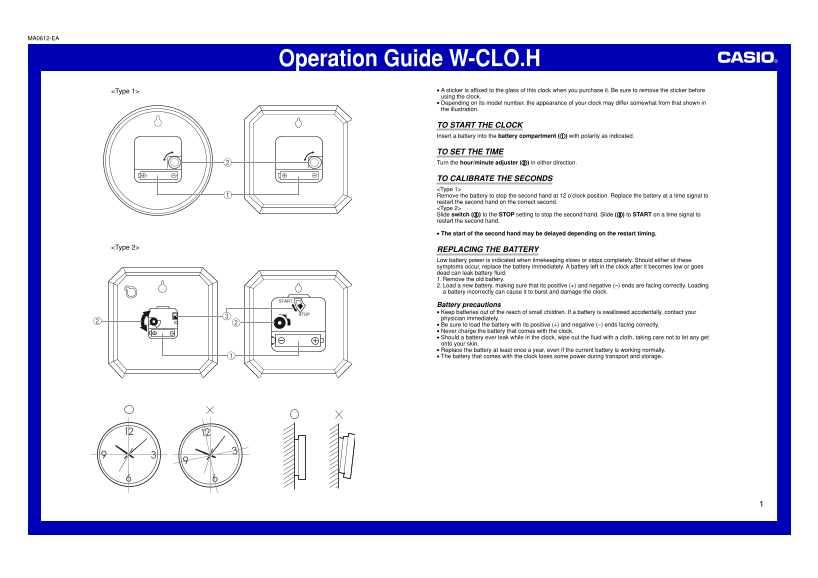
<Type 1> A sticker is affixed to the glass of this clock when you purchase it. Be sure to remove the sticker before using the clock. Depending on its model number, the appearance of your clock may differ somewhat from that shown in the illustration.
TO START THE CLOCK Insert a battery into the battery compartment (1) with polarity as indicated.
TO SET THE TIME Turn the hour/minute adjuster (2) in either direction.
TO CALIBRATE THE SECONDS <Type 1> Remove the battery to stop the second hand at 12 o’clock position. Replace the battery at a time signal to restart the second hand on the correct second. <Type 2> Slide switch (3) to the STOP setting to stop the second hand. Slide (3) to START on a time signal to restart the second hand.
The start of the second hand may be delayed depending on the restart timing.
<Type 2>
REPLACING THE BATTERY Low battery power is indicated when timekeeping slows or stops completely. Should either of these symptoms occur, replace the battery immediately. A battery left in the clock after it becomes low or goes dead can leak battery fluid. 1. Remove the old battery. 2. Load a new battery, making sure that its positive (+) and negative (–) ends are facing correctly. Loading a battery incorrectly can cause it to burst and damage the clock.
Battery precautions Keep batteries out of the reach of small children. If a battery is swallowed accidentally, contact your physician immediately. Be sure to load the battery with its positive (+) and negative (–) ends facing correctly. Never charge the battery that comes with the clock. Should a battery ever leak while in the clock, wipe out the fluid with a cloth, taking care not to let any get onto your skin. Replace the battery at least once a year, even if the current battery is working normally. The battery that comes with the clock loses some power during transport and storage.
Page Summary Contents For CASIO IQ-123 User Guide
Manual Details
| Brand | Casio |
|---|---|
| Pages | 1 |
| File Size | 350.47 KB |
| Published | June 05, 2026 |
Enter the captcha to get the download link:

Frequently Asked Questions
How do I set the time on this clock?
Turn the hour/minute adjuster in either direction to set the time.
What procedure should I follow to stop or start the second hand (Type 2)?
Slide switch (33333) to STOP to stop the second hand, and slide it to START on a time signal to restart it.
How do I properly replace the clock's battery?
Remove the old battery, load the new one ensuring the positive (+) and negative (–) ends face correctly.
What happens if I leave a used or dead battery in the clock?
The battery can leak fluid. You should also replace the battery at least once per year.