Senheiser Call Center and Office Headphones Alcatel-Lucent MB Pro 1, 2 Quick Guide
Summary
Enhance your professional communication with the Sennheiser MB Pro headset system. This comprehensive guide provides expert instructions on setup, Bluetooth pairing, advanced call control, and maximizing performance. Learn how to manage calls efficiently, use mute functions, adjust volume for both speech and music, and optimize charging cycles. Essential reading for all business professionals and call center agents who demand reliable connectivity and superior audio clarity in their work environment.
Page 1 Text Content
Package contents | Leveringsomfang | Lieferumfang | Volumen de suministro | Contenu |
MB Pro 1 Dotazione | Omvang levering | Zakres dostawy MB Pro 2
EN FR
DA IT MB Pro 1 MB Pro 2 or
DE NL ES PL Quick Guide Safety Guide
Quick Guide Kort vejledning Kurzanleitung Instrucciones resumidas Guide rapide Istruzioni brevi Beknopte gebruiksaanwijzing Krótka instrukcja obsługi
For product specific software and firmware upgrade with the “Sennheiser Updater” go to
Headset charger CH 20 MB USB
www.sennheiser.com/cco/software
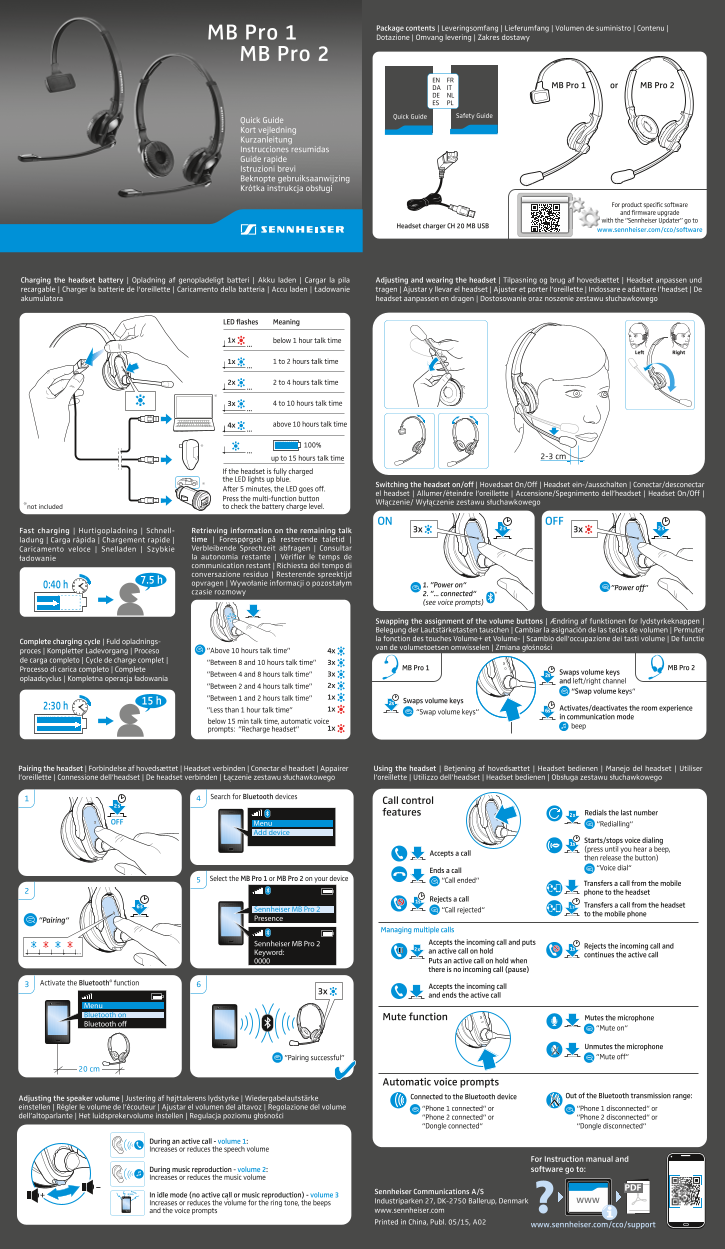
Charging the headset battery | Opladning af genopladeligt batteri | Akku laden | Cargar la pila Adjusting and wearing the headset | Tilpasning og brug af hovedsættet | Headset anpassen und recargable | Charger la batterie de l‘oreillette | Caricamento della batteria | Accu laden | Ładowanie tragen | Ajustar y llevar el headset | Ajuster et porter l‘oreillette | Indossare e adattare l’headset | De akumulatora headset aanpassen en dragen | Dostosowanie oraz noszenie zestawu słuchawkowego
LED flashes Meaning
1x below 1 hour talk time
Right Left
1x 1 to 2 hours talk time
2x 2 to 4 hours talk time
3x 4 to 10 hours talk time
4x above 10 hours talk time
up to 15 hours talk time 2-3 cm
If the headset is fully charged the LED lights up blue.
Switching the headset on/off | Hovedsæt On/Off | Headset ein-/ausschalten | Conectar/desconectar
After 5 minutes, the LED goes off.
el headset | Allumer/éteindre l‘oreillette | Accensione/Spegnimento dell’headset | Headset On/Off |
Press the multi-function button
Włączenie/ Wyłączenie zestawu słuchawkowego
*not included to check the battery charge level.
ON OFF
Fast charging | Hurtigopladning | Schnell- Retrieving information on the remaining talk ladung | Carga rápida | Chargement rapide | time | Forespørgsel på resterende taletid | Caricamento veloce | Snelladen | Szybkie Verbleibende Sprechzeit abfragen | Consultar ładowanie la autonomía restante | Vérifier le temps de communication restant | Richiesta del tempo di conversazione residuo | Resterende spreektijd
opvragen | Wywołanie informacji o pozostałym 1. ”Power on“
0:40 h ”Power off“
czasie rozmowy 2. ”... connected“
(see voice prompts)
Swapping the assignment of the volume buttons | Ændring af funktionen for lydstyrkeknappen | Belegung der Lautstärketasten tauschen | Cambiar la asignación de las teclas de volumen | Permuter la fonction des touches Volume+ et Volume- | Scambio dell’occupazione dei tasti volume | De functie
Complete charging cycle | Fuld opladnings-
van de volumetoetsen omwisselen | Zmiana głośności
proces | Kompletter Ladevorgang | Proceso ”Above 10 hours talk time” 4x
de carga completo | Cycle de charge complet |
”Between 8 and 10 hours talk time” 3x
Processo di carica completo | Complete MB Pro 2MB Pro 1
3x Swaps volume keys
”Between 4 and 8 hours talk time” 2s
oplaadcyclus | Kompletna operacja ładowania
and left/right channel
”Between 2 and 4 hours talk time” 2x
“Swap volume keys“
”Between 1 and 2 hours talk time” 1x
15 h Swaps volume keys2s
2:30 h Activates/deactivates the room experience
”Less than 1 hour talk time” 1x 6s
“Swap volume keys“
in communication mode
below 15 min talk time, automatic voice
prompts: ”Recharge headset” 1x
Pairing the headset | Forbindelse af hovedsættet | Headset verbinden | Conectar el headset | Appairer Using the headset | Betjening af hovedsættet | Headset bedienen | Manejo del headset | Utiliser l‘oreillette | Connessione dell’headset | De headset verbinden | Łączenie zestawu słuchawkowego l‘oreillette | Utilizzo dell’headset | Headset bedienen | Obsługa zestawu słuchawkowego
Search for Bluetooth devices
Call control
features 2 x Redials the last number
OFF Menu
“Redialling“
Add device
Starts/stops voice dialing 1s (press until you hear a beep,
Accepts a call
then release the button) “Voice dial“
Ends a call
Select the MB Pro 1 or MB Pro 2 on your device “Call ended“
Transfers a call from the mobile phone to the headset
1s Rejects a call
6 s 1 s Transfers a call from the headset
Sennheiser MB Pro 2 “Call rejected“
to the mobile phone
”Pairing“ Presence
Managing multiple calls
Sennheiser MB Pro 2 Accepts the incoming call and puts
Rejects the incoming call and 2 x 1s
Keyword: an active call on hold
continues the active call
Puts an active call on hold when there is no incoming call (pause)
Activate the Bluetooth® function
Accepts the incoming call
and ends the active call
Menu Bluetooth on
Mute function Mutes the microphone
Bluetooth off
“Mute on“
Unmutes the microphone ”Pairing successful” “Mute off“
20 cm
Automatic voice prompts
Connected to the Bluetooth device Out of the Bluetooth transmission range:
Adjusting the speaker volume | Justering af højttalerens lydstyrke | Wiedergabelautstärke einstellen | Régler le volume de l‘écouteur | Ajustar el volumen del altavoz | Regolazione del volume “Phone 1 connected“ or “Phone 1 disconnected“ or dell’altoparlante | Het luidsprekervolume instellen | Regulacja poziomu głośności “Phone 2 connected“ or “Phone 2 disconnected“ or
“Dongle connected“ “Dongle disconnected“
During an active call - volume 1: Increases or reduces the speech volume
For Instruction manual and During music reproduction - volume 2: software go to:
Increases or reduces the music volume
Sennheiser Communications A/S
In idle mode (no active call or music reproduction) - volume 3
: Increases or reduces the volume for the ring tone, the beeps Industriparken 27, DK-2750 Ballerup, Denmark www
and the voice prompts www.sennheiser.com Printed in China, Publ. 05/15, A02
www.sennheiser.com/cco/support
Page Summary Contents For Senheiser Call Center and Office Headphones Alcatel-Lucent MB Pro 1, 2 Quick Guide
Manual Details
| Brand | Alcatel-Lucent |
|---|---|
| Pages | 2 |
| File Size | 1.62 MB |
| Published | May 13, 2026 |
Enter the captcha to get the download link:

Frequently Asked Questions
How do I check the remaining talk time?
Press the multi-function button; the system will provide an automatic voice prompt stating the remaining duration (e.g., '1h 30m').
What is the maximum predicted talk time for a fully charged headset?
The advertised range varies by model and charge level, going up to 15 hours under specific conditions.
How do I reconnect or pair the headset via Bluetooth?
During use, press the multi-function button multiple times (number of presses depending on current state) until a 'Pairing successful' prompt is heard. Alternatively, check the app/manual for connection steps.
What controls does the volume button sequence provide during an active call?
Volume 1 adjusts speech volume; Volume 2 adjusts music volume; and Volume 3 adjusts ring tone or voice prompt volume.