Samsung NX Lens 60mm F2.8 Macro User's Manual
Summary
Master your camera system with this comprehensive guide for Samsung Lenses. Designed for new photographers and owners of the advanced lens series, this manual provides step-by-step instructions on optimal usage. It thoroughly covers essential functionalities, including attaching and removing lenses, utilizing macro modes, setting precise focus distances, and customizing settings via the i-Function button. Use it to ensure safe operation, maintain peak image quality, and fully unlock every feature of your camera setup.
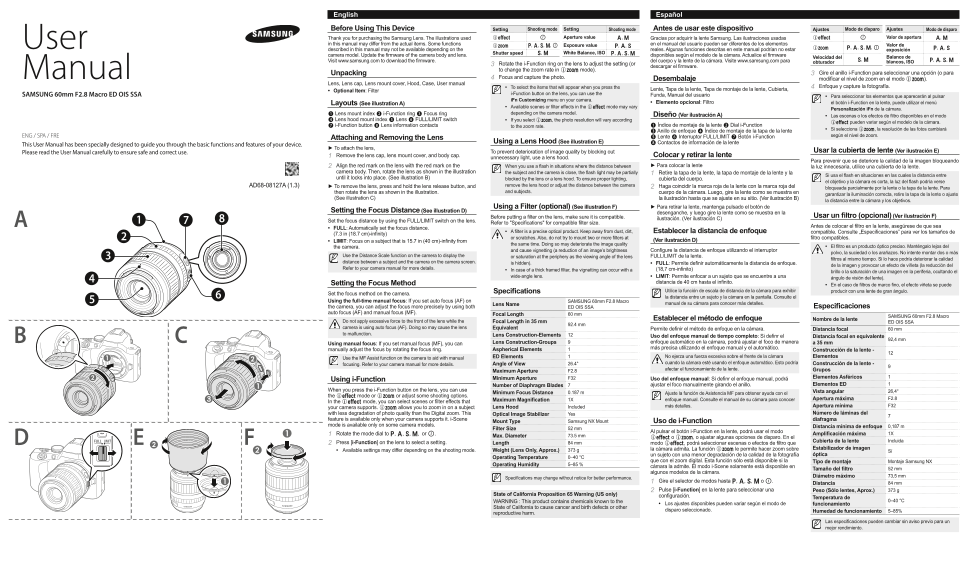
Page 1 Text Content
English Español
Before Using This Device Setting Shooting mode Setting Shooting mode Antes de usar este dispositivo Ajustes Modo de disparo Ajustes Modo de disparo
Thank you for purchasing the Samsung Lens. The illustrations used Aperture value A, M Gracias por adquirir la lente Samsung. Las ilustraciones usadas Valor de apertura A, M
User in this manual may differ from the actual items. Some functions P, A, S, M, i Exposure value P, A, S en el manual del usuario pueden ser diferentes de los elementos Valor de
described in this manual may not be available depending on the reales. Algunas funciones descritas en este manual podrían no estar exposición
Shutter speed S, M White Balance, ISO P, A, S, M
camera model. Update the firmware of the camera body and lens. disponibles según el modelo de la cámara. Actualice el firmware Balance de
Velocidad del
Visit www.samsung.com to download the firmware. del cuerpo y la lente de la cámara. Visite www.samsung.com para S, M P, A, S, M
obturador blancos, ISO
3 Rotate the i-Function ring on the lens to adjust the setting (or descargar el firmware. to change the zoom rate in Z mode).
Manual Unpacking 3 Gire el anillo i-Function para seleccionar una opción (o para
4 Focus and capture the photo. Desembalaje modificar el nivel de zoom en el modo Z).
Lens, Lens cap, Lens mount cover, Hood, Case, User manual
• To select the items that will appear when you press the 4 Enfoque y capture la fotografía.
• Optional Item: Filter Lente, Tapa de la lente, Tapa de montaje de la lente, Cubierta,
SAMSUNG 60mm F2.8 Macro ED OIS SSA i-Function button on the lens, you can use the Funda, Manual del usuario
• Para seleccionar los elementos que aparecerán al pulsar
i Fn Customizing menu on your camera.
Layouts (See illustration A) • Elemento opcional: Filtro el botón i-Function en la lente, puede utilizar el menú
• Available scenes or filter effects in the E mode may vary
Personalización i Fn de la cámara.
1 Lens mount index 2 i-Function ring 3 Focus ring depending on the camera model.
Diseño (Ver ilustración A) • Las escenas o los efectos de filtro disponibles en el modo
4 Lens hood mount index 5 Lens 6 FULL/LIMIT switch • If you select Z, the photo resolution will vary according
E pueden variar según el modelo de la cámara.
7 i-Function button 8 Lens information contacts to the zoom rate. 1 Índice de montaje de la lente 2 Dial i-Function
• Si selecciona Z, la resolución de las fotos cambiará
3 Anillo de enfoque 4 Índice de montaje de la tapa de la lente
ENG / SPA / FRE 5 Lente 6 Interruptor FULL/LIMIT 7 Botón i-Function según el nivel de zoom.
Attaching and Removing the Lens
Using a Lens Hood (See illustration E) 8 Contactos de información de la lente
This User Manual has been specially designed to guide you through the basic functions and features of your device.
► To attach the lens,
Please read the User Manual carefully to ensure safe and correct use. To prevent deterioration of image quality by blocking out Usar la cubierta de lente (Ver ilustración E)
1 Remove the lens cap, lens mount cover, and body cap. Colocar y retirar la lente
unnecessary light, use a lens hood.
Para prevenir que se deteriore la calidad de la imagen bloqueando
2 Align the red mark on the lens with the red mark on the When you use a flash in situations where the distance between ► Para colocar la lente la luz innecesaria, utilice una cubierta de la lente.
camera body. Then, rotate the lens as shown in the illustration the subject and the camera is close, the flash light may be partially 1 Retire la tapa de la lente, la tapa de montaje de la lente y la
Si usa el flash en situaciones en las cuales la distancia entre
until it locks into place. (See illustration B) blocked by the lens or a lens hood. To ensure proper lighting, cubierta del cuerpo.
el objetivo y la cámara es corta, la luz del flash podría verse
AD68-08127A (1.3) ► To remove the lens, press and hold the lens release button, and remove the lens hood or adjust the distance between the camera 2 Haga coincidir la marca roja de la lente con la marca roja del
bloqueada parcialmente por la lente o la tapa de la lente. Para
then rotate the lens as shown in the illustration. and subjects. cuerpo de la cámara. Luego, gire la lente como se muestra en
garantizar la iluminación correcta, retire la tapa de la lente o ajuste
(See illustration C) la ilustración hasta que se ajuste en su sitio. (Ver ilustración B)
la distancia entre la cámara y los objetivos.
Using a Filter (optional) (See illustration F) ► Para retirar la lente, mantenga pulsado el botón de
Setting the Focus Distance (See illustration D) desenganche, y luego gire la lente como se muestra en la
Before putting a filter on the lens, make sure it is compatible. Usar un filtro (opcional) (Ver ilustración F)
ilustración. (Ver ilustración C)
Set the focus distance by using the FULL/LIMIT switch on the lens.
Refer to "Specifications" for compatible filter size.
Antes de colocar el filtro en la lente, asegúrese de que sea
• FULL: Automatically set the focus distance.
• A filter is a precise optical product. Keep away from dust, dirt, Establecer la distancia de enfoque compatible. Consulte „Especificaciones” para ver los tamaños de
(7.3 in (18.7 cm)-infinity)
or scratches. Also, do not try to mount two or more filters at filtro compatibles.
• LIMIT: Focus on a subject that is 15.7 in (40 cm)-infinity from (Ver ilustración D)
the same time. Doing so may deteriorate the image quality
the camera. • El filtro es un producto óptico preciso. Manténgalo lejos del
and cause vignetting (a reduction of an image’s brightness Configure la distancia de enfoque utilizando el interruptor
polvo, la suciedad o los arañazos. No intente montar dos o más
Use the Distance Scale function on the camera to display the or saturation at the periphery as the viewing angle of the lens FULL/LIMIT de la lente.
filtros al mismo tiempo. Si lo hace podría deteriorar la calidad
distance between a subject and the camera on the camera screen. is hidden). • FULL: Permite definir automáticamente la distancia de enfoque.
de la imagen y provocar un efecto de viñeta (la reducción del
Refer to your camera manual for more details. • In case of a thick framed filter, the vignetting can occur with a (18,7 cm-infinito)
brillo o la saturación de una imagen en la periferia, ocultando el
wide-angle lens. • LIMIT: Permite enfocar a un sujeto que se encuentre a una ángulo de visión del lente).
Setting the Focus Method distancia de 40 cm hasta el infinito.
• En el caso de filtros de marco fino, el efecto viñeta se puede
Specifications Utilice la función de escala de distancia de la cámara para exhibir producir con una lente de gran ángulo.
Set the focus method on the camera.
la distancia entre un sujeto y la cámara en la pantalla. Consulte el
Using the full-time manual focus: If you set auto focus (AF) on SAMSUNG 60mm F2.8 Macro
Lens Name manual de su cámara para conocer más detalles.
the camera, you can adjust the focus more precisely by using both ED OIS SSA Especificaciones
auto focus (AF) and manual focus (MF). Focal Length 60 mm
SAMSUNG 60mm F2.8 Macro
Establecer el método de enfoque Nombre de la lente
Do not apply excessive force to the front of the lens while the Focal Length in 35 mm ED OIS SSA
92.4 mm
camera is using auto focus (AF). Doing so may cause the lens Equivalent Permite definir el método de enfoque en la cámara. Distancia focal 60 mm to malfunction. Lens Construction-Elements
Uso del enfoque manual de tiempo completo: Si definr el Distancia focal en equivalente
92,4 mm
Using manual focus: If you set manual focus (MF), you can Lens Construction-Groups 9 enfoque automático en la cámara, podrá ajustar el foco de manera a 35 mm manually adjust the focus by rotating the focus ring. Aspherical Elements más precisa utilizando el enfoque manual y el automático.
Construcción de la lente -
Use the MF Assist function on the camera to aid with manual ED Elements No ejerza una fuerza excesiva sobre el frente de la cámara Elementos focusing. Refer to your camera manual for more details. Angle of View 26.4° cuando la cámara esté usando el enfoque automático. Esto podría Construcción de la lente - afectar el funcionamiento de la lente. Grupos
Maximum Aperture F2.8
Minimum Aperture F32 Uso del enfoque manual: Si definr el enfoque manual, podrá Elementos Asféricos
Using i-Function
Number of Diaphragm Blades ajustar el foco manualmente girando el anillo. Elementos ED
When you press the i-Function button on the lens, you can use Vista angular 26,4°
Minimum Focus Distance 0.187 m Ajuste la función de Asistencia MF para obtener ayuda con el
the E mode or Z or adjust some shooting options.
Maximum Magnification 1X enfoque manual. Consulte el manual de su cámara para conocer Apertura máxima F2.8
In the mode, you can select scenes or filter effects that
your camera supports. Z allows you to zoom in on a subject Lens Hood Included más detalles. Apertura mínima F32
with less degradation of photo quality than the Digital zoom. This Optical Image Stabilizer Yes Número de láminas del
feature is available only when your camera supports it. i-Scene diafragma
Mount Type Samsung NX Mount Uso de i-Function
mode is available only on some camera models. Distancia mínima de enfoque 0,187 m
Filter Size 52 mm
Al pulsar el botón i-Function en la lente, podrá usar el modo
1 Rotate the mode dial to P, A, S, M, or i. Amplificación máxima 1X
Max. Diameter 73.5 mm E o Z, o ajustar algunas opciones de disparo. En el
Cubierta de la lente Incluida
2 Press [i-Function] on the lens to select a setting. Length 84 mm modo E, podrá seleccionar escenas o efectos de filtro que
373 g la cámara admita. La función Z le permite hacer zoom sobre Estabilizador de imagen
• Available settings may differ depending on the shooting mode. Weight (Lens Only, Approx.) Sí
un sujeto con una menor degradación de la calidad de la fotografía óptica
Operating Temperature 0–40 °C
que con el zoom digital. Esta función sólo está disponible si la Tipo de montaje Montaje Samsung NX
Operating Humidity 5–85 %
cámara la admite. El modo i-Scene solamente está disponible en
Tamaño del filtro 52 mm
algunos modelos de la cámara.
Diámetro máximo 73,5 mm
Specifications may change without notice for better performance.
1 Gire el selector de modos hasta P, A, S, M o i. Distancia 84 mm
2 Pulse [i-Function] en la lente para seleccionar una Peso (Sólo lentes, Aprox.) 373 g
State of California Proposition 65 Warning (US only) configuración.
Temperatura de
WARNING : This product contains chemicals known to the 0–40 °C
• Los ajustes disponibles pueden variar según el modo de funcionamiento
State of California to cause cancer and birth defects or other
disparo seleccionado. Humedad de funcionamiento 5–85%
reproductive harm.
Las especificaciones pueden cambiar sin aviso previo para un mejor rendimiento.
Page Summary Contents For Samsung NX Lens 60mm F2.8 Macro User's Manual
Manual Details
| Brand | Samsung |
|---|---|
| Pages | 2 |
| File Size | 833.27 KB |
| Published | May 31, 2026 |
Enter the captcha to get the download link:

Frequently Asked Questions
What should I do to keep my lens clean when it's not in use?
Always place the lens cap and the mount cover on the lens to prevent contamination from foreign particles and protect against scratches.
How do I properly attach or detach the lens from the body?
Align the red mark on the lens with the corresponding red mark on the camera body, then rotate until it secures into place.
Where is the best way to set the focus distance for the lens?
You set the focus distance using the FULL/LIMIT switch that is located directly on the lens itself.
What precautions should I take when using a flash at close range?
If the distance between your camera and subject is short, the flash light might be partially blocked by the lens or a hood, so adjust your distance to ensure proper lighting.