Roland RMP-3 Rhythm Coach Drum Pad Owner's Manual
Summary
This comprehensive owner's manual guides you through the features of the Roland RMP-3, a versatile electronic metronome for musicians. Learn how to set up your unit, connect external audio sources via dedicated jacks, and utilize advanced functions like Coach mode. The guide details everything from battery installation and adjusting head tension to troubleshooting, ensuring reliable performance for any practice routine or recording setup.
Page 1 Text Content
RMP-3_e ページ 2005年1月14日 金曜日 午前11時13分
Thank you, and congratulations on your choice of the Roland RMP-3. Before using this unit, carefully read the sections entitled: “USING THE UNIT SAFELY” and “IMPORTANT NOTES” (on another leaflet). These sections provide important information concerning the proper operation of the unit. Additionally, in order to feel assured that you have gained a good grasp of every feature provided by your new unit, Owner’s manual should be read in its entirety. The manual should be saved and kept on hand as a convenient reference. As shipped, the RMP-3’s battery is not installed. Please read “Preparations—Loading the Battery” and follow the instructions to install the battery. Copyright © 2005 ROLAND CORPORATION All rights reserved. No part of this publication may be reproduced in any form without the written permission of ROLAND CORPORATION.
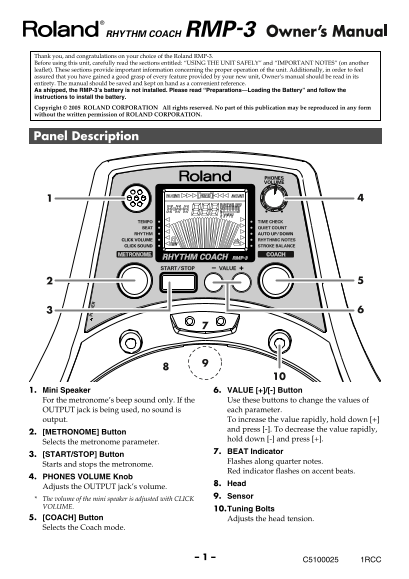
Panel Description fig.Panel
1. Mini Speaker 6. VALUE [+]/[-] Button For the metronome’s beep sound only. If the Use these buttons to change the values of OUTPUT jack is being used, no sound is each parameter. output. To increase the value rapidly, hold down [+]
and press [-]. To decrease the value rapidly,
2. [METRONOME] Button
hold down [-] and press [+].
Selects the metronome parameter.
7. BEAT Indicator
3. [START/STOP] Button
Flashes along quarter notes.
Starts and stops the metronome.
Red indicator flashes on accent beats.
4. PHONES VOLUME Knob
8. Head
Adjusts the OUTPUT jack’s volume.
9. Sensor
The volume of the mini speaker is adjusted with CLICK VOLUME.
10.Tuning Bolts
5. [COACH] Button Adjusts the head tension. Selects the Coach mode.
C5100025 1RCC
Page Summary Contents For Roland RMP-3 Rhythm Coach Drum Pad Owner's Manual
Manual Details
| Brand | Roland |
|---|---|
| Pages | 10 |
| File Size | 703.60 KB |
| Published | June 06, 2026 |
Enter the captcha to get the download link:

Frequently Asked Questions
How should I power the RMP-3 first time?
Do not use an old or unauthorized AC adaptor; only use a BOSS PSA series AC adaptor and turn off the power before connecting it.
Is the battery already installed when I receive the unit?
No, as shipped, the RMP-3’s battery is not installed. You must follow the instructions to load the battery.
What do I do if the battery runs out or volume drops?
Replace the battery immediately when the Battery LOW indicator flashes, as insufficient power lowers the mini speaker's volume and causes unstable operation.
How often should I adjust the head tension?
You must tune the head before playing, and make minor adjustments to the tension (tuning bolts) as needed due to extended use or changes in tension.