Philips IRT8099 10 Omniprog IR Commissioning Tool User Manual
Summary
The OmniProg IR Commissioning Tool is an essential piece of equipment for professional setup and comprehensive management of advanced electrical lighting systems. This manual provides detailed operating instructions, guiding facility managers, electricians, and lighting installers through the complete commissioning process. It offers technical guidance on setting precise luminosity levels, configuring group controls, and optimizing power settings across commercial buildings, ensuring reliable and efficient illumination control solutions.
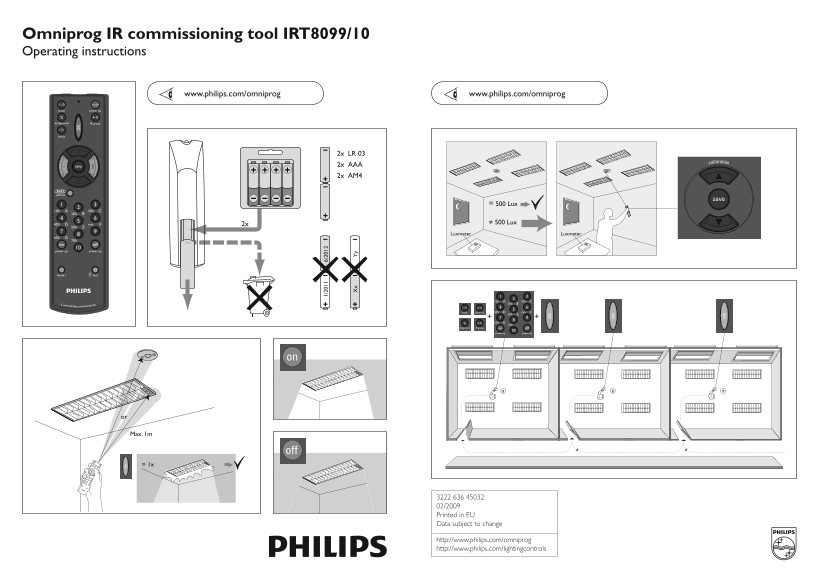
Page 1 Text Content
Omniprog IR commissioning tool IRT8099/10 Operating instructions
www.philips.com/omniprog www.philips.com/omniprog
2x LR 03 2x AAA 2x AM4
= 500 Lux
2x ≠ 500 Lux
Luxmeter Luxmeter
1-10 on/off
mode power up +6 40% min.
background IR group on off
power uppower up
Max. 1m
3222 636 45032 02/2009 Printed in EU Data subject to change
http://www.philips.com/omniprog http://www.philips.com/lightingcontrols
Page Summary Contents For Philips IRT8099 10 Omniprog IR Commissioning Tool User Manual
Manual Details
| Brand | Philips |
|---|---|
| Pages | 2 |
| File Size | 1.34 MB |
| Published | June 04, 2026 |
Enter the captcha to get the download link:

Frequently Asked Questions
What power sources are required for the Omniprog IR commissioning tool?
It requires 2x LR 03 batteries and 2x AAA batteries, plus 2x AM4.
How do I check the lighting level using the device?
The manual references a Luxmeter to measure light levels.
What is the general procedure for power up or commissioning the unit?
You can use mode switches (labeled 4, 6, 5) and follow status indicators like 'power up' or connect external lighting sources.
What are some specifications related to ambient background lighting?
The device supports setting background IR group levels at 60%, 70% (background), and has various on/off states.