Panasonic SL-CT790 User's Guide
Summary
Experience high-quality audio anywhere with this portable CD player featuring an Anti-Skip System for reliable playback of standard compact discs. This comprehensive manual provides essential guidelines on optimal operation and safety, covering everything from initial setup and proper disc handling to necessary storage precautions to protect your valuable collection. It is designed for music enthusiasts and casual listeners who require detailed instructions to ensure maximum enjoyment and device longevity.
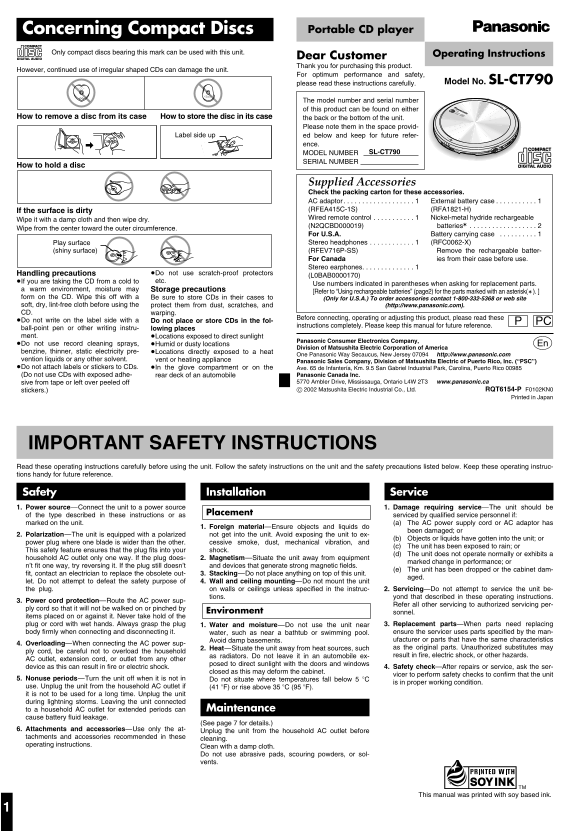
Page 1 Text Content
Concerning Compact Discs Portable CD player
Only compact discs bearing this mark can be used with this unit. Operating Instructions
Dear Customer Thank you for purchasing this product.
However, continued use of irregular shaped CDs can damage the unit.
For optimum performance and safety,
please read these instructions carefully. Model No. SL-CT790
The model number and serial number PORTABLE CD PLAYER
SL-CT790
of this product can be found on either seconds SYSTEM ANTI-SKIP
How to store the disc in its case How to remove a disc from its case the back or the bottom of the unit.
Please note them in the space provid-
Label side up ed below and keep for future refer-
ence.
OPEN VOL
SL-CT790 CHG
MODEL NUMBER SERIAL NUMBER
How to hold a disc
Supplied Accessories Check the packing carton for these accessories. AC adaptor . . . . . . . . . . . . . . . . . . . 1 External battery case . . . . . . . . . . . 1 If the surface is dirty (RFEA415C-1S) (RFA1821-H) Wired remote control . . . . . . . . . . . 1 Nickel-metal hydride rechargeable
Wipe it with a damp cloth and then wipe dry.
(N2QCBD000019) batteries° . . . . . . . . . . . . . . . . . . 2
Wipe from the center toward the outer circumference.
For U.S.A. Battery carrying case . . . . . . . . . . 1 Play surface Stereo headphones . . . . . . . . . . . . 1 (RFC0062-X)
(shiny surface) (RFEV716P-SS) Remove the rechargeable batter-
For Canada ies from their case before use.
Stereo earphones. . . . . . . . . . . . . . 1
Handling precautions ≥Do not use scratch-proof protectors
(L0BAB0000170)
≥If you are taking the CD from a cold to etc.
Use numbers indicated in parentheses when asking for replacement parts.
a warm environment, moisture may Storage precautions
[Refer to “Using rechargeable batteries” (page2) for the parts marked with an asterisk(†). ]
form on the CD. Wipe this off with a Be sure to store CDs in their cases to (Only for U.S.A.) To order accessories contact 1-800-332-5368 or web site soft, dry, lint-free cloth before using the protect them from dust, scratches, and (http://www.panasonic.com). CD. warping.
Before connecting, operating or adjusting this product, please read these
≥Do not write on the label side with a Do not place or store CDs in the fol- PC
instructions completely. Please keep this manual for future reference.
ball-point pen or other writing instru- lowing places ment. ≥Locations exposed to direct sunlight
Panasonic Consumer Electronics Company,
≥Do not use record cleaning sprays, ≥Humid or dusty locations p Division of Matsushita Electric Corporation of America benzine, thinner, static electricity pre- ≥Locations directly exposed to a heat
One Panasonic Way Secaucus, New Jersey 07094 http://www.panasonic.com
vention liquids or any other solvent. vent or heating appliance
Panasonic Sales Company, Division of Matsushita Electric of Puerto Rico, Inc. (“PSC”)
≥Do not attach labels or stickers to CDs. ≥In the glove compartment or on the Ave. 65 de Infantería, Km. 9.5 San Gabriel Industrial Park, Carolina, Puerto Rico 00985 (Do not use CDs with exposed adhe- rear deck of an automobile Panasonic Canada Inc.
sive from tape or left over peeled off 5770 Ambler Drive, Mississauga, Ontario L4W 2T3 www.panasonic.ca
stickers.) C 2002 Matsushita Electric Industrial Co., Ltd. RQT6154-P F0102KN0 Printed in Japan
IMPORTANT SAFETY INSTRUCTIONS Read these operating instructions carefully before using the unit. Follow the safety instructions on the unit and the safety precautions listed below. Keep these operating instruc- tions handy for future reference. Safety Installation Service 1. Power source—Connect the unit to a power source 1. Damage requiring service—The unit should be
of the type described in these instructions or as Placement serviced by qualified service personnel if:
marked on the unit. 1. (a) The AC power supply cord or AC adaptor has
1. Foreign material—Ensure objects and liquids do
been damaged; or
2. Polarization—The unit is equipped with a polarized not get into the unit. Avoid exposing the unit to ex-
1. (b) Objects or liquids have gotten into the unit; or
power plug where one blade is wider than the other. cessive smoke, dust, mechanical vibration, and
1. (c) The unit has been exposed to rain; or
This safety feature ensures that the plug fits into your shock.
1. (d) The unit does not operate normally or exhibits a
household AC outlet only one way. If the plug does- 2. Magnetism—Situate the unit away from equipment
marked change in performance; or
n’t fit one way, try reversing it. If the plug still doesn’t and devices that generate strong magnetic fields.
1. (e) The unit has been dropped or the cabinet dam-
fit, contact an electrician to replace the obsolete out- 3. Stacking—Do not place anything on top of this unit.
aged.
let. Do not attempt to defeat the safety purpose of 4. Wall and ceiling mounting—Do not mount the unit the plug. on walls or ceilings unless specified in the instruc- 2. Servicing—Do not attempt to service the unit be-
tions. yond that described in these operating instructions.
3. Power cord protection—Route the AC power sup-
Refer all other servicing to authorized servicing per-
ply cord so that it will not be walked on or pinched by
Environment sonnel.
items placed on or against it. Never take hold of the plug or cord with wet hands. Always grasp the plug 1. Water and moisture—Do not use the unit near 3. Replacement parts—When parts need replacing body firmly when connecting and disconnecting it. water, such as near a bathtub or swimming pool. ensure the servicer uses parts specified by the man-
Avoid damp basements. ufacturer or parts that have the same characteristics
4. Overloading—When connecting the AC power sup-
2. Heat—Situate the unit away from heat sources, such as the original parts. Unauthorized substitutes may
ply cord, be careful not to overload the household
as radiators. Do not leave it in an automobile ex- result in fire, electric shock, or other hazards.
AC outlet, extension cord, or outlet from any other
posed to direct sunlight with the doors and windows
device as this can result in fire or electric shock. 4. Safety check—After repairs or service, ask the ser-
closed as this may deform the cabinet.
vicer to perform safety checks to confirm that the unit
5. Nonuse periods—Turn the unit off when it is not in 2. Do not situate where temperatures fall below 5 o C
is in proper working condition.
use. Unplug the unit from the household AC outlet if (41 o F) or rise above 35 o C (95 o F). it is not to be used for a long time. Unplug the unit during lightning storms. Leaving the unit connected
to a household AC outlet for extended periods can Maintenance
cause battery fluid leakage.
(See page 7 for details.)
6. Attachments and accessories—Use only the at- Unplug the unit from the household AC outlet before tachments and accessories recommended in these cleaning. operating instructions. Clean with a damp cloth.
Do not use abrasive pads, scouring powders, or sol- vents.
This manual was printed with soy based ink.
Page Summary Contents For Panasonic SL-CT790 User's Guide
Manual Details
| Brand | Panasonic |
|---|---|
| Pages | 8 |
| File Size | 642.27 KB |
| Published | June 19, 2026 |
Enter the captcha to get the download link:
