Panasonic SL-CT700 User Guide
Summary
Enjoy crystal-clear audio anywhere with this versatile portable CD and MP3 player. This comprehensive operating manual serves as your essential guide, detailing simple setup procedures and advanced usage instructions for features like Album Mode and multi-session playback. Within these pages, you will also find an extensive troubleshooting guide and specifications to help ensure a stable and uninterrupted listening experience for years to come.
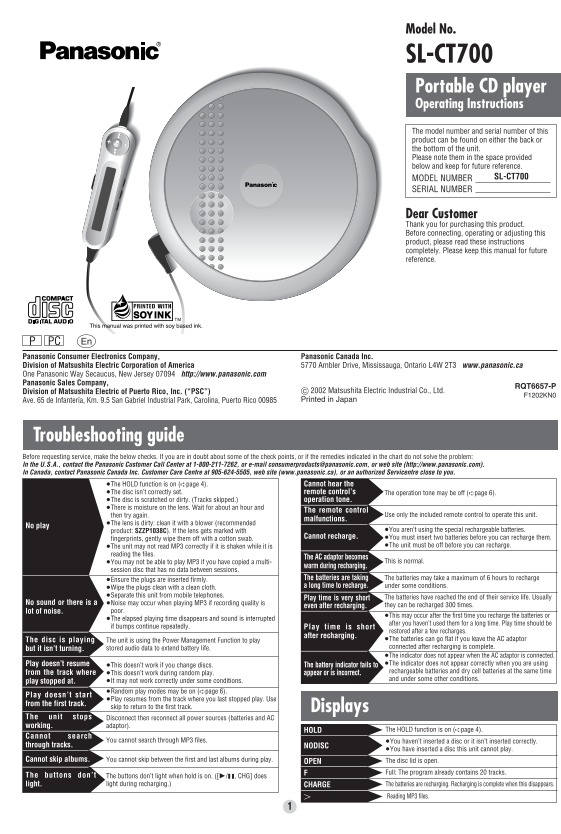
Page 1 Text Content
Model No.
SL-CT700 Portable CD player Operating Instructions The model number and serial number of this product can be found on either the back or the bottom of the unit. Please note them in the space provided below and keep for future reference.
MODEL NUMBER SL-CT700
SERIAL NUMBER
Dear Customer Thank you for purchasing this product. Before connecting, operating or adjusting this product, please read these instructions completely. Please keep this manual for future reference.
This manual was printed with soy based ink.
PC Panasonic Consumer Electronics Company, Panasonic Canada Inc. Division of Matsushita Electric Corporation of America 5770 Ambler Drive, Mississauga, Ontario L4W 2T3 www.panasonic.ca One Panasonic Way Secaucus, New Jersey 07094 http://www.panasonic.com Panasonic Sales Company,
RQT6657-P
Division of Matsushita Electric of Puerto Rico, Inc. (“PSC”) C 2002 Matsushita Electric Industrial Co., Ltd.
F1202KN0
Ave. 65 de Infantería, Km. 9.5 San Gabriel Industrial Park, Carolina, Puerto Rico 00985 Printed in Japan
Troubleshooting guide Before requesting service, make the below checks. If you are in doubt about some of the check points, or if the remedies indicated in the chart do not solve the problem: In the U.S.A., contact the Panasonic Customer Call Center at 1-800-211-7262, or e-mail [email protected], or web site (http://www.panasonic.com). In Canada, contact Panasonic Canada Inc. Customer Care Centre at 905-624-5505, web site (www.panasonic.ca), or an authorized Servicentre close to you.
≥The HOLD function is on (➪page 4). Cannot hear the ≥The disc isn’t correctly set. remote control’s The operation tone may be off (➪page 6). ≥The disc is scratched or dirty. (Tracks skipped.) operation tone.
≥There is moisture on the lens. Wait for about an hour and
The remote control
then try again. Use only the included remote control to operate this unit.
malfunctions.
≥The lens is dirty: clean it with a blower (recommended
No play
product: SZZP1038C). If the lens gets marked with ≥You aren’t using the special rechargeable batteries.
Cannot recharge. ≥You must insert two batteries before you can recharge them.
fingerprints, gently wipe them off with a cotton swab.
≥The unit may not read MP3 correctly if it is shaken while it is ≥The unit must be off before you can recharge.
reading the files.
The AC adaptor becomes
≥You may not be able to play MP3 if you have copied a multi- This is normal.
warm during recharging.
session disc that has no data between sessions.
≥Ensure the plugs are inserted firmly. The batteries are taking The batteries may take a maximum of 6 hours to recharge ≥Wipe the plugs clean with a clean cloth. a long time to recharge. under some conditions.
≥Separate this unit from mobile telephones.
Play time is very short The batteries have reached the end of their service life. Usually
No sound or there is a ≥Noise may occur when playing MP3 if recording quality is
even after recharging. they can be recharged 300 times.
lot of noise. poor.
≥This may occur after the first time you recharge the batteries or
≥The elapsed playing time disappears and sound is interrupted
after you haven’t used them for a long time. Play time should be
if bumps continue repeatedly. Play time is short
restored after a few recharges.
after recharging.
The disc is playing The unit is using the Power Management Function to play ≥The batteries can go flat if you leave the AC adaptor stored audio data to extend battery life. connected after recharging is complete.
but it isn’t turning.
≥The indicator does not appear when the AC adaptor is connected. Play doesn’t resume ≥The indicator does not appear correctly when you are using
≥This doesn’t work if you change discs. The battery indicator fails to
from the track where rechargeable batteries and dry cell batteries at the same time
≥This doesn’t work during random play. appear or is incorrect.
and under some other conditions.
play stopped at. ≥It may not work correctly under some conditions. ≥Random play modes may be on (➪page 6).
Play doesn’t start
≥Play resumes from the track where you last stopped play. Use
from the first track.
skip to return to the first track. Displays
The unit stops Disconnect then reconnect all power sources (batteries and AC working. adaptor).
HOLD The HOLD function is on (➪page 4).
Cannot search
You cannot search through MP3 files. ≥You haven’t inserted a disc or it isn’t inserted correctly.
through tracks. NODISC
≥You have inserted a disc this unit cannot play.
Cannot skip albums. You cannot skip between the first and last albums during play. The disc lid is open.
Full: The program already contains 20 tracks.
The buttons don’t The buttons don’t light when hold is on. ([1/;, CHG] does
light. light during recharging.) CHARGE The batteries are recharging. Recharging is complete when this disappears.
Reading MP3 files.
Page Summary Contents For Panasonic SL-CT700 User Guide
Manual Details
| Brand | Panasonic |
|---|---|
| Pages | 6 |
| File Size | 725.15 KB |
| Published | June 18, 2026 |
Enter the captcha to get the download link:

Frequently Asked Questions
What should I do if the 'Cannot hear' message appears?
Check if the HOLD function is activated. Also, ensure the disc is correctly set and that there is no moisture on the lens.
How often can the rechargeable batteries be used?
The unit specifies that the batteries can be recharged up to 300 times.
What are the limitations regarding playing MP3 files?
It only supports version 1.0 and 1.1 ID3 tags, cannot play packet-written files, and may display issues based on file naming methods.
Can I search through specific tracks using this unit?
No, you cannot search through MP3 files or skip between individual albums; random play modes may be used.