Lenovo ThinkVision T32p-20 Quick Setup Guide (Workstation)
Summary
Understand expected operational parameters and performance capabilities for your device’s peripheral connections. This guide details key specifications, including varying data transfer rates across different USB standards (e.g., Gen 1, Gen 2, 3.2), clarifying that actual speed is dependent on connected devices and system configuration. Essential reading for users needing maximum compatibility assurance. For full technical support or detailed setup guides, please visit the official manufacturer website.
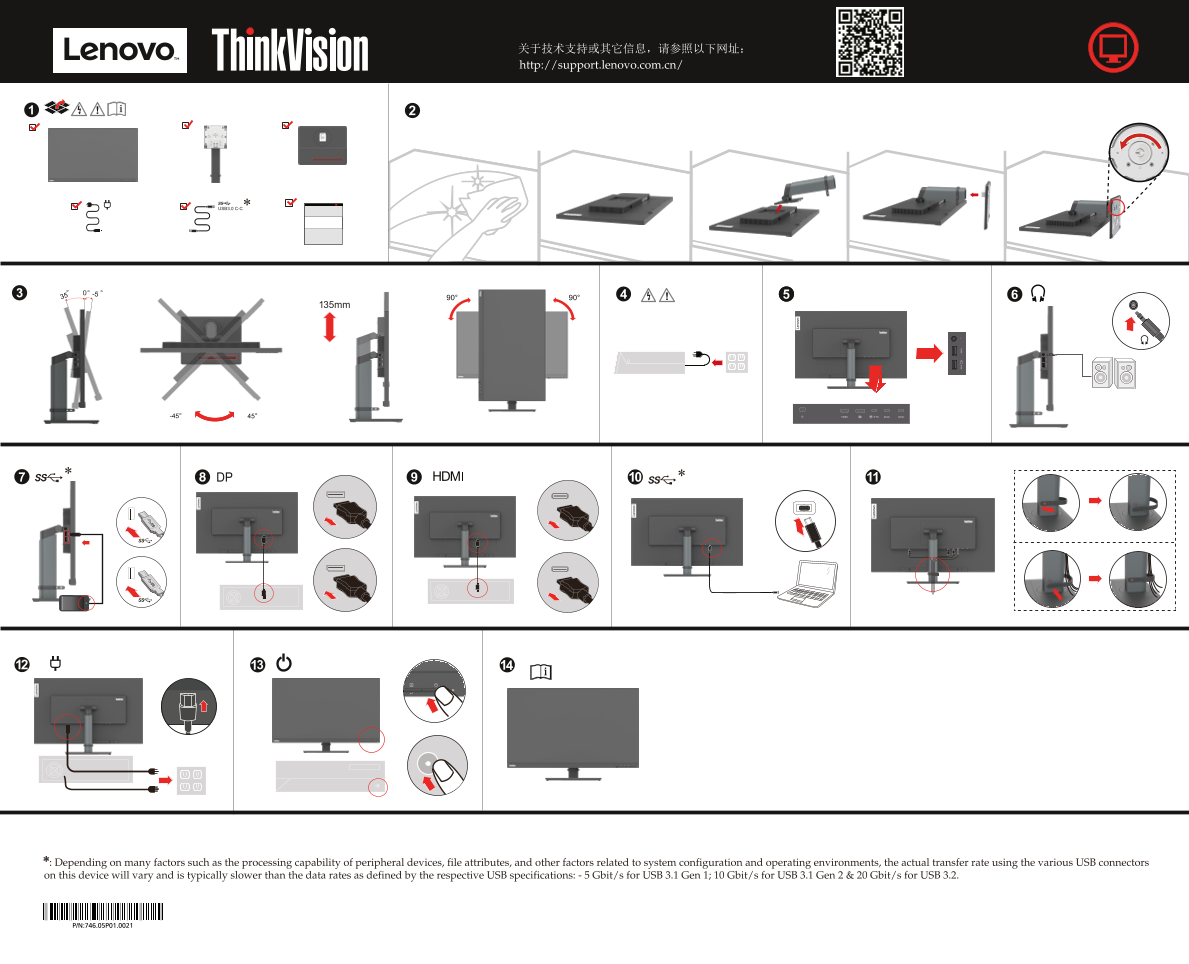
Page 1 Text Content
关于技术支持或其它信息,请参照以下网址: http://support.lenovo.com.cn/
135mm
: Depending on many factors such as the processing capability of peripheral devices, file attributes, and other factors rela* ted to system configuration and operating environments, the actual transfer rate using the various USB connectors on this device will vary and is typically slower than the data rates as defined by the respective USB specifications: - 5 Gbit/s for USB 3.1 Gen 1; 10 Gbit/s for USB 3.1 Gen 2 & 20 Gbit/s for USB 3.2.
Page Summary Contents For Lenovo ThinkVision T32p-20 Quick Setup Guide (Workstation)
Manual Details
| Brand | Lenovo |
|---|---|
| Pages | 2 |
| File Size | 9.41 MB |
| Published | June 03, 2026 |
Enter the captcha to get the download link:

Frequently Asked Questions
How does the actual transfer rate of the USB connectors compare to specifications?
The actual transfer rate varies depending on system configuration and is typically slower than the defined data rates.
What are the typical maximum speed ranges for the various USB connections?
USB 3.1 Gen 1 is typically 5 Gbit/s; USB 3.1 Gen 2 is 10 Gbit/s; and USB 3.2 is 20 Gbit/s.