IRIVER iRiver I10 Player User's Manual
Summary
Meet the i10, a smart electronic pet companion designed to be both an interactive playmate and a powerful portable speaker system. This comprehensive manual provides expert guidance for owners, detailing every feature from setup to advanced usage. It expertly covers navigating multiple GUIs (Puppy Mode, Mix Mode), connecting via USB 2.0 PC interface, and understanding full specifications like charging protocols, audio codecs, and physical controls. Ideal for tech-savvy pet owners who want a sophisticated, multi-functional accessory that delivers high-quality sound and endless entertainment.
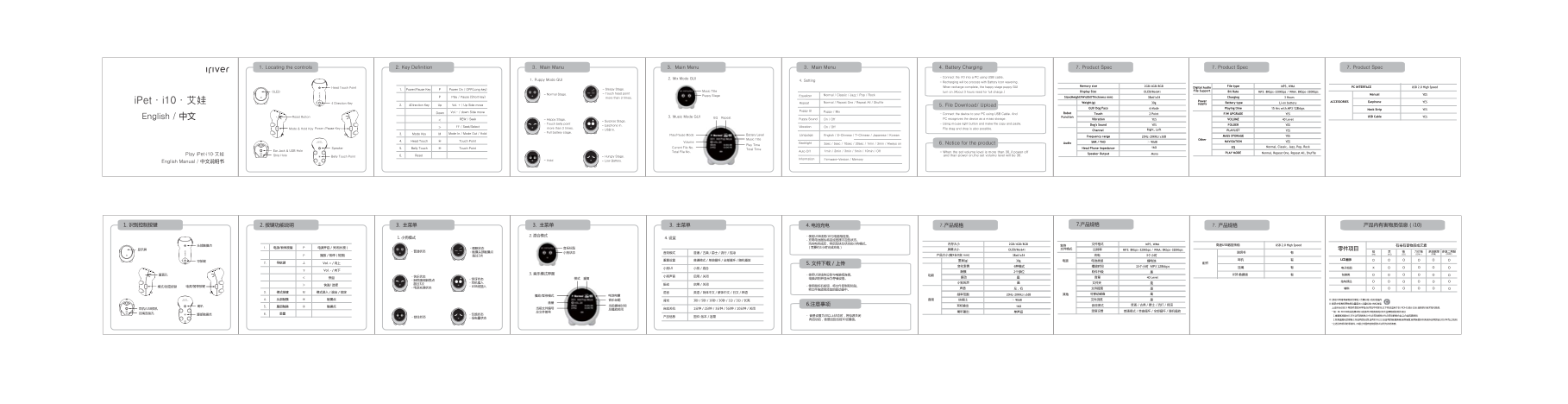
Page 1 Text Content
1. Locating the controls 2. Key Definition 3. Main Manu 3. Main Menu 3. Main Menu 4. Battery Charging 7. Product Spec 7. Product Spec 7. Product Spec
2. Mix Mode GUI - Connect the i10 into a PC using USB cable.
1. Puppy Mode GUI 4. Setting
- Recharging will be process with Battery Icon wavering.
When recharge complete, the happy stage puppy GUI Memory size 2GB/4GB/8GB Digital Audio File type MP3, WMA PC INTERFACE USB 2.0 High Speed
Head Touch Point - Sleepy Stage.
Power/Pause Key Power On / OFF(Long key)1. Music Title File Support
OLED turn on.(About 3 hours need for full charge.) Display Size OLED(96x64) Bit Rate MP3: 8Kbps~320Kbps / WMA: 8Kbps~320Kbps
- Normal Stage. - Touch head point Normal / Classic / Jazz / Pop / Rock Equalizer Manual YES
Play / Pause (Short key) Puppy Stage Size(Height XWidth XThickness mm) 38x61x34 Charging 3 Hours
more than 3 times.
i Pet · i10 · 艾娃 Normal / Repeat One / Repeat All / Shuffle Repeat Weight(g) Power Battery type ACCESSORIES Earphone YES
4 Direction Key 30g supply Li-on battery
4Direction Key Up Vol. + / Up Side move2. 5. File Download/ Upload
GUI/ Dog Face 6 Mode Playing time 15 Hrs with MP3 128kbps Neck Strip YES
Down Vol.- / down Side move Puppy / Mix Puppy UI Robot
- Connect the device to your PC using USB Cable. And Touch 2 Point F/W UPGRADE YES
English / 中文 Reset Button 3. Music Mode GUI EQ Repeat Function USB Cable YES
REW / Seek - Happy Stage. On / Off Puppy Sound PC recognizes the device as a mass storage. Vibration YES VOLUME 40 Level
- Surprise Stage.
- Touch belly point - Using mouse right button and make file copy and paste. Dog's Sound YES FOLDER YES
FF / Seek/Select - Earphone In. On / Off Vibration
Mode & Hold Key Power /Pause Key more than 3 times. - USB In. File drag and drop is also possible. Right, Left
Channel PLAYLIST YES
Mode Key Mode In / Mode Out / Hold3. - Full battery stage.
Play/Pause Mode Battery Level English / S-Chinese / T-Chinese / Japanese / Korean Language Frequency range MASS STORAGE YES
20Hz~20KHz/±3d B
Music Title Other
Touch Point⊙Head Touch4. Volume SNR / THD 90d B YESNAVIGATION
3sec / 5sec / 10sec / 30sec / 1min / 3min / Always on Backlight 6. Notice for the product Audio
Play Time
Speaker Touch Point⊙Belly Touch5. Current File No. Head Phone Impedance 16Ω EQ Normal, Classic, Jazz, Pop, Rock
Ear Jack & USB Hole Total Time
Total File No. 1min / 2min / 3min / 5min / 10min / Off Auto Off - When the set volume level is more than 30,if power off
Speaker Output Mono PLAY MODE Normal, Repeat One, Repeat All, Shuffle
Play i Pet·i10·艾娃 Strip Hole 6. Reset and than power on,the set volume level will be 30.
Belly Touch Point - Hungry Stage.
- Low Battery.- Hold Firmware-Version / Memory Information
English Manual / 中文说明书
2. 混合模式 - 使用USB线将i10与电脑相连接。
- 充电电池图标将变成摇摆不定的状态。 当充电完成后,将启动快乐状态的小狗模式。 内存大小 2GB/4GB/8GB 文件格式 MP3, WMA 高速USB数据传输 USB 2.0 High Speed
显示屏 屏幕大小 OLED(96x64) 比特率 MP3: 8Kbps~320Kbps / WMA: 8Kbps~320Kbps 零件项目
播放 / 暂停(短按) 超过3次 产品大小(高X长X宽 mm) 38x61x34 充电 3个小时 (PB) (HG) (CD) (CR6+) (PBB) (PBDE)
导航键 普通模式 / 单曲循环 / 全部循环 / 随机播放重复设置 重量(g) 30g 电源 电池类型 锂电池 耳机 LCD显示 oooo
导航键 Vol. + / 向上2. 5. 文件下载 / 上传 配件
变化表情 6种模式 播放时间 15个小时 MP3 128kbps 挂绳 电子部品 oooo
小狗 / 混合小狗UI
Vol. - / 向下 触摸 2个部位 软件升级
重置孔 3. 音乐模式界面 - 使用USB线将设备与电脑相连接。 功能 USB 数据线 包装类 oooo
快退 - 快乐状态 启用 / 关闭小狗声音 振动 音量 40 Level
- 触摸腹部触摸点 结构部品 ooo
模式/锁定按键 电源/暂停按键 快进/ 选择 - USB线插入 - 使用鼠标右按钮,将文件复制和粘贴。
- 电源充满状态 声道 左,右 文件搜索 辅料 oooo
电池电量 频率范围 20Hz~20KHz/±3d B 其他 可移动磁盘
触摸点⊙腹部触摸5. 上述所标识的 X 零部件是在科学性/技术性不可实行,以下两项适用于EU ROHS,预计以后 逐渐执行技术性代替品.
耳机/USB插孔 当前文件编号 总播放时间 1分钟 / 2分钟 / 3分钟 / 5分钟 / 10分钟 / 关闭自动关机
总文件编号 喇叭输出 单声道 重复设置 普通模式 / 单曲循环 / 全部循环 / 随机播放 * 锡 : EU ROHS有关的第4组(1)的条件开始免除的对4大金属物质的例外项目
Page Summary Contents For IRIVER iRiver I10 Player User's Manual
Manual Details
| Brand | iRiver |
|---|---|
| Pages | 1 |
| File Size | 519.01 KB |
| Published | May 24, 2026 |
Enter the captcha to get the download link:

Frequently Asked Questions
How long does a full charge take?
It requires approximately 3 hours for a full charge.
What is the maximum playback time on MP3 files?
The device supports up to 15 hours of playing time with MP3 files at 128kbps.
How can I transfer music files from my PC?
Connect the i10 to your PC using a USB cable; the PC will recognize it as mass storage, and you can copy and paste files.
What is supported file format and memory capacity?
It supports MP3 and WMA formats with capacities of 2GB, 4GB, or 8GB.