Intel White Paper: Optimizing Media and Video Applications with Intel® VTune™ Profiler
Summary
Optimize modern media and video applications with Intel VTune Amplifier. This technical guide shows developers how to maximize performance by analyzing complex, heterogeneous hardware environments on Intel processors. It provides deep visualization of key components—including SIMD CPU cores, general-purpose OpenCL™ Execution Units (EUs), and dedicated fixed-function accelerators like Quick Sync Video. Use this tool to gain actionable insights into system bottlenecks, ensuring your code fully utilizes the diverse capabilities of advanced Intel hardware architectures.
Page 1 Text Content
white paper Using Intel® VTune™ Amplifier to Optimize Media & Video Applications Access the power of Intel® Quick Sync Video (hardware-accelerated codecs) Visualize heterogeneous hardware operations to improve performance Introduction Intel® VTune™ Amplifier is an ideal software tool to help optimize your code for the amazing capabilities of Intel's hardware. This whitepaper focuses on how to use Intel® VTune™ (together with other Intel software tools) to understand performance issues in applications that access Intel® Quick Sync Video fixed function hardware via the Intel® Media SDK.
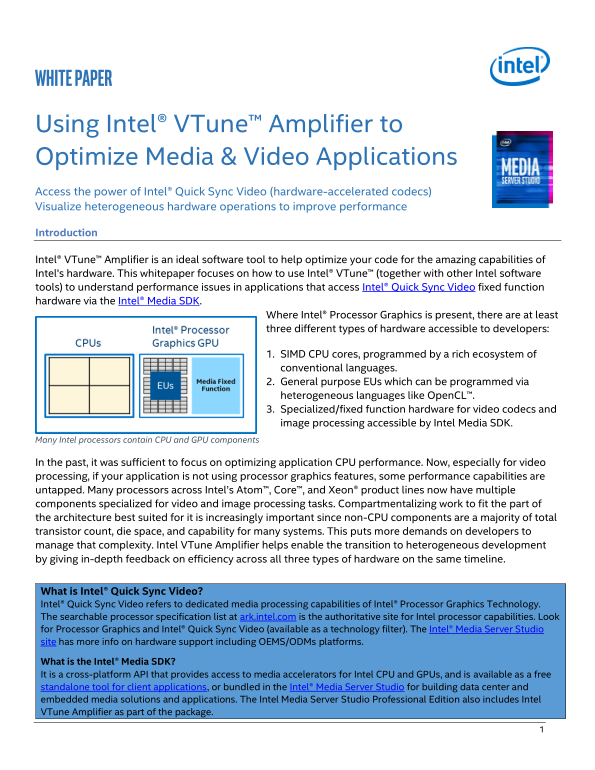
Where Intel® Processor Graphics is present, there are at least three different types of hardware accessible to developers:
1. SIMD CPU cores, programmed by a rich ecosystem of conventional languages. 2. General purpose EUs which can be programmed via heterogeneous languages like Open CL™. 3. Specialized/fixed function hardware for video codecs and image processing accessible by Intel Media SDK.
Many Intel processors contain CPU and GPU components
In the past, it was sufficient to focus on optimizing application CPU performance. Now, especially for video processing, if your application is not using processor graphics features, some performance capabilities are untapped. Many processors across Intel’s Atom™, Core™, and Xeon® product lines now have multiple components specialized for video and image processing tasks. Compartmentalizing work to fit the part of the architecture best suited for it is increasingly important since non-CPU components are a majority of total transistor count, die space, and capability for many systems. This puts more demands on developers to manage that complexity. Intel VTune Amplifier helps enable the transition to heterogeneous development by giving in-depth feedback on efficiency across all three types of hardware on the same timeline.
What is Intel® Quick Sync Video? Intel® Quick Sync Video refers to dedicated media processing capabilities of Intel® Processor Graphics Technology. The searchable processor specification list at ark.intel.com is the authoritative site for Intel processor capabilities. Look for Processor Graphics and Intel® Quick Sync Video (available as a technology filter). The Intel® Media Server Studio site has more info on hardware support including OEMS/ODMs platforms. What is the Intel® Media SDK? It is a cross-platform API that provides access to media accelerators for Intel CPU and GPUs, and is available as a free standalone tool for client applications, or bundled in the Intel® Media Server Studio for building data center and embedded media solutions and applications. The Intel Media Server Studio Professional Edition also includes Intel VTune Amplifier as part of the package.
Page Summary Contents For Intel White Paper: Optimizing Media and Video Applications with Intel® VTune™ Profiler
Manual Details
| Brand | Intel |
|---|---|
| Pages | 20 |
| File Size | 1.86 MB |
| Published | June 03, 2026 |
Enter the captcha to get the download link:

Frequently Asked Questions
What is Intel VTune Amplifier primarily used for in media applications?
It helps optimize code by analyzing performance across various hardware components, including SIMD CPU cores, OpenCL EUs, and fixed function video accelerators.
How does the text describe Quick Sync Video capabilities?
Quick Sync Video refers to dedicated media processing capabilities of Intel Processor Graphics Technology.
What is required to visualize heterogeneous activity in VTune Amplifier?
The searchable processor specification list at ark.intel.com is the authoritative site for Intel processor capabilities.