Installation Guide for Gigabyte GC-WB300D and GC-WB150
Summary
Effortlessly upgrade your PC's connectivity with these specialized PCI Express Wi-Fi and Bluetooth add-in cards. This comprehensive guide details every step required for seamless setup, from installing the card into the PCIe slot to connecting the USB cable and mounting antennas. The manual walks users through hardware integration, initial deployment recommendations, and crucial post-installation driver setup for reliable wireless performance. Essential reading for desktop builders and system users needing robust Wi-Fi and Bluetooth functionality in their PC build.
Page 1 Text Content
GC-WB300D GC-WB150 Installation Guide/安裝指南/安装指南/ インストール ガイド 12WE6-WIFIBT-10AR
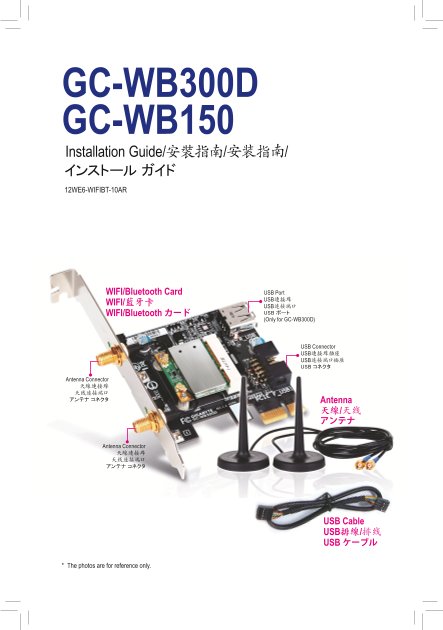
WIFI/Bluetooth Card USB Port USB連接埠
WIFI/藍牙卡
USB连接端口 WIFI/Bluetooth カード USB ポート (Only for GC-WB300D)
USB Connector USB連接埠插座 USB连接端口插座 USB コネクタ
Antenna Connector 天線連接埠 天线连接端口 アンテナ コネクタ Antenna
Antenna Connector 天線連接埠 天线连接端口 アンテナ コネクタ
USB Cable USB排線/排线 USB ケーブル
* The photos are for reference only.
Page Summary Contents For Installation Guide for Gigabyte GC-WB300D and GC-WB150
Manual Details
| Brand | GIGABYTE |
|---|---|
| Pages | 6 |
| File Size | 5.31 MB |
| Published | June 03, 2026 |
Enter the captcha to get the download link:

Frequently Asked Questions
What PCI slot is this add-in card designed for?
It must be installed in a PCI Express x1 slot.
How do I connect the antennas and cables?
Connect the USB cable to the WIFI/Bluetooth card's USB connector, and then connect the free end to the motherboard’s F_USB port. Secure the two antenna cables to their respective connectors on the card.
What is required after physical installation?
You must start the computer, install the driver for the WIFI/Bluetooth card, and then configure your wireless LAN settings based on your environment.
Does this setup have any software limitations?
The Wi-Fi Share Utility only supports Windows 7.