HP Officejet Pro 8100 ePrinter Series - N811 User Guide
Summary
Master your printer's connectivity status using this comprehensive guide to the HP ePrint indicator light. This manual helps you accurately diagnose any printing issues by explaining what various light patterns—on, off, or flashing—mean for your device. Whether you are initially setting up ePrint, resolving networking and proxy server errors, understanding firmware updates, or simply confirming connectivity, we provide clear, step-by-step troubleshooting methods designed for all HP printer users who demand reliable online printing performance.
Page 1 Text Content
OFFICEJET PRO 8100
EN Understanding the HP e Print light
The HP e Print light indicates status and is useful for diagnosing printing problems. The following table contains information about the HP e Print light, what it indicates, and what action to take, if necessary. For more information about managing and configuring HP e Print settings and to learn about the latest features, visit e Print Center (www.eprintcenter.com).
Light description/Light pattern Explanation and recommended action
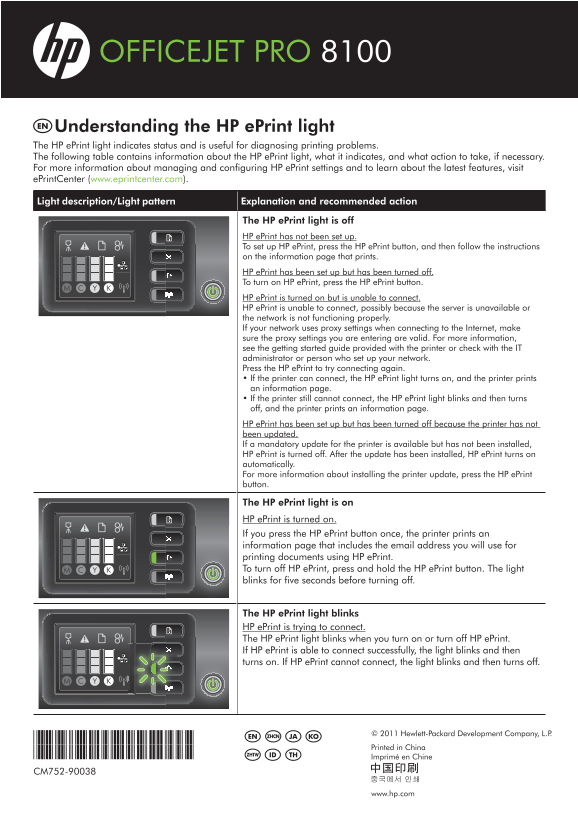
The HP e Print light is off HP e Print has not been set up. To set up HP e Print, press the HP e Print button, and then follow the instructions on the information page that prints. HP e Print has been set up but has been turned off. To turn on HP e Print, press the HP e Print button. HP e Print is turned on but is unable to connect. HP e Print is unable to connect, possibly because the server is unavailable or the network is not functioning properly. If your network uses proxy settings when connecting to the Internet, make sure the proxy settings you are entering are valid. For more information, see the getting started guide provided with the printer or check with the IT administrator or person who set up your network. Press the HP e Print to try connecting again. • If the printer can connect, the HP e Print light turns on, and the printer prints an information page. • If the printer still cannot connect, the HP e Print light blinks and then turns off, and the printer prints an information page. HP e Print has been set up but has been turned off because the printer has not been updated. If a mandatory update for the printer is available but has not been installed, HP e Print is turned off. After the update has been installed, HP e Print turns on automatically. For more information about installing the printer update, press the HP e Print button.
The HP e Print light is on HP e Print is turned on. If you press the HP e Print button once, the printer prints an information page that includes the email address you will use for printing documents using HP e Print. To turn off HP e Print, press and hold the HP e Print button. The light blinks for five seconds before turning off.
The HP e Print light blinks HP e Print is trying to connect. The HP e Print light blinks when you turn on or turn off HP e Print. If HP e Print is able to connect successfully, the light blinks and then turns on. If HP e Print cannot connect, the light blinks and then turns off.
© 2011 Hewlett-Packard Development Company, L.P.
EN ZHCN JA KO
*CM752-90038*
Printed in China
*CM752-90038* ID THZHTW
Imprimé en Chine
CM752-90038
www.hp.com
Page Summary Contents For HP Officejet Pro 8100 ePrinter Series - N811 User Guide
Manual Details
| Brand | HP |
|---|---|
| Pages | 7 |
| File Size | 1.30 MB |
| Published | June 18, 2026 |
Enter the captcha to get the download link:

Frequently Asked Questions
What do I do if the HP ePrint light is completely off?
Press the HP ePrint button and follow the instructions on the printed information page to set up the service.
The ePrint light keeps blinking. Is this normal?
Blinking means the printer is actively attempting to connect. If it turns solid, the connection succeeded; if it blinks then goes off, the connection failed.
My ePrint feature won't work after a mandatory firmware update. Why?
If a required printer update has not been installed, HP ePrint will automatically turn off until the update is successfully installed.
How do I manually prevent the ePrint service from connecting?
Press and hold the HP ePrint button. The light will blink for five seconds before turning off.