EMERSON Manuals & Guides Serial Number CSI Technologies
Summary
Effortlessly manage and maintain your AMS Machinery analyzes using this guide. Learn exactly how to locate both the software serial number (for versions 4.70 through 5.0+) and the unique hardware serial number on all analyzer models. This essential manual is for current owners and technicians who need quick, accurate instructions to find critical product identification numbers, ensuring seamless support or tracking.
Page 1 Text Content
Finding your AMS Machinery Manager software serial number.
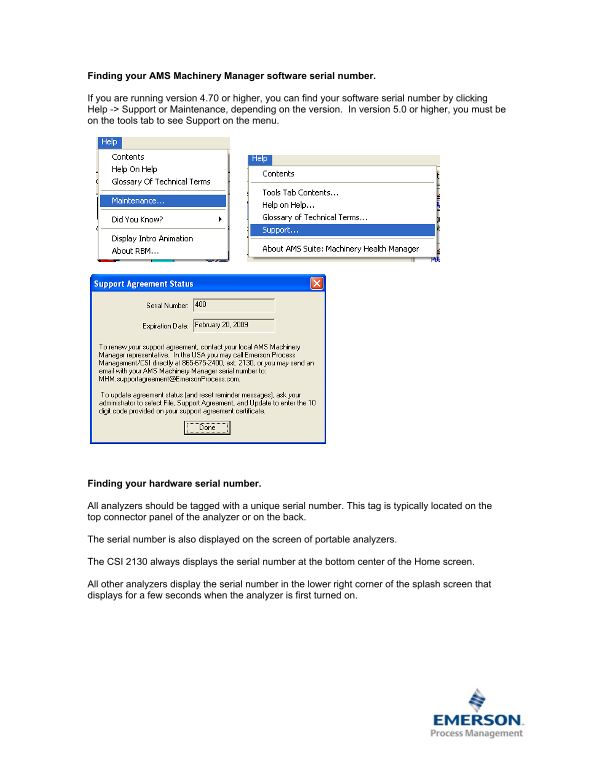
If you are running version 4.70 or higher, you can find your software serial number by clicking Help -> Support or Maintenance, depending on the version. In version 5.0 or higher, you must be on the tools tab to see Support on the menu.
Finding your hardware serial number.
All analyzers should be tagged with a unique serial number. This tag is typically located on the top connector panel of the analyzer or on the back.
The serial number is also displayed on the screen of portable analyzers.
The CSI 2130 always displays the serial number at the bottom center of the Home screen.
All other analyzers display the serial number in the lower right corner of the splash screen that displays for a few seconds when the analyzer is first turned on.
Page Summary Contents For EMERSON Manuals & Guides Serial Number CSI Technologies
Manual Details
| Brand | Emerson |
|---|---|
| Pages | 1 |
| File Size | 30.14 KB |
| Published | June 05, 2026 |
Enter the captcha to get the download link:

Frequently Asked Questions
Where can I find the hardware serial number on most analyzers?
It is typically located either on the top connector panel or on the device's back.
Which menu should I check to locate the software serial number if I am using version 5.0 or higher?
You must be on the Tools tab to see and access Support in the menu.
How do I find the hardware serial number displayed on the screen of a CSI 2130?
The CSI 2130 always displays the serial number at the bottom center of the Home screen.
For analyzers other than the CSI 2130, where is the visible serial number located when first powered on?
It can be found in the lower right corner of the splash screen that appears briefly.