Dell SE2018HV Dell Display Manager User's Guide
Summary
Dell Display Manager User's Guide for Windows. Application for managing Dell monitors with features including brightness/contrast adjustment, preset modes, auto mode assignment, energy management, and image rotation. Supports single or multiple monitor configurations with quick settings and advanced UI. Target users: Dell monitor users seeking display optimization.
Page 1 Text Content
Dell Display Manager User's Guide Overview Dell Display Manager is a Windows application used to manage a monitor or a group of monitors. It allows manual adjustment of the displayed image, assignment of automatic settings, energy management, image rotation and other features on select Dell models. Once installed, Dell Display Manager will run each time the system starts and will place its icon in the notification tray. Information about monitors connected to the system is always available when hovering over the notification tray icon.
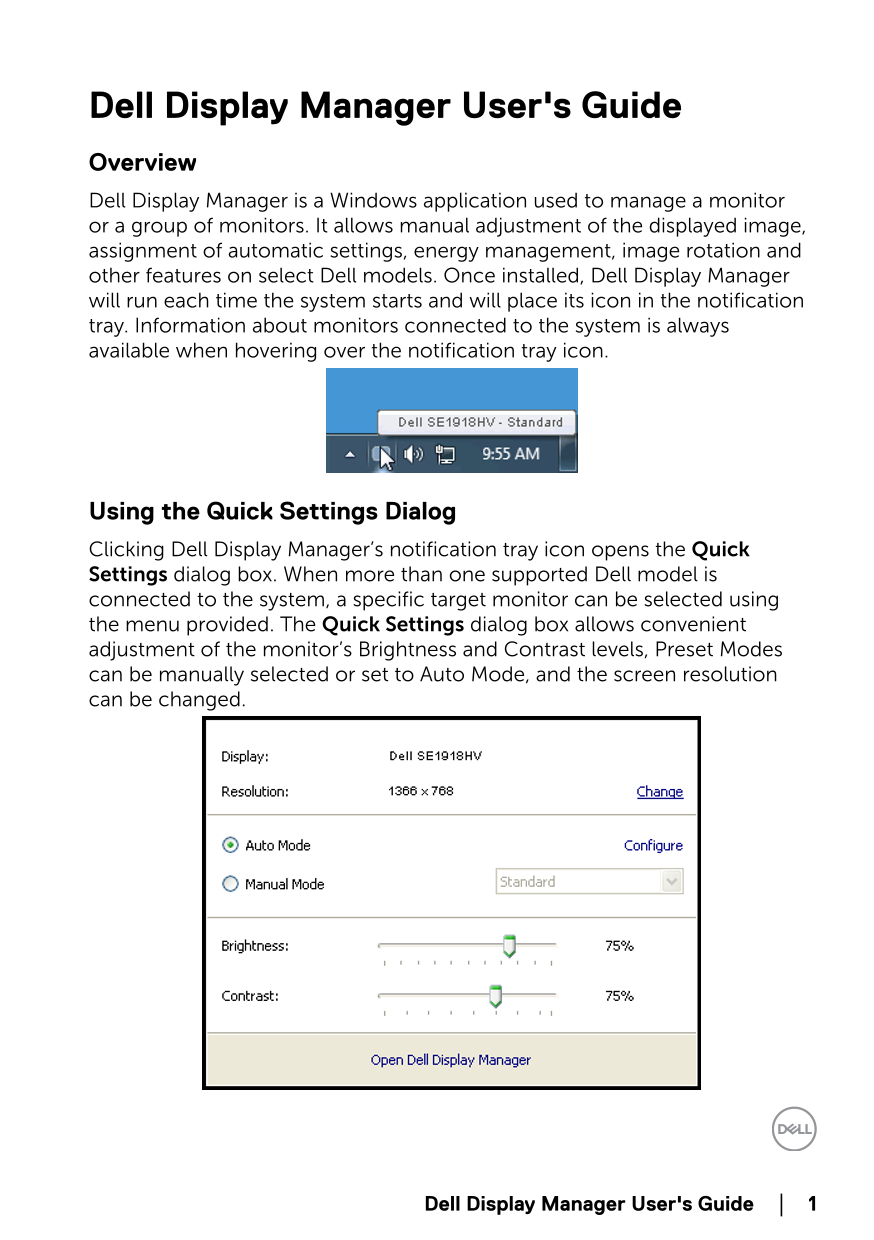
Using the Quick Settings Dialog Clicking Dell Display Manager’s notification tray icon opens the Quick Settings dialog box. When more than one supported Dell model is connected to the system, a specific target monitor can be selected using the menu provided. The Quick Settings dialog box allows convenient adjustment of the monitor’s Brightness and Contrast levels, Preset Modes can be manually selected or set to Auto Mode, and the screen resolution can be changed.
Dell Display Manager User's Guide │ 1
Page Summary Contents For Dell SE2018HV Dell Display Manager User's Guide
Manual Details
| Brand | Dell |
|---|---|
| Pages | 4 |
| File Size | 98.72 KB |
| Published | June 25, 2026 |
Enter the captcha to get the download link:

Frequently Asked Questions
How do I manually adjust monitor brightness or contrast?
You can adjust Brightness and Contrast levels in the Quick Settings dialog box, or directly from the Basic tab.
What is 'Auto Mode' and how does it work?
Auto Mode associates a specific Preset Mode with an application, automatically applying that mode when the associated application activates.
Does Dell Display Manager support all file types for presets?
No. It is ineffective when targeting non-executable files such as zip archives or batch scripts.
How can I use the monitor's energy saving features?
On supported models, navigate to the Options tab for PowerNap energy conservation options, which can dim brightness or put the monitor to sleep.