Dell Precision 7510 Quick User Guide - Windows 10
Summary
Quick Start Guide for the Dell Precision Mobile Workstation 7000 Series professional laptop. Multi-language document covering power adapter connection, Windows 10 setup, Dell application location, and SupportAssist for system updates. Details hardware features including optional camera and microphone, contactless fingerprint reader option, smart card reader option, USB 3.0, mini DisplayPort, and HDMI ports.
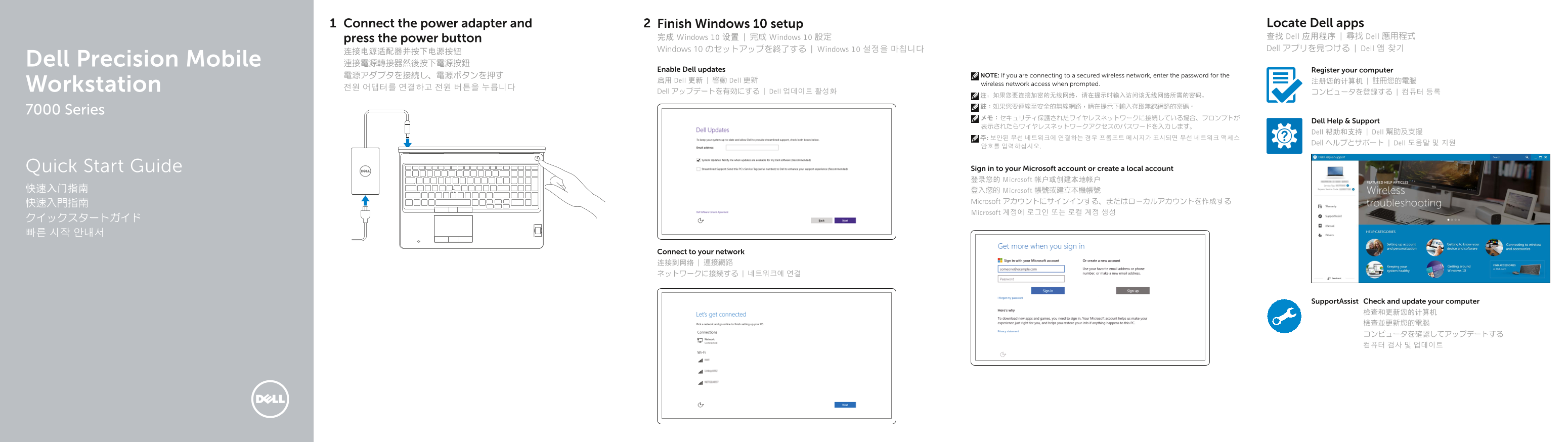
Page 1 Text Content
Connect the power adapter and Finish Windows 10 setup Locate Dell apps press the power button 完成 Windows 10 设置 | 完成 Windows 10 設定 查找 Dell 应用程序 | 尋找 Dell 應用程式 Windows 10 のセットアップを終了する | Windows 10 설정을 마칩니다 Dell アプリを見つける | Dell 앱 찾기
连接电源适配器并按下电源按钮 Dell Precision Mobile 連接電源轉接器然後按下電源按鈕
Enable Dell updates Register your computer
電源アダプタを接続し、電源ボタンを押す NOTE: If you are connecting to a secured wireless network, enter the password for the
启用 Dell 更新 | 啟動 Dell 更新 注册您的计算机 | 註冊您的電腦
wireless network access when prompted.
Workstation 전원 어댑터를 연결하고 전원 버튼을 누릅니다
Dell アップデートを有効にする | Dell 업데이트 활성화 コンピュータを登録する | 컴퓨터 등록
7000 Series
Dell Help & Support
Dell 帮助和支持 | Dell 幫助及支援
Dell ヘルプとサポート | Dell 도움말 및 지원
Quick Start Guide Sign in to your Microsoft account or create a local account 登录您的 Microsoft 帐户或创建本地帐户
快速入门指南 登入您的 Microsoft 帳號或建立本機帳號
Microsoft アカウントにサインインする、またはローカルアカウントを作成する
Microsoft 계정에 로그인 또는 로컬 계정 생성
Connect to your network 连接到网络 | 連接網路 ネットワークに接続する | 네트워크에 연결
Support Assist Check and update your computer
Page Summary Contents For Dell Precision 7510 Quick User Guide - Windows 10
Manual Details
| Brand | Dell |
|---|---|
| Pages | 2 |
| File Size | 583.85 KB |
| Published | July 02, 2026 |
Enter the captcha to get the download link:

Frequently Asked Questions
How do I initialize the device setup?
Connect the power adapter and press the power button, then follow the Windows 10 setup instructions.
What is the model type of this computer?
The regulatory model is P53F, identifying it as a Dell Precision Mobile Workstation.
Does the device have modern connectivity options?
Yes, it includes USB-C connectors (optional), HDMI connectors, and USB 3.0 ports.
What information do I need for secure network connection?
If connecting to a secured wireless network, you must enter an access password when prompted with the Dell Help & Support message.