Dell PowerEdge R7415 Quick Start Guide
Summary
This guide provides essential setup instructions for deploying your system in a professional data center environment. It covers critical initial steps, including mandatory safety precautions upon installation and proper rack mounting guidelines for secure operation. Users will learn how to connect power sources using Extended Power Performance (EPP) compatible PSUs, ensuring system stability right from the start. The manual also emphasizes vital prerequisites, such as installing the operating system before integrating any external hardware or software, guaranteeing a seamless setup process for IT professionals.
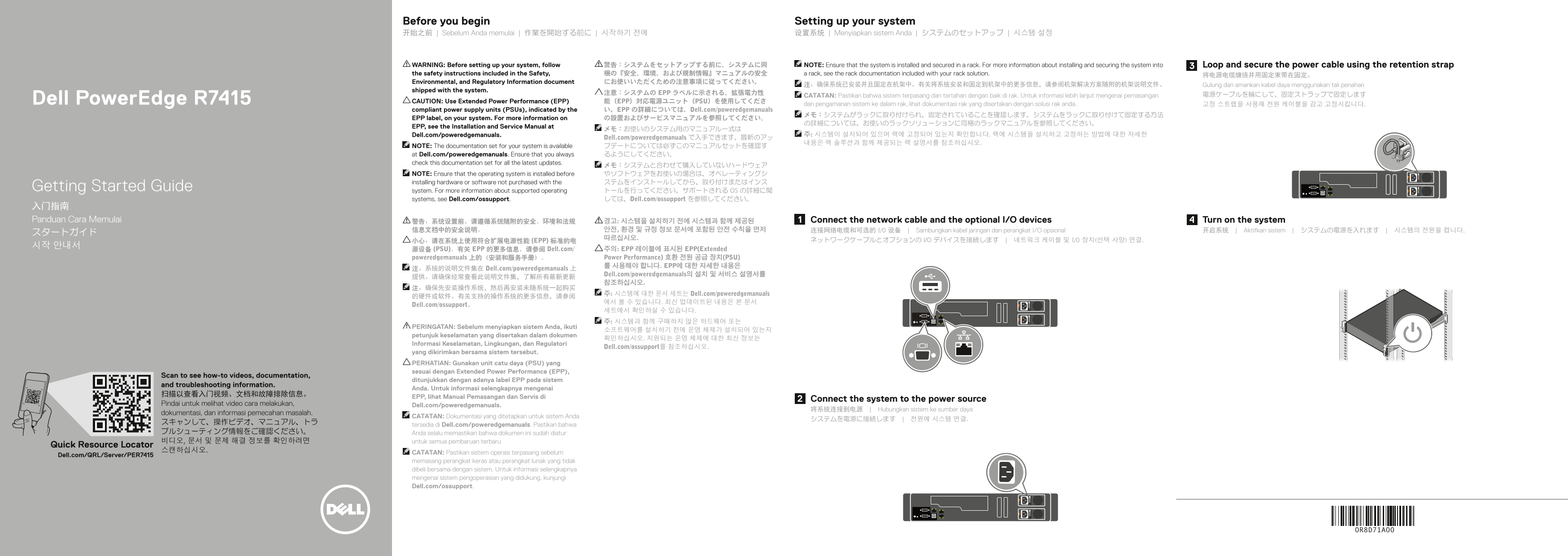
Page 1 Text Content
Before you begin Setting up your system 开始之前 | Sebelum Anda memulai | 作業を開始する前に | 시작하기 전에 设置系统 | Menyiapkan sistem Anda | システムのセットアップ | 시스템 설정
WARNING: Before setting up your system, follow 警告:システムをセットアップする前に、システムに同 NOTE: Ensure that the system is installed and secured in a rack. For more information about installing and securing the system into Loop and secure the power cable using the retention strap the safety instructions included in the Safety, 梱の『安全、環境、および規制情報』マニュアルの安全 a rack, see the rack documentation included with your rack solution. 将电源电缆缠绕并用固定束带在固定。 Environmental, and Regulatory Information document にお使いいただくための注意事項に従ってください。
注:确保系统已安装并且固定在机架中。有关将系统安装和固定到机架中的更多信息,请参阅机架解决方案随附的机架说明文件。 Gulung dan amankan kabel daya menggunakan tali penahan
shipped with the system.
注意:システムの EPP ラベルに示される、拡張電力性 電源ケーブルを輪にして、固定ストラップで固定します
CATATAN: Pastikan bahwa sistem terpasang dan tertahan dengan baik di rak. Untuk informasi lebih lanjut mengenai pemasangan
Dell Power Edge R7415 CAUTION: Use Extended Power Performance (EPP) 能(EPP)対応電源ユニット(PSU)を使用してくださ
dan pengamanan sistem ke dalam rak, lihat dokumentasi rak yang disertakan dengan solusi rak anda. 고정 스트랩을 사용해 전원 케이블을 감고 고정시킵니다.
compliant power supply units (PSUs), indicated by the い。EPP の詳細については、Dell.com/poweredgemanuals
EPP label, on your system. For more information on の設置およびサービスマニュアルを参照してください。
EPP, see the Installation and Service Manual at
Dell.com/poweredgemanuals. 주: 시스템이 설치되어 있으며 랙에 고정되어 있는지 확인합니다. 랙에 시스템을 설치하고 고정하는 방법에 대한 자세한
Dell.com/poweredgemanuals で入手できます。最新のアッ
NOTE: The documentation set for your system is available プデートについては必ずこのマニュアルセットを確認す at Dell.com/poweredgemanuals. Ensure that you always るようにしてください。 check this documentation set for all the latest updates.
NOTE: Ensure that the operating system is installed before やソフトウェアをお使いの場合は、オペレーティングシ installing hardware or software not purchased with the ステムをインストールしてから、取り付けまたはインス
Getting Started Guide system. For more information about supported operating トールを行ってください。サポートされる OS の詳細に関
systems, see Dell.com/ossupport. しては、Dell.com/ossupport を参照してください。
入门指南 Panduan Cara Memulai 警告:系统设置前,请遵循系统随附的安全、环境和法规 경고: 시스템을 설치하기 전에 시스템과 함께 제공된 Connect the network cable and the optional I/O devices Turn on the system
信息文档中的安全说明。 안전, 환경 및 규정 정보 문서에 포함된 안전 수칙을 먼저 连接网络电缆和可选的 I/O 设备 | Sambungkan kabel jaringan dan perangkat I/O opsional 开启系统 | Aktifkan sistem | システムの電源を入れます | 시스템의 전원을 켭니다.
小心:请在系统上使用符合扩展电源性能 (EPP) 标准的电 ネットワークケーブルとオプションの I/O デバイスを接続します | 네트워크 케이블 및 I/O 장치(선택 사양) 연결.
源设备 (PSU)。有关 EPP 的更多信息,请参阅 Dell.com/ 주의: EPP 레이블에 표시된 EPP(Extended poweredgemanuals 上的《安装和服务手册》。 Power Performance) 호환 전원 공급 장치(PSU) 를 사용해야 합니다. EPP에 대한 자세한 내용은
注:系统的说明文件集在 Dell.com/poweredgemanuals 上
Dell.com/poweredgemanuals의 설치 및 서비스 설명서를
주: 시스템에 대한 문서 세트는 Dell.com/poweredgemanuals
Dell.com/ossupport。
PERINGATAN: Sebelum menyiapkan sistem Anda, ikuti
petunjuk keselamatan yang disertakan dalam dokumen
Informasi Keselamatan, Lingkungan, dan Regulatori
Dell.com/ossupport를 참조하십시오.
yang dikirimkan bersama sistem tersebut. PERHATIAN: Gunakan unit catu daya (PSU) yang sesuai dengan Extended Power Performance (EPP),
Scan to see how-to videos, documentation,
ditunjukkan dengan adanya label EPP pada sistem
and troubleshooting information.
Anda. Untuk informasi selengkapnya mengenai
EPP, lihat Manual Pemasangan dan Servis di
Connect the system to the power source
Pindai untuk melihat video cara melakukan, Dell.com/poweredgemanuals.
将系统连接到电源 | Hubungkan sistem ke sumber daya
dokumentasi, dan informasi pemecahan masalah.
CATATAN: Dokumentasi yang ditetapkan untuk sistem Anda
tersedia di Dell.com/poweredgemanuals. Pastikan bahwa
ブルシューティング情報をご確認ください。 Anda selalu memastikan bahwa dokumen ini sudah diatur 비디오, 문서 및 문제 해결 정보를 확인하려면 untuk semua pembaruan terbaru
Quick Resource Locator
CATATAN: Pastikan sistem operasi terpasang sebelum
Dell.com/QRL/Server/PER7415
memasang perangkat keras atau perangkat lunak yang tidak dibeli bersama dengan sistem. Untuk informasi selengkapnya mengenai sistem pengoperasian yang didukung, kunjungi Dell.com/ossupport.
Page Summary Contents For Dell PowerEdge R7415 Quick Start Guide
Manual Details
| Brand | Dell |
|---|---|
| Pages | 2 |
| File Size | 574.53 KB |
| Published | June 23, 2026 |
Enter the captcha to get the download link:

Frequently Asked Questions
Before setting up the system, what must I do?
Securely install and mount the system in a rack following safety instructions. Use Extended Power Performance (EPP) compliant PSUs.
Where can I find up-to-date documentation for my system?
Documentation set is available at Dell.com/poweredgemanuals. Always check this site for the latest updates.
Is another hardware or software compatible if it wasn't bought with the system?
Yes, but ensure you install the operating system first before installing unsupported hardware or software. Check Dell.com/ossupport for details.