Dell P2319H Dell Display Manager User's Guide
Summary
This user guide documents Dell Display Manager, a Windows application for managing Dell monitors. It covers quick settings adjustment, preset mode configuration, auto mode setup, window organization, image rotation, energy management, and multi-monitor support. The manual targets end users and IT administrators configuring Dell monitors in office and professional environments.
Page 1 Text Content
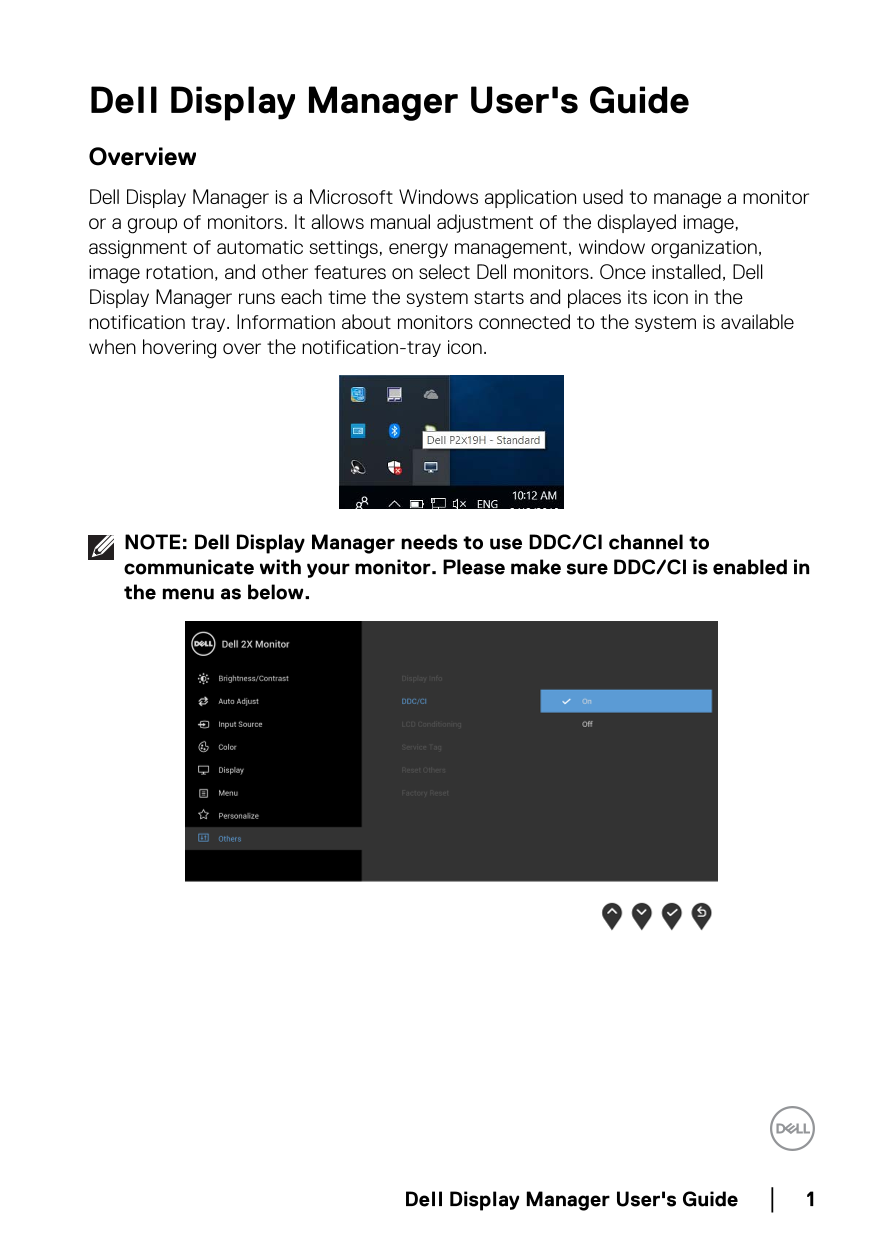
Dell Display Manager User's Guide Overview Dell Display Manager is a Microsoft Windows application used to manage a monitor or a group of monitors. It allows manual adjustment of the displayed image, assignment of automatic settings, energy management, window organization, image rotation, and other features on select Dell monitors. Once installed, Dell Display Manager runs each time the system starts and places its icon in the notification tray. Information about monitors connected to the system is available when hovering over the notification-tray icon.
NOTE: Dell Display Manager needs to use DDC/CI channel to communicate with your monitor. Please make sure DDC/CI is enabled in the menu as below.
Dell Display Manager User's Guide
Page Summary Contents For Dell P2319H Dell Display Manager User's Guide
Manual Details
| Brand | Dell |
|---|---|
| Pages | 13 |
| File Size | 1.46 MB |
| Published | June 25, 2026 |
Enter the captcha to get the download link:

Frequently Asked Questions
What type of files are not supported for Preset Mode assignments in Auto Mode?
Batch files, scripts, loaders, zip archives, or other non-executable files cannot be assigned a preset mode.