Dell P2012H Monitor Front View Diagram User Guide
Summary
This document provides the outline dimension drawing for the Dell P2012H monitor, showing detailed physical measurements in millimeters and inches. It includes specifications for swivel range (plus/minus 45 degrees), pivot adjustment (90 degrees), tilt range (4 to 21 degrees), lift height, and VESA mounting pattern (M4x10, 100x100mm). The drawing illustrates the monitor's overall dimensions, stand footprint, and rear view mounting hole positions. Designed for workspace planners and IT procurement teams deploying 20-inch Dell Professional series monitors.
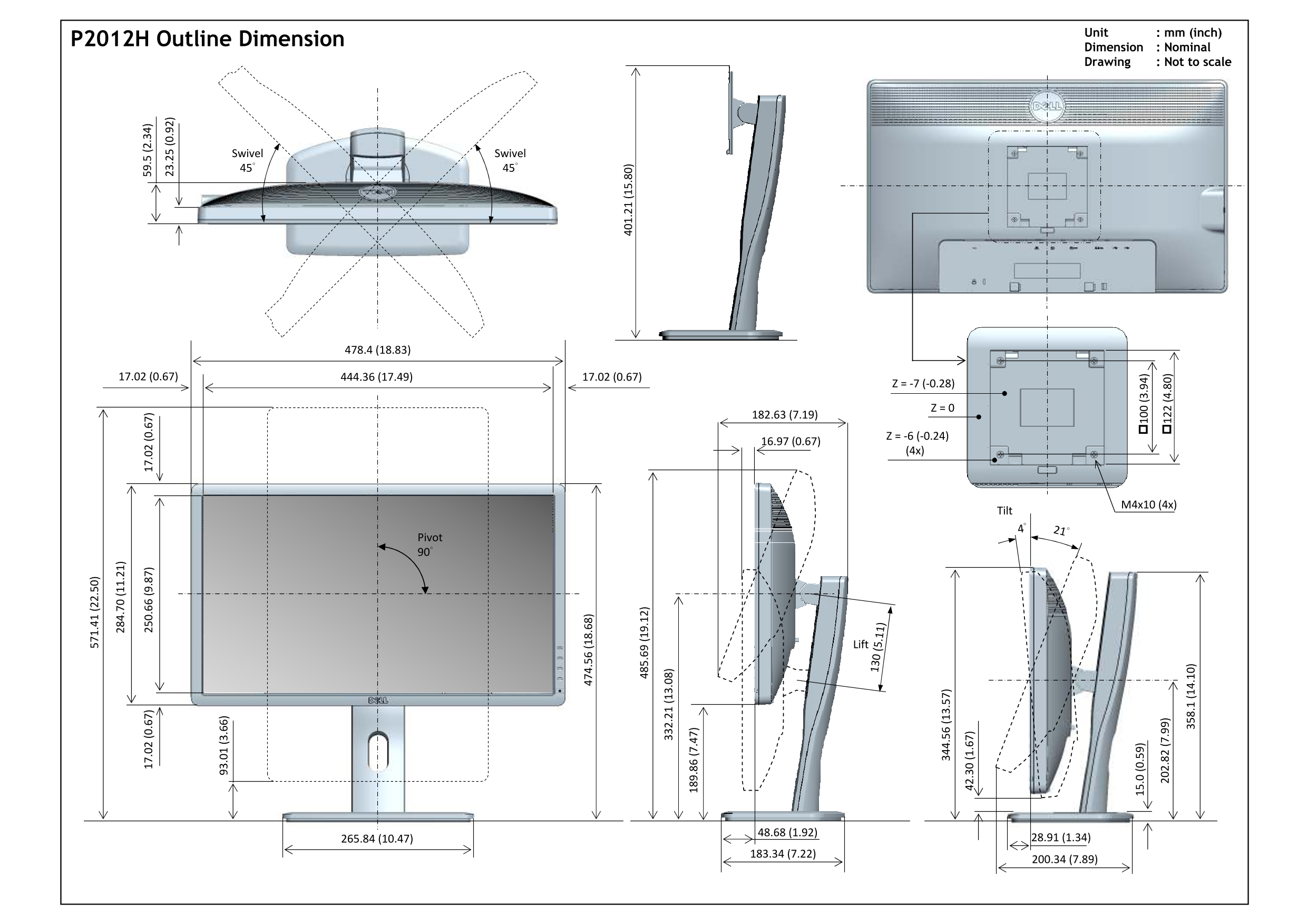
Page 1 Text Content
Unit : mm (inch)
P2012H Outline Dimension
Dimension : Nominal Drawing : Not to scale
Swivel Swivel 45° 45° .2 (0 .9
Tilt 4° 21°
Pivot 90°
.6 (1 .1 Lift
Page Summary Contents For Dell P2012H Monitor Front View Diagram User Guide
Manual Details
| Brand | Dell |
|---|---|
| Pages | 1 |
| File Size | 225.74 KB |
| Published | July 01, 2026 |
Enter the captcha to get the download link:

Frequently Asked Questions
What are the maximum listed angular movements for the component?
The Swivel mechanism allows a 45° rotation, and the Tilt Pivot has a specified range of 90°.
What mounting hardware is designated for securing the components?
The assembly utilizes four M4x10 screws (4x).
What are the overall dimensional measurements provided in the drawing?
Dimensions include structures measuring 571.41 mm (22.50 inches) and a projected base width of 478.4 mm (18.83 inches).