Dell OpenManage Deployment Toolkit Version 3.2 Readme Linux Owner's Manual
Summary
This user guide provides comprehensive documentation for the Dell OpenManage Deployment Toolkit. The document covers installation procedures, configuration instructions. This documentation is intended for end users and system administrators, network administrators and IT professionals. The manual provides detailed guidance to ensure proper operation and maintenance of the Dell OpenManage Deployment Toolkit. Users will find step-by-step instructions and technical details necessary for effective utilization of the product.
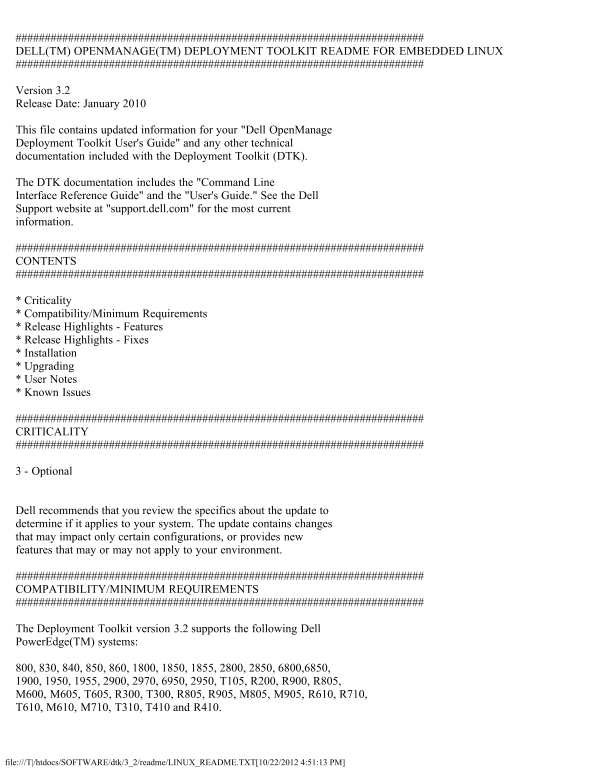
Page 1 Text Content
DELL(TM) OPENMANAGE(TM) DEPLOYMENT TOOLKIT README FOR EMBEDDED LINUX
Version 3.2 Release Date: January 2010
This file contains updated information for your "Dell Open Manage Deployment Toolkit User's Guide" and any other technical documentation included with the Deployment Toolkit (DTK).
The DTK documentation includes the "Command Line Interface Reference Guide" and the "User's Guide." See the Dell Support website at "support.dell.com" for the most current information.
CONTENTS
* Criticality * Compatibility/Minimum Requirements * Release Highlights - Features * Release Highlights - Fixes * Installation * Upgrading * User Notes * Known Issues
CRITICALITY
3 - Optional
Dell recommends that you review the specifics about the update to determine if it applies to your system. The update contains changes that may impact only certain configurations, or provides new features that may or may not apply to your environment.
COMPATIBILITY/MINIMUM REQUIREMENTS
The Deployment Toolkit version 3.2 supports the following Dell Power Edge(TM) systems:
800, 830, 840, 850, 860, 1800, 1850, 1855, 2800, 2850, 6800,6850, 1900, 1950, 1955, 2900, 2970, 6950, 2950, T105, R200, R900, R805, M600, M605, T605, R300, T300, R805, R905, M805, M905, R610, R710, T610, M610, M710, T310, T410 and R410.
file:///T|/htdocs/SOFTWARE/dtk/3_2/readme/LINUX_README.TXT[10/22/2012 4:51:13 PM]
Page Summary Contents For Dell OpenManage Deployment Toolkit Version 3.2 Readme Linux Owner's Manual
Manual Details
| Brand | Dell |
|---|---|
| Pages | 8 |
| File Size | 27.22 KB |
| Published | June 16, 2026 |
Enter the captcha to get the download link:

Frequently Asked Questions
What Dell PowerEdge systems are supported by version 3.2?
It supports Dell PowerEdge systems 800, 1800, 2800, 2900, 6800, 6950, 1900, 1950, 2950, T105, R200, R900, R805, M600, M605, T605, R300, T300, R610, R710, T610, M610, M710, T310, T410, and R410.
Which Linux distributions are compatible with the DTK?
The sample scripts are tested on Red Hat Enterprise Linux Server versions 4 and 5 (32- and 64-bit), and SUSE Linux Enterprise Server versions 10 and 11 (64-bit).
What are the prerequisites for installing the DTK?
You need the DTK ISO image, at least 200 MB of free hard-drive space on a Linux workstation, and advanced knowledge of Linux scripting, networking, RPMs, and loop file systems.
What scripts are required for RAID and HAPI setup?
You must run the start-hapi.sh script to load OpenIPMI modules and the start-raid.sh script to create device nodes required by RAIDCFG and HAPI.
Where should the omreg.cfg configuration file be placed?
The modified omreg.cfg file should be placed under the /etc/ directory.