Dell Latitude E5550 5550 Quick User Guide
Summary
Quick Start Guide for the Dell Latitude 15 5000 Series business laptop with Windows 8. Multi-language document covering power adapter connection, Windows setup, network connectivity, and Microsoft account sign-in. Features details include VGA and HDMI connectors, USB 3.0 with PowerShare, optional camera and microphone, optional fingerprint and smart card readers, wireless/battery/hard drive/power status lights, speakers, and touchpad.
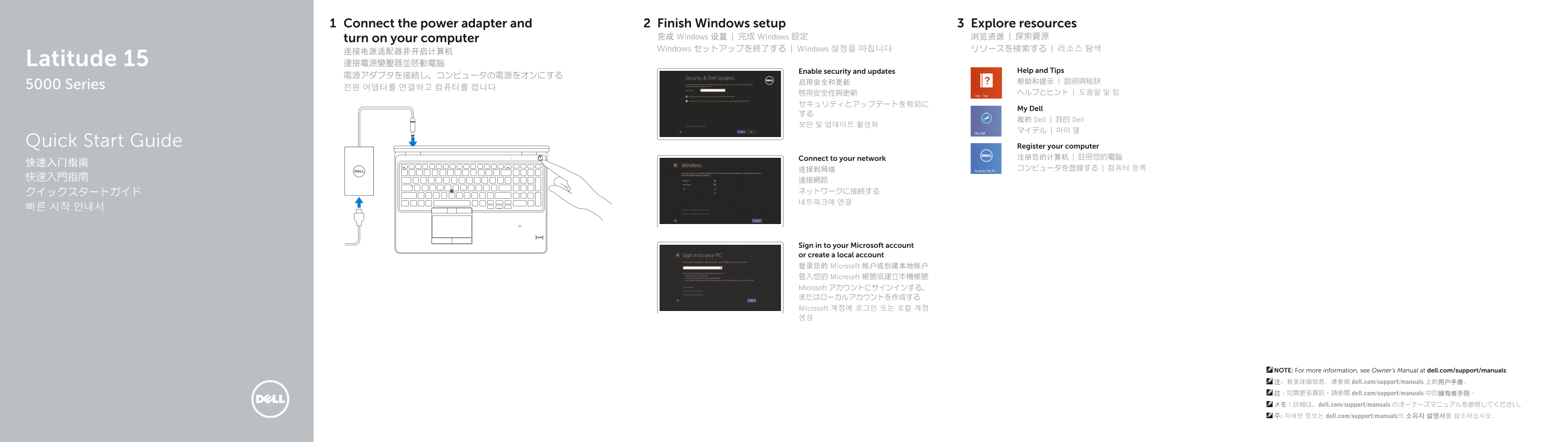
Page 1 Text Content
Connect the power adapter and Finish Windows setup Explore resources turn on your computer 完成 Windows 设置 | 完成 Windows 設定 浏览资源 | 探索資源 Windows セットアップを終了する | Windows 설정을 마칩니다 リソースを検索する | 리소스 탐색
Latitude 15 連接電源變壓器並啟動電腦
Enable security and updates Help and Tips
5000 Series 전원 어댑터를 연결하고 컴퓨터를 켭니다
My Dell
我的 Dell | 我的 Dell
Quick Start Guide Register your computer
Connect to your network 注册您的计算机 | 註冊您的電腦
Sign in to your Microsoft account or create a local account 登录您的 Microsoft 帐户或创建本地帐户 登入您的 Microsoft 帳號或建立本機帳號 Microsoft アカウントにサインインする、 またはローカルアカウントを作成する Microsoft 계정에 로그인 또는 로컬 계정 생성
NOTE: For more information, see Owner’s Manual at dell.com/support/manuals. 注:有关详细信息,请参阅 dell.com/support/manuals 上的用户手册。 註:如需更多資訊,請參閱 dell.com/support/manuals 中的擁有者手冊。 メモ:詳細は、dell.com/support/manuals のオーナーズマニュアルを参照してください。 주: 자세한 정보는 dell.com/support/manuals의 소유자 설명서를 참조하십시오.
Page Summary Contents For Dell Latitude E5550 5550 Quick User Guide
Manual Details
| Brand | Dell |
|---|---|
| Pages | 2 |
| File Size | 327.76 KB |
| Published | July 02, 2026 |
Enter the captcha to get the download link:

Frequently Asked Questions
哪些端口是可選的連接埠?
本機型號包含多個可選設備,如指紋讀取器、麥克風、智能卡讀取器等。
該筆電具備哪些主要的連接規格?
它配有USB 3.0、HDMI、VGA、電源連接埠以及耳機接口等標準端口。
如果設備無法正常使用,應該如何獲取更多詳細資訊和幫助?
請訪問dell.com/support/manuals,並查閱擁有者手冊以獲取詳盡指導與支援。
哪些功能指示燈可以讓使用者了解即時設備狀態?
除了電源、電池以及硬碟活動指示燈外,系統還有無線和攝影機狀態的專用指示燈。