Dell Inspiron 15 5559 Quick User Guide - Windows 7
Summary
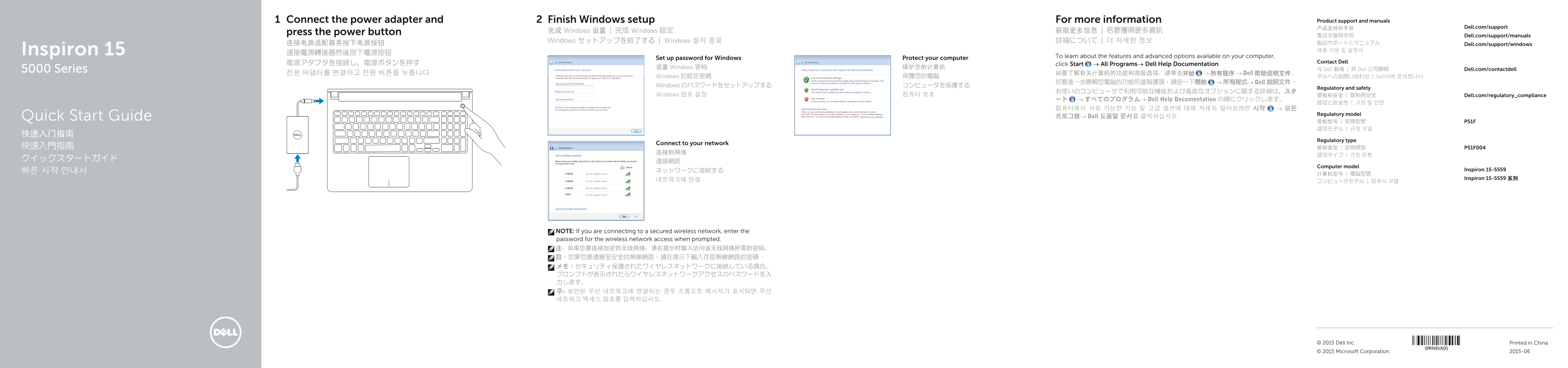
The Dell Inspiron 15 5000 Series Quick Start Guide (Model 5559, Regulatory P51F, Type P51F004) provides multi-language setup instructions for this laptop. It covers power adapter connection and power-on, Windows setup and password creation, computer protection features, network connectivity for secured wireless networks, and accessing Dell Help Documentation via Start > All Programs for detailed feature and advanced option information. The guide serves as the initial setup reference for users co
Page 1 Text Content
Connect the power adapter and Finish Windows setup For more information Product support and manuals
产品支持和手册 Dell.com/support
press the power button 完成 Windows 设置 | 完成 Windows 設定 获取更多信息 | 若要獲得更多資訊
產品支援與手冊 Dell.com/support/manuals
Windows セットアップを終了する | Windows 설치 종료 詳細について | 더 자세한 정보
连接电源适配器并按下电源按钮 製品サポートとマニュアル Dell.com/support/windows Inspiron 15 제품 지원 및 설명서
To learn about the features and advanced options available on your computer,
Set up password for Windows Protect your computer
電源アダプタを接続し、電源ボタンを押す Contact Dell
click Start → All Programs→ Dell Help Documentation.
设置 Windows 密码 保护您的计算机
5000 Series 与 Dell 联络 | 與 Dell 公司聯絡 Dell.com/contactdell
전원 어댑터를 연결하고 전원 버튼을 누릅니다 如要了解有关计算机的功能和高级选项,请单击开始 → 所有程序 → Dell 帮助说明文件。
Windows 的設定密碼 保護您的電腦 デルへのお問い合わせ | Dell사에 문의합니다
如要進一步瞭解您電腦的功能和進階選項,請按一下開始 → 所有程式→ Dell 說明文件。
Windows のパスワードをセットアップする コンピュータを保護する
Regulatory and safety
Windows 암호 설정 컴퓨터 보호 管制和安全 | 管制與安全 Dell.com/regulatory_compliance
ート → すべてのプログラム→ Dell Help Documentation の順にクリックします。
Regulatory model
Quick Start Guide 프로그램→ Dell 도움말 문서를 클릭하십시오.
Regulatory type
Connect to your network
Computer model
ネットワークに接続する Inspiron 15-5559
Inspiron 15-5559 系列
NOTE: If you are connecting to a secured wireless network, enter the password for the wireless network access when prompted. 注:如果您要连接加密的无线网络,请在提示时输入访问该无线网络所需的密码。 註:如果您要連線至安全的無線網路,請在提示下輸入存取無線網路的密碼。 メモ:セキュリティ保護されたワイヤレスネットワークに接続している場合、 プロンプトが表示されたらワイヤレスネットワークアクセスのパスワードを入 力します。 주: 보안된 무선 네트워크에 연결하는 경우 프롬프트 메시지가 표시되면 무선 네트워크 액세스 암호를 입력하십시오.
© 2015 Dell Inc. Printed in China.
© 2015 Microsoft Corporation. 2015-06
Page Summary Contents For Dell Inspiron 15 5559 Quick User Guide - Windows 7
Manual Details
| Brand | Dell |
|---|---|
| Pages | 2 |
| File Size | 392.05 KB |
| Published | June 22, 2026 |
Enter the captcha to get the download link:

Frequently Asked Questions
After connecting power, what is needed to finalize setup?
You must complete Windows setup and may need to set up a password for Windows protections.
How do I manage the system volume or display brightness?
Use the designated function shortcut keys for Decrease/Increase volume or brightness reduction/increase.
If connecting to a secured wireless network, what information is required?
You must enter the specific password needed to access that secure wireless network.