Dell Inspiron 15 3521 Quick User Guide - Windows 7
Summary
The Inspiron 15 (P28F) Quick Start Guide offers setup instructions for Dell Inspiron 15 laptops. It identifies computer features including camera, USB ports, optical drive, media card reader, HDMI port, and network connectivity options. The guide provides basic setup steps and directs users to Dell support resources for additional information. Target users are consumers and small business users setting up their new Inspiron 15 notebook computers.
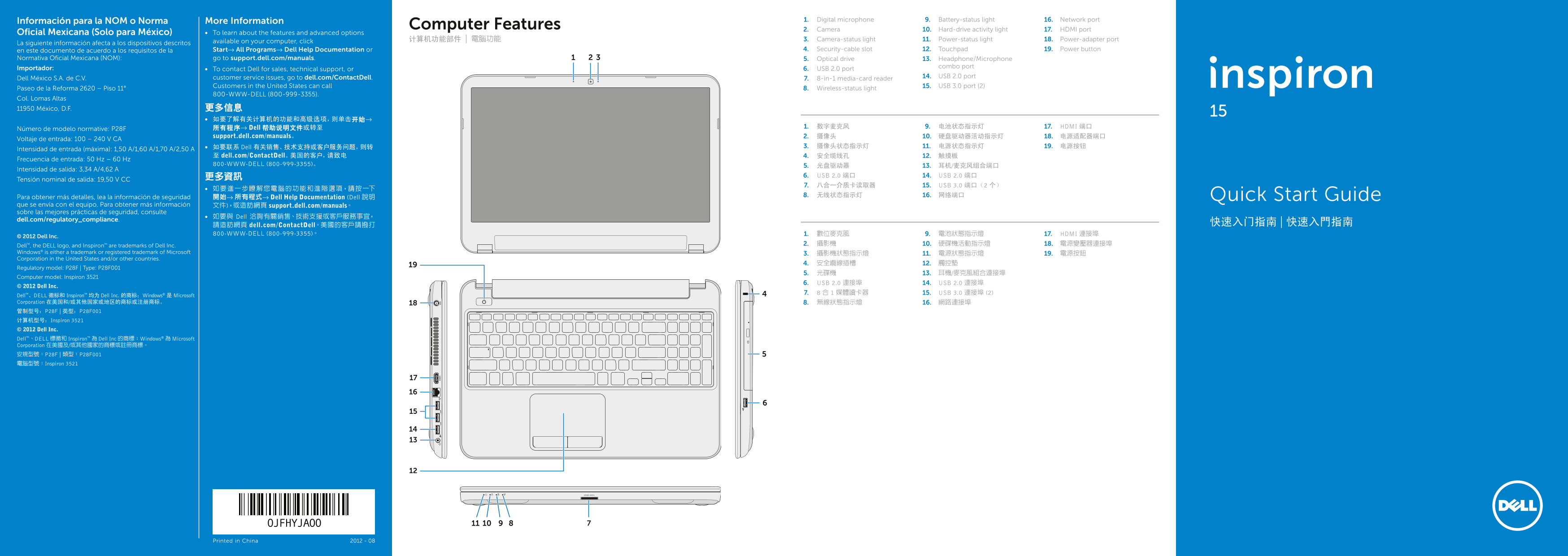
Page 1 Text Content
Información para la NOM o Norma More Information Digital microphone1. Battery-status light9. Network port16.
Computer Features
Camera2. Hard-drive activity light10. HDMI port17.
Oficial Mexicana (Solo para México) To learn about the features and advanced options •
计算机功能部件 | 電腦功能 Camera-status light3. Power-status light11. Power-adapter port18.
La siguiente información afecta a los dispositivos descritos available on your computer, click
en este documento de acuerdo a los requisitos de la Start→ All Programs→ Dell Help Documentation or Security-cable slot4. Touchpad12. Power button19.
Normativa Oficial Mexicana (NOM): go to support.dell.com/manuals. Optical drive5. Headphone/Microphone 13.
Importador: combo port
To contact Dell for sales, technical support, or • USB 2.0 port6.
customer service issues, go to dell.com/Contact Dell. USB 2.0 port14.
Dell México S.A. de C.V. 8-in-1 media-card reader7.
Customers in the United States can call USB 3.0 port (2) 15.
Paseo de la Reforma 2620 – Piso 11° Wireless-status light 8.
800-WWW-DELL (800-999-3355).
Col. Lomas Altas
11950 México, D.F. 更多信息 如要了解有关计算机的功能和高级选项,则单击• 开始→
所有程序→ Dell 帮助说明文件或转至 数字麦克风1. 电池状态指示灯9. HDMI 端口17.
Número de modelo normative: P28F
support.dell.com/manuals。 摄像头2. 硬盘驱动器活动指示灯10. 电源适配器端口18.
Voltaje de entrada: 100 – 240 V CA
如要联系 Dell 有关销售、技术支持或客户服务问题,则转• 摄像头状态指示灯3. 电源状态指示灯11. 电源按钮19.
Intensidad de entrada (máxima): 1,50 A/1,60 A/1,70 A/2,50 A
至 dell.com/Contact Dell。美国的客户,请致电 安全缆线孔4. 触摸板12.
Frecuencia de entrada: 50 Hz – 60 Hz
800-WWW-DELL (800-999-3355)。 光盘驱动器5. 耳机/麦克风组合端口 13.
Intensidad de salida: 3,34 A/4,62 A
更多資訊 USB 2.0 端口6. USB 2.0 端口14.
Tensión nominal de salida: 19,50 V CC
八合一介质卡读取器7. USB 3.0 端口(2 个)15.
无线状态指示灯 8. 网络端口16. Quick Start Guide
Para obtener más detalles, lea la información de seguridad 開始→ 所有程式→ Dell Help Documentation (Dell 說明 que se envía con el equipo. Para obtener más información 文件),或造訪網頁 support.dell.com/manuals。 sobre las mejores prácticas de seguridad, consulte
如要與 Dell 洽詢有關銷售、技術支援或客戶服務事宜,•
dell.com/regulatory_compliance.
請造訪網頁 dell.com/Contact Dell。美國的客戶請撥打 快速入门指南 | 快速入門指南
800-WWW-DELL (800-999-3355)。 數位麥克風1. 電池狀態指示燈9. HDMI 連接埠17.
© 2012 Dell Inc.
Dell™, the DELL logo, and Inspiron™ are trademarks of Dell Inc. 攝影機2. 硬碟機活動指示燈10. 電源變壓器連接埠18.
Windows® is either a trademark or registered trademark of Microsoft 攝影機狀態指示燈3. 電源狀態指示燈11. 電源按鈕19. Corporation in the United States and/or other countries.
Regulatory model: P28F | Type: P28F001
Computer model: Inspiron 3521
USB 2.0 連接埠6. USB 2.0 連接埠14.
© 2012 Dell Inc.
8 合 1 媒體讀卡器7. USB 3.0 連接埠 (2)15.
Dell™、DELL 徽标和 Inspiron™ 均为 Dell Inc. 的商标;Windows® 是 Microsoft Corporation 在美国和/或其他国家或地区的商标或注册商标。 無線狀態指示燈 8. 網路連接埠16. 管制型号:P28F | 类型:P28F001 计算机型号:Inspiron 3521 © 2012 Dell Inc. Dell™、DELL 標徽和 Inspiron™ 為 Dell Inc 的商標;Windows® 為 Microsoft Corporation 在美國及/或其他國家的商標或註冊商標。 安規型號:P28F | 類型:P28F001 電腦型號:Inspiron 3521
Printed in China 2012 - 08
Page Summary Contents For Dell Inspiron 15 3521 Quick User Guide - Windows 7
Manual Details
| Brand | Dell |
|---|---|
| Pages | 2 |
| File Size | 399.64 KB |
| Published | June 25, 2026 |
Enter the captcha to get the download link:

Frequently Asked Questions
如何联系Dell进行技术支持?
您可以通过访问dell.com/ContactDell或致电800-WWW-DELL (800-999-3355)联系。
电脑连接外部显示器时需做什么?
按下电源按钮,然后使用对应的端口进行切换。
这个设备的典型工作电压和频率是多少?
输入电压为100 – 240 V CA,输入频率为50 Hz – 60 Hz。
要查询设备功能的高级选项,在哪里查看?
可以点击“开始”→“所有程序”→“Dell Help Documentation”,或访问support.dell.com/manuals。
如果我需要启用/禁用触摸板,应该按哪个功能键?
按下机身上的相应功能键即可在文本中实现此操作。