Dell Inspiron 14 3442 Quick User Guide - Windows 8
Summary
Quick Start Guide for the Dell Inspiron 14 3000 Series laptop with Windows 8. Multi-language document covering power adapter connection, Windows setup, network connectivity, and multimedia shortcut keys including play/pause, track navigation, volume control, wireless toggle, and external display switching. Features details include camera, USB 3.0/2.0 ports, HDMI, media card reader, and touchpad areas.
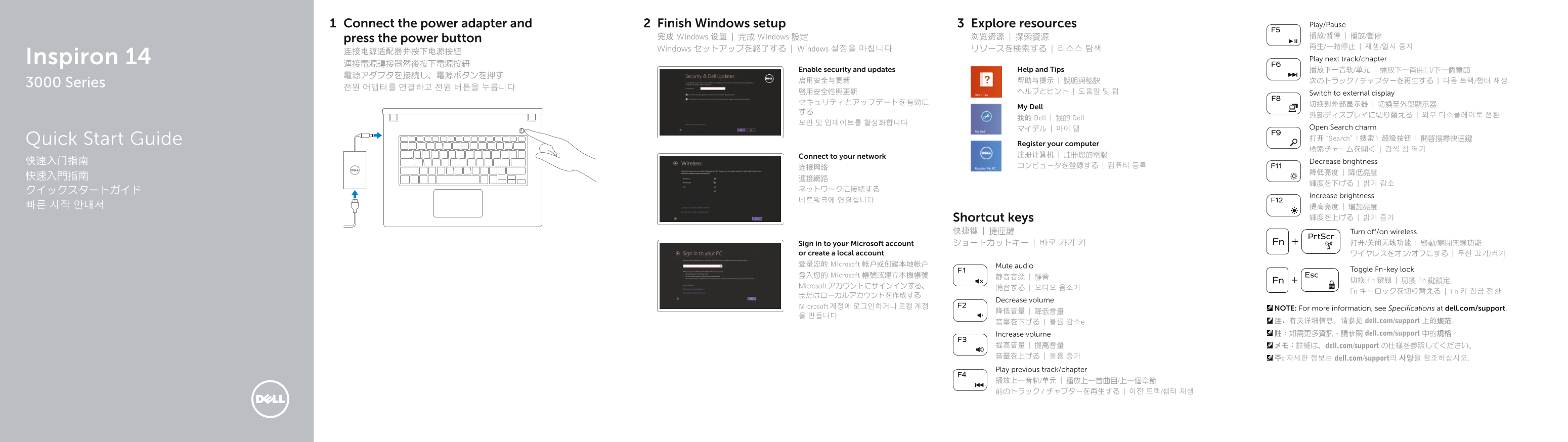
Page 1 Text Content
Connect the power adapter and Finish Windows setup Explore resources Play/Pause 完成 Windows 设置 | 完成 Windows 設定 浏览资源 | 探索資源 播放/暂停 | 播放/暫停
press the power button
Windows セットアップを終了する | Windows 설정을 마칩니다 リソースを検索する | 리소스 탐색
Inspiron 14 Play next track/chapter
Enable security and updates Help and Tips 播放下一音轨/单元 | 播放下一首曲目/下一個章節
3000 Series
啟用安全性與更新 ヘルプとヒント | 도움말 및 팁 Switch to external display セキュリティとアップデートを有効に 切换到外部显示器 | 切換至外部顯示器
My Dell
我的 Dell | 我的 Dell
マイデル | 마이 델 Open Search charm Quick Start Guide 打开 “Search”(搜索)超级按钮 | 開啟搜尋快速鍵
Register your computer
Connect to your network 注册计算机 | 註冊您的電腦
快速入门指南 Decrease brightness
Increase brightness
Shortcut keys 輝度を上げる | 밝기 증가
快捷键 | 捷徑鍵 Turn off/on wireless
Sign in to your Microsoft account ショートカットキー | 바로 가기 키 打开/关闭无线功能 | 啟動/關閉無線功能
or create a local account ワイヤレスをオン/オフにする | 무선 끄기/켜기 登录您的 Microsoft 帐户或创建本地帐户 Mute audio
Toggle Fn-key lock
登入您的 Microsoft 帳號或建立本機帳號 静音音频 | 靜音
切换 Fn 键锁 | 切換 Fn 鍵鎖定
Microsoft アカウントにサインインする、 消音する | 오디오 음소거
Fn キーロックを切り替える | Fn 키 잠금 전환
Decrease volume
Microsoft 계정에 로그인하거나 로컬 계정 NOTE: For more information, see Specifications at dell.com/support.
音量を下げる | 볼륨 감소e 注:有关详细信息,请参见 dell.com/support 上的规范。 Increase volume 註:如需更多資訊,請參閱 dell.com/support 中的規格。
提高音量 | 提高音量 メモ:詳細は、dell.com/support の仕様を参照してください。 音量を上げる | 볼륨 증가 주: 자세한 정보는 dell.com/support의 사양을 참조하십시오. Play previous track/chapter 播放上一音轨/单元 | 播放上一首曲目/上一個章節 前のトラック / チャプターを再生する | 이전 트랙/챕터 재생
Page Summary Contents For Dell Inspiron 14 3442 Quick User Guide - Windows 8
Manual Details
| Brand | Dell |
|---|---|
| Pages | 2 |
| File Size | 346.05 KB |
| Published | July 02, 2026 |
Enter the captcha to get the download link:

Frequently Asked Questions
How do I connect the power and turn on the device?
Connect the power adapter and press the power button.
What types of ports are available on the computer?
It has HDMI, USB 2.0, USB 3.0, headphone port, network port, media card reader, optical drive, and power-adapter port.
Where can I find detailed technical specifications?
For more information, see Specifications at dell.com/support.
How do I manage the display output?
You can switch to an external display using the 'My Dell' function.