Dell Inspiron 11 3152 Quick User Guide - Windows 8
Summary
Dell Inspiron 11 3000 Series (3152) Quick Start Guide covering power adapter, Windows setup, Dell Backup and Recovery, SupportAssist, security updates, network connection, dual modes (Notebook/Tablet), shortcut keys, and features including camera, ambient light sensor, Windows button, HDMI, USB 3.0/2.0, and media card reader for 2-in-1 convertible.
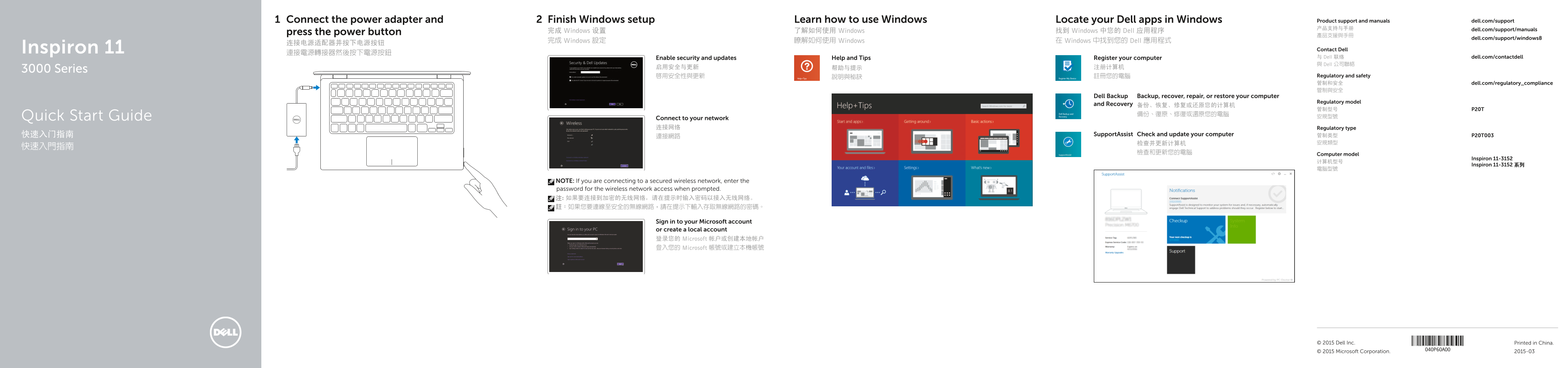
Page 1 Text Content
Connect the power adapter and Finish Windows setup Learn how to use Windows Locate your Dell apps in Windows Product support and manuals dell.com/support 产品支持与手册 dell.com/support/manuals
press the power button 完成 Windows 设置 了解如何使用 Windows 找到 Windows 中您的 Dell 应用程序
dell.com/support/windows8
完成 Windows 設定 瞭解如何使用 Windows 在 Windows 中找到您的 Dell 應用程式
Inspiron 11 Contact Dell
Enable security and updates Help and Tips Register your computer 与 Dell 联络 dell.com/contactdell 與 Dell 公司聯絡
3000 Series
啟用安全性與更新 說明與秘訣 註冊您的電腦 Regulatory and safety 管制和安全 dell.com/regulatory_compliance 管制與安全
Dell Backup Backup, recover, repair, or restore your computer
Regulatory model
and Recovery 备份、恢复、修复或还原您的计算机
備份、復原、修復或還原您的電腦Quick Start Guide
Connect to your network 连接网络 Regulatory type
快速入门指南 Support Assist Check and update your computer 管制类型 P20T003
檢查和更新您的電腦 Computer model
Inspiron 11-3152
Inspiron 11-3152 系列
NOTE: If you are connecting to a secured wireless network, enter the password for the wireless network access when prompted. 注: 如果要连接到加密的无线网络,请在提示时输入密码以接入无线网络。 註:如果您要連線至安全的無線網路,請在提示下輸入存取無線網路的密碼。
Sign in to your Microsoft account or create a local account 登录您的 Microsoft 帐户或创建本地帐户 登入您的 Microsoft 帳號或建立本機帳號
© 2015 Dell Inc. Printed in China.
© 2015 Microsoft Corporation. 2015-03
Page Summary Contents For Dell Inspiron 11 3152 Quick User Guide - Windows 8
Manual Details
| Brand | Dell |
|---|---|
| Pages | 2 |
| File Size | 1.34 MB |
| Published | July 03, 2026 |
Enter the captcha to get the download link:

Frequently Asked Questions
How do I activate or manage wireless functionality?
Use the volume control buttons (2) to turn/on and off the wireless function.
Where can I find detailed technical specifications for this model?
For more information, see Specifications at dell.com/support.
What features are available on the USB ports?
There is a USB 3.0 port with PowerShare and another standard USB 3.0 port.
How do I begin the initial setup after powering on the device?
You will need to finish Windows setup, sign in to your Microsoft account, or create a local account.