Dell EMC XC940 Series Hyper-Converged Appliance Quick Start Guide
Summary
The Dell EMC XC940 Series Hyper-Converged Appliance Setup Guide provides initial configuration documentation. It covers safety instructions, rack installation, power cable securing, EPP power supply requirements, appliance setup prerequisites, and multilingual quick start instructions. Target users are data center engineers, system integrators, and IT administrators deploying hyper-converged infrastructure.
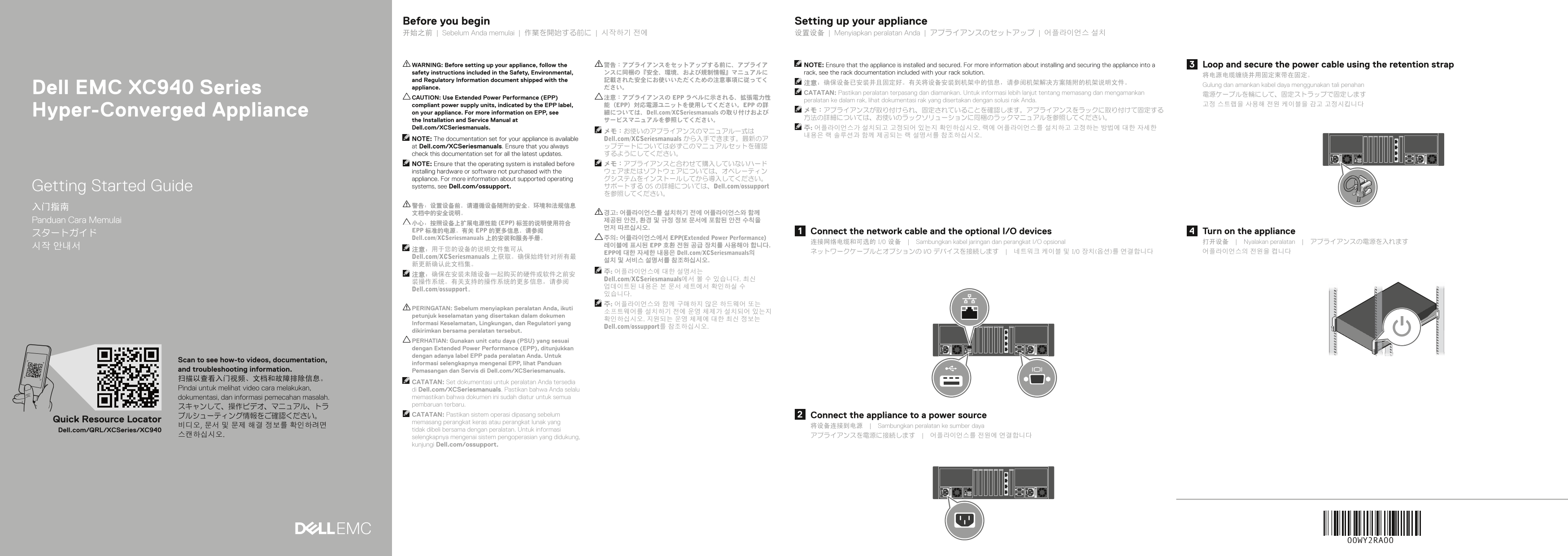
Page 1 Text Content
Before you begin Setting up your appliance 开始之前 | Sebelum Anda memulai | 作業を開始する前に | 시작하기 전에 设置设备 | Menyiapkan peralatan Anda | アプライアンスのセットアップ | 어플라이언스 설치
WARNING: Before setting up your appliance, follow the 警告:アプライアンスをセットアップする前に、アプライア NOTE: Ensure that the appliance is installed and secured. For more information about installing and securing the appliance into a Loop and secure the power cable using the retention strap safety instructions included in the Safety, Environmental, ンスに同梱の『安全、環境、および規制情報』マニュアルに rack, see the rack documentation included with your rack solution.
and Regulatory Information document shipped with the 記載された安全にお使いいただくための注意事項に従ってく
Gulung dan amankan kabel daya menggunakan tali penahan
Dell EMC XC940 Series appliance. ださい。
CATATAN: Pastikan peralatan terpasang dan diamankan. Untuk informasi lebih lanjut tentang memasang dan mengamankan 電源ケーブルを輪にして、固定ストラップで固定します
CAUTION: Use Extended Power Performance (EPP) 注意:アプライアンスの EPP ラベルに示される、拡張電力性
peralatan ke dalam rak, lihat dokumentasi rak yang disertakan dengan solusi rak Anda.
compliant power supply units, indicated by the EPP label, 能(EPP)対応電源ユニットを使用してください。EPP の詳 고정 스트랩을 사용해 전원 케이블을 감고 고정시킵니다
Hyper-Converged Appliance メモ:アプライアンスが取り付けられ、固定されていることを確認します。アプライアンスをラックに取り付けて固定する
on your appliance. For more information on EPP, see 細については、Dell.com/XCSeriesmanuals の取り付けおよび
the Installation and Service Manual at サービスマニュアルを参照してください。 Dell.com/XCSeriesmanuals. 주: 어플라이언스가 설치되고 고정되어 있는지 확인하십시오. 랙에 어플라이언스를 설치하고 고정하는 방법에 대한 자세한
NOTE: The documentation set for your appliance is available Dell.com/XCSeriesmanuals から入手できます。最新のア at Dell.com/XCSeriesmanuals. Ensure that you always ップデートについては必ずこのマニュアルセットを確認 check this documentation set for all the latest updates. するようにしてください。 NOTE: Ensure that the operating system is installed before メモ:アプライアンスと合わせて購入していないハード installing hardware or software not purchased with the ウェアまたはソフトウェアについては、オペレーティン appliance. For more information about supported operating グシステムをインストールしてから導入してください。 Getting Started Guide systems, see Dell.com/ossupport. サポートする OS の詳細については、Dell.com/ossupport
文档中的安全说明。 경고: 어플라이언스를 설치하기 전에 어플라이언스와 함께 Panduan Cara Memulai 제공된 안전, 환경 및 규정 정보 문서에 포함된 안전 수칙을
小心:按照设备上扩展电源性能 (EPP) 标签的说明使用符合
EPP 标准的电源。有关 EPP 的更多信息,请参阅 Connect the network cable and the optional I/O devices Turn on the appliance
Dell.com/XCSeriesmanuals 上的安装和服务手册。 주의: 어플라이언스에서 EPP(Extended Power Performance)
连接网络电缆和可选的 I/O 设备 | Sambungkan kabel jaringan dan perangkat I/O opsional 打开设备 | Nyalakan peralatan | アプライアンスの電源を入れます
시작 안내서 레이블에 표시된 EPP 호환 전원 공급 장치를 사용해야 합니다.
EPP에 대한 자세한 내용은 Dell.com/XCSeriesmanuals의 ネットワークケーブルとオプションの I/O デバイスを接続します | 네트워크 케이블 및 I/O 장치(옵션)를 연결합니다 어플라이언스의 전원을 켭니다
Dell.com/XCSeriesmanuals 上获取。确保始终针对所有最
Dell.com/XCSeriesmanuals에서 볼 수 있습니다. 최신
Dell.com/ossupport。
PERINGATAN: Sebelum menyiapkan peralatan Anda, ikuti
petunjuk keselamatan yang disertakan dalam dokumen
Informasi Keselamatan, Lingkungan, dan Regulatori yang
Dell.com/ossupport를 참조하십시오.
dikirimkan bersama peralatan tersebut. PERHATIAN: Gunakan unit catu daya (PSU) yang sesuai dengan Extended Power Performance (EPP), ditunjukkan dengan adanya label EPP pada peralatan Anda. Untuk
Scan to see how-to videos, documentation,
informasi selengkapnya mengenai EPP, lihat Panduan
and troubleshooting information. Pemasangan dan Servis di Dell.com/XCSeriesmanuals. 扫描以查看入门视频、文档和故障排除信息。
CATATAN: Set dokumentasi untuk peralatan Anda tersedia
Pindai untuk melihat video cara melakukan, di Dell.com/XCSeriesmanuals. Pastikan bahwa Anda selalu
dokumentasi, dan informasi pemecahan masalah. memastikan bahwa dokumen ini sudah diatur untuk semua pembaruan terbaru.
ブルシューティング情報をご確認ください。 CATATAN: Pastikan sistem operasi dipasang sebelum Connect the appliance to a power source
Quick Resource Locator memasang perangkat keras atau perangkat lunak yang
비디오, 문서 및 문제 해결 정보를 확인하려면 将设备连接到电源 | Sambungkan peralatan ke sumber daya
Dell.com/QRL/XCSeries/XC940 tidak dibeli bersama dengan peralatan. Untuk informasi
selengkapnya mengenai sistem pengoperasian yang didukung, kunjungi Dell.com/ossupport.
Page Summary Contents For Dell EMC XC940 Series Hyper-Converged Appliance Quick Start Guide
Manual Details
| Brand | Dell |
|---|---|
| Pages | 2 |
| File Size | 552.12 KB |
| Published | June 25, 2026 |
Enter the captcha to get the download link:

Frequently Asked Questions
必须在设置设备之前执行什么操作?
您需要遵循设备随附的安全、环境和法规信息文档中的安全说明。
连接或固定电源时有什么注意事项?
用固定束带环绕并固定电源电缆,确保设备已安装并在机架中牢固固定。
如何知道是否可以使用特定型号的电源供应器(PSU)?
必须使用带有Extended Power Performance (EPP)标签的电源单元,以确保兼容性。
如果我没有购入配套的操作系统,应该怎么做?
请参阅 Dell.com/ossupport 了解支持的操作系统详细信息。
设备持续运行时的最高环境温度是多少?
最高环境温度为35°C (95°F)。