Dell EMC XC XR2 Quick Start Guide
Summary
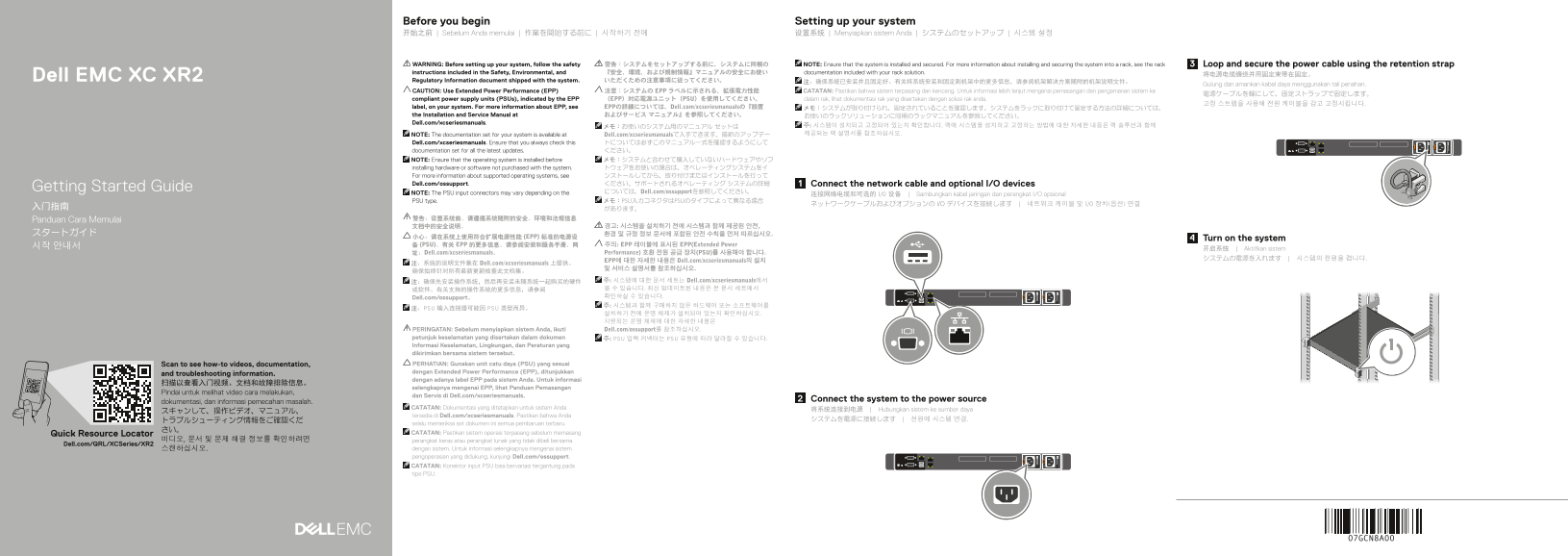
The Dell EMC XC XR2 Regulatory Information document provides safety warnings and installation guidelines for rack-mount server deployment. It specifies using Extended Power Performance (EPP) compliant power supply units indicated by EPP labels, proper power cable routing with retention straps, and system installation before adding third-party hardware. Safety instructions are provided in English, Chinese, Japanese, and Korean, with references to Dell.com/xcseriesmanuals for complete installation
Page 1 Text Content
Before you begin Setting up your system 开始之前 | Sebelum Anda memulai | 作業を開始する前に | 시작하기 전에 设置系统 | Menyiapkan sistem Anda | システムのセットアップ | 시스템 설정
WARNING: Before setting up your system, follow the safety 警告:システムをセットアップする前に、システムに同梱の NOTE: Ensure that the system is installed and secured. For more information about installing and securing the system into a rack, see the rack Loop and secure the power cable using the retention strap instructions included in the Safety, Environmental, and 『安全、環境、および規制情報』マニュアルの安全にお使い documentation included with your rack solution.
Dell EMC XC XR2 将电源电缆缠绕并用固定束带在固定。
Regulatory Information document shipped with the system. いただくための注意事項に従ってください。 注:确保系统已安装并且固定好。有关将系统安装和固定到机架中的更多信息,请参阅机架解决方案随附的机架说明文件。
Gulung dan amankan kabel daya menggunakan tali penahan.
CAUTION: Use Extended Power Performance (EPP) 注意:システムの EPP ラベルに示される、拡張電力性能 CATATAN: Pastikan bahwa sistem terpasang dan kencang. Untuk informasi lebih lanjut mengenai pemasangan dan pengamanan sistem ke
compliant power supply units (PSUs), indicated by the EPP (EPP)対応電源ユニット(PSU)を使用してください。 dalam rak, lihat dokumentasi rak yang disertakan dengan solusi rak anda.
label, on your system. For more information about EPP, see EPPの詳細については、Dell.com/xcseriesmanualsの『設置 メモ:システムが取り付けられ、固定されていることを確認します。システムをラックに取り付けて固定する方法の詳細については、 the Installation and Service Manual at およびサービス マニュアル』を参照してください。 お使いのラックソリューションに同梱のラックマニュアルを参照してください。 Dell.com/xcseriesmanuals.
メモ:お使いのシステム用のマニュアル セットは 주: 시스템이 설치되고 고정되어 있는지 확인합니다. 랙에 시스템을 설치하고 고정하는 방법에 대한 자세한 내용은 랙 솔루션과 함께 NOTE: The documentation set for your system is available at Dell.com/xcseriesmanualsで入手できます。最新のアップデー 제공되는 랙 설명서를 참조하십시오.
Dell.com/xcseriesmanuals. Ensure that you always check this トについては必ずこのマニュアル一式を確認するようにして documentation set for all the latest updates. ください。 NOTE: Ensure that the operating system is installed before メモ:システムと合わせて購入していないハードウェアやソフ installing hardware or software not purchased with the system. トウェアをお使いの場合は、オペレーティングシステムをイ For more information about supported operating systems, see ンストールしてから、取り付けまたはインストールを行って Dell.com/ossupport. ください。サポートされるオペレーティング システムの詳細 Connect the network cable and optional I/O devices
Getting Started Guide
NOTE: The PSU input connectors may vary depending on the については、Dell.com/ossupportを参照してください。
连接网络电缆和可选的 I/O 设备 | Sambungkan kabel jaringan dan perangkat I/O opsional
PSU type. メモ:PSU入力コネクタはPSUのタイプによって異なる場合
Panduan Cara Memulai
小心:请在系统上使用符合扩展电源性能 (EPP) 标准的电源设
Turn on the system
시작 안내서 备 (PSU)。有关 EPP 的更多信息,请参阅安装和服务手册,网 주의: EPP 레이블에 표시된 EPP(Extended Power
开启系统 | Aktifkan sistem
址:Dell.com/xcseriesmanuals。 Performance) 호환 전원 공급 장치(PSU)를 사용해야 합니다.
EPP에 대한 자세한 내용은 Dell.com/xcseriesmanuals의 설치
注:系统的说明文件集在 Dell.com/xcseriesmanuals 上提供。
注:确保先安装操作系统,然后再安装未随系统一起购买的硬件 주: 시스템에 대한 문서 세트는 Dell.com/xcseriesmanuals에서 或软件。有关支持的操作系统的更多信息,请参阅 볼 수 있습니다. 최신 업데이트된 내용은 본 문서 세트에서 Dell.com/ossupport。 확인하실 수 있습니다. 주: 시스템과 함께 구매하지 않은 하드웨어 또는 소프트웨어를
注:PSU 输入连接器可能因 PSU 类型而异。
PERINGATAN: Sebelum menyiapkan sistem Anda, ikuti Dell.com/ossupport를 참조하십시오. petunjuk keselamatan yang disertakan dalam dokumen 주: PSU 입력 커넥터는 PSU 유형에 따라 달라질 수 있습니다. Informasi Keselamatan, Lingkungan, dan Peraturan yang dikirimkan bersama sistem tersebut. Scan to see how-to videos, documentation, PERHATIAN: Gunakan unit catu daya (PSU) yang sesuai dengan Extended Power Performance (EPP), ditunjukkan
and troubleshooting information.
dengan adanya label EPP pada sistem Anda. Untuk informasi
selengkapnya mengenai EPP, lihat Panduan Pemasangan
Pindai untuk melihat video cara melakukan,
dan Servis di Dell.com/xcseriesmanuals.
Connect the system to the power source
dokumentasi, dan informasi pemecahan masalah.
CATATAN: Dokumentasi yang ditetapkan untuk sistem Anda
将系统连接到电源 | Hubungkan sistem ke sumber daya
tersedia di Dell.com/xcseriesmanuals. Pastikan bahwa Anda
selalu memeriksa set dokumen ini semua pembaruan terbaru.
Quick Resource Locator CATATAN: Pastikan sistem operasi terpasang sebelum memasang
비디오, 문서 및 문제 해결 정보를 확인하려면 perangkat keras atau perangkat lunak yang tidak dibeli bersama
Dell.com/QRL/XCSeries/XR2
스캔하십시오. dengan sistem. Untuk informasi selengkapnya mengenai sistem pengoperasian yang didukung, kunjungi Dell.com/ossupport. CATATAN: Konektor input PSU bisa bervariasi tergantung pada tipe PSU.
Page Summary Contents For Dell EMC XC XR2 Quick Start Guide
Manual Details
| Brand | Dell |
|---|---|
| Pages | 2 |
| File Size | 572.33 KB |
| Published | June 18, 2026 |
Enter the captcha to get the download link:

Frequently Asked Questions
What steps are required before setting up the system?
Follow the safety instructions detailed in the accompanying Safety, Environmental, and Regulatory Information manual.
Does this system require specific power units (PSU)?
Yes, you must use Extended Power Performance (EPP) compliant PSUs indicated by the EPP label on your system.
What is the acceptable operating temperature range?
The continuous operational environment temperature range is stated as 5°C to 45°C.
When should I install the core operating system?
Ensure that the operating system is installed before installing any hardware or software not purchased with the system.