Dell Active Pen PN557W Quick Start Guide
Summary
This Quick Start Guide for the Dell Active Pen PN557W (Regulatory Model PN556W) provides basic setup instructions including battery installation with an ON/OFF switch diagram, pairing instructions, and references to the Active Pen Control Panel for configuration. It includes support website URLs for drivers, documentation, and regulatory compliance information. Designed for users of compatible Dell touchscreen laptops and 2-in-1 devices who need a precision stylus for drawing, note-taking, and navigation.
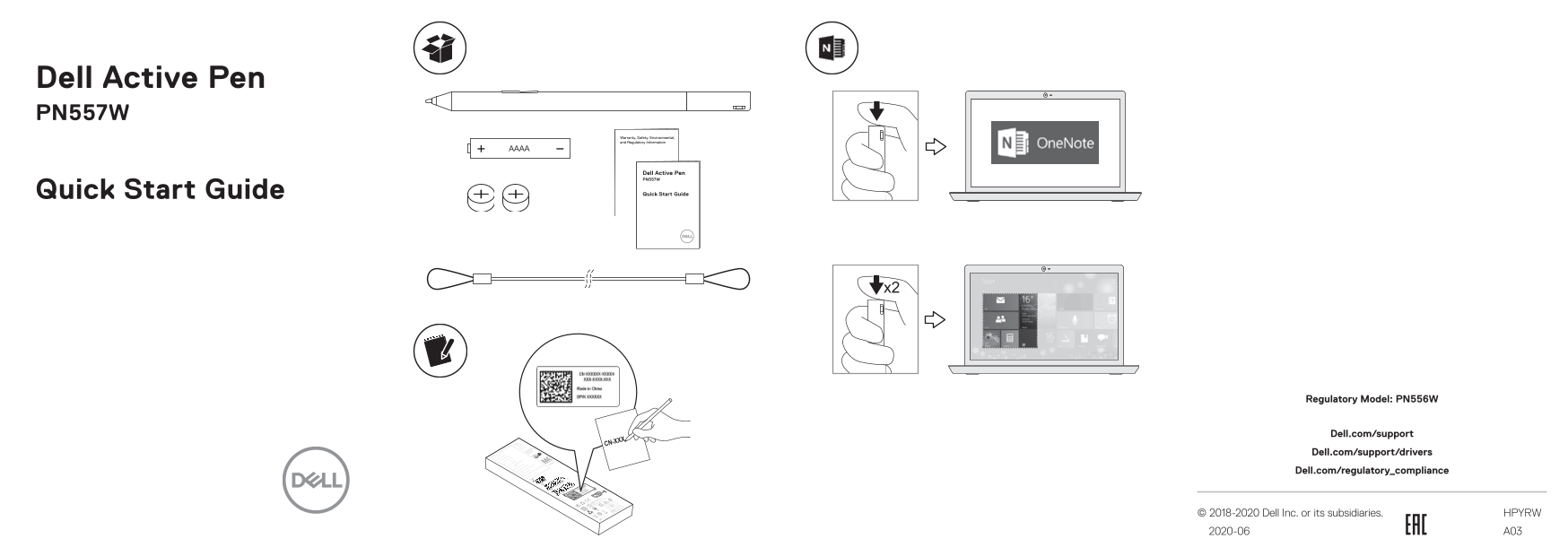
Page 1 Text Content
Dell Active Pen PN557W
Quick Start Guide
Regulatory Model: PN556W
Dell.com/support Dell.com/support/drivers Dell.com/regulatory_compliance
© 2018-2020 Dell Inc. or its subsidiaries. HPYRW 2020-06 A03
Page Summary Contents For Dell Active Pen PN557W Quick Start Guide
Manual Details
| Brand | Dell |
|---|---|
| Pages | 2 |
| File Size | 1.22 MB |
| Published | July 02, 2026 |
Enter the captcha to get the download link:

Frequently Asked Questions
How do I control the power of the Active Pen?
The control panel features an ON/OFF switch for power management.
Where can I download drivers or support files?
Drivers and support are available on Dell.com/support/drivers.
What is covered in this quick start guide content?
It provides controls, specifications, and regulatory compliance details for the PN557W Active Pen.