Casio TQ-377 Operation Guide
Summary
Master your mornings with this comprehensive guide for your analog alarm clock. This manual provides step-by-step instructions on setting accurate time, programming daily alarms, utilizing the snooze function, and safely executing all battery replacements. It covers essential operational features and maintenance care to ensure dependable timekeeping performance. Ideal for any home or individual needing reliable wake-up support and precise household time management.
Page 1 Text Content
MA0608-EA
Operation Guide TQ-377
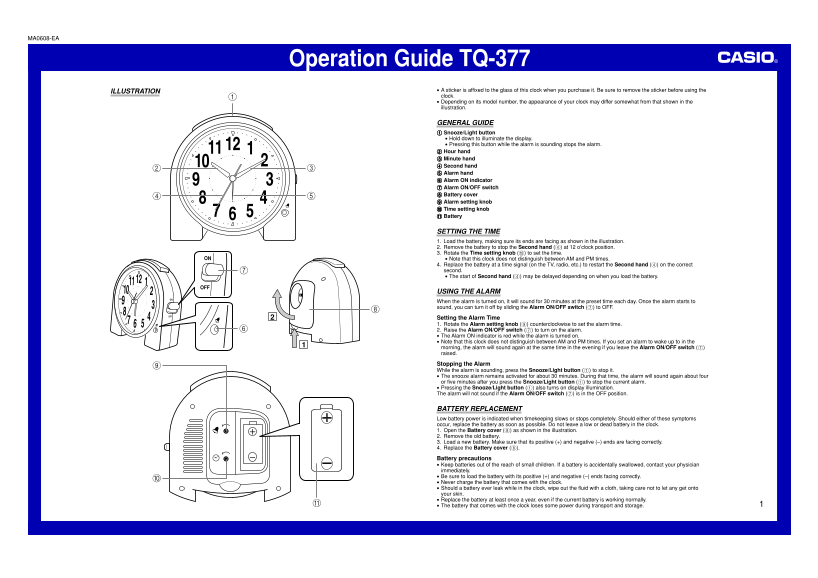
ILLUSTRATION A sticker is affixed to the glass of this clock when you purchase it. Be sure to remove the sticker before using the clock. Depending on its model number, the appearance of your clock may differ somewhat from that shown in the illustration.
GENERAL GUIDE Snooze/Light button Hold down to illuminate the display. Pressing this button while the alarm is sounding stops the alarm. Hour hand Minute hand Second hand Alarm hand Alarm ON indicator Alarm ON/OFF switch Battery cover Alarm setting knob Time setting knob Battery
SETTING THE TIME 1. Load the battery, making sure its ends are facing as shown in the illustration. 2. Remove the battery to stop the Second hand (4) at 12 o’clock position. 3. Rotate the Time setting knob (0) to set the time.
ON Note that this clock does not distinguish between AM and PM times.
4. Replace the battery at a time signal (on the TV, radio, etc.) to restart the Second hand (4) on the correct second. The start of Second hand (4) may be delayed depending on when you load the battery.
USING THE ALARM
When the alarm is turned on, it will sound for 30 minutes at the preset time each day. Once the alarm starts to sound, you can turn it off by sliding the Alarm ON/OFF switch (7) to OFF.
Setting the Alarm Time 1. Rotate the Alarm setting knob (9) counterclockwise to set the alarm time. 2. Raise the Alarm ON/OFF switch (7) to turn on the alarm. The Alarm ON indicator is red while the alarm is turned on. Note that this clock does not distinguish between AM and PM times. If you set an alarm to wake up to in the morning, the alarm will sound again at the same time in the evening if you leave the Alarm ON/OFF switch (7) raised.
Stopping the Alarm While the alarm is sounding, press the Snooze/Light button (1) to stop it. The snooze alarm remains activated for about 30 minutes. During that time, the alarm will sound again about four or five minutes after you press the Snooze/Light button (1) to stop the current alarm. Pressing the Snooze/Light button (1) also turns on display illumination. The alarm will not sound if the Alarm ON/OFF switch (7) is in the OFF position.
BATTERY REPLACEMENT Low battery power is indicated when timekeeping slows or stops completely. Should either of these symptoms occur, replace the battery as soon as possible. Do not leave a low or dead battery in the clock. 1. Open the Battery cover (8) as shown in the illustration. 2. Remove the old battery. 3. Load a new battery. Make sure that its positive (+) and negative (–) ends are facing correctly. 4. Replace the Battery cover (8).
Battery precautions Keep batteries out of the reach of small children. If a battery is accidentally swallowed, contact your physician immediately. Be sure to load the battery with its positive (+) and negative (–) ends facing correctly. Never charge the battery that comes with the clock. Should a battery ever leak while in the clock, wipe out the fluid with a cloth, taking care not to let any get onto your skin. Replace the battery at least once a year, even if the current battery is working normally. The battery that comes with the clock loses some power during transport and storage.
Page Summary Contents For Casio TQ-377 Operation Guide
Manual Details
| Brand | Casio |
|---|---|
| Pages | 1 |
| File Size | 80.88 KB |
| Published | June 05, 2026 |
Enter the captcha to get the download link:

Frequently Asked Questions
How do I set the time on this clock?
Load the battery, remove it to stop the second hand, rotate the Time setting knob (0) to set the time, then replace the battery when a time signal is available.
What happens if I need to turn off the alarm while it's sounding?
Press the Snooze/Light button (1) or slide the Alarm ON/OFF switch (7) to OFF. The snooze feature keeps the alarm active for about 30 minutes.
How is low battery power indicated?
Low battery is shown when timekeeping begins to slow down or stops entirely; replace the battery immediately.
Does this clock distinguish between AM and PM times?
No, the manual notes that the clock does not distinguish between AM and PM times for setting both time and alarms.