Casio 2328 5051 User's Manual
Summary
Master the operation of your multi-functional timepiece with this comprehensive guide. Learn accurate instructions on setting both the hours and date, utilizing the high-precision stopwatch function to measure elapsed time up to 11 hours. The manual also provides advanced procedures for ensuring optimal hand alignment and correctly reading the elapsed time bezel. Perfect for watch owners who require detailed technical knowledge to maintain and operate all features seamlessly.
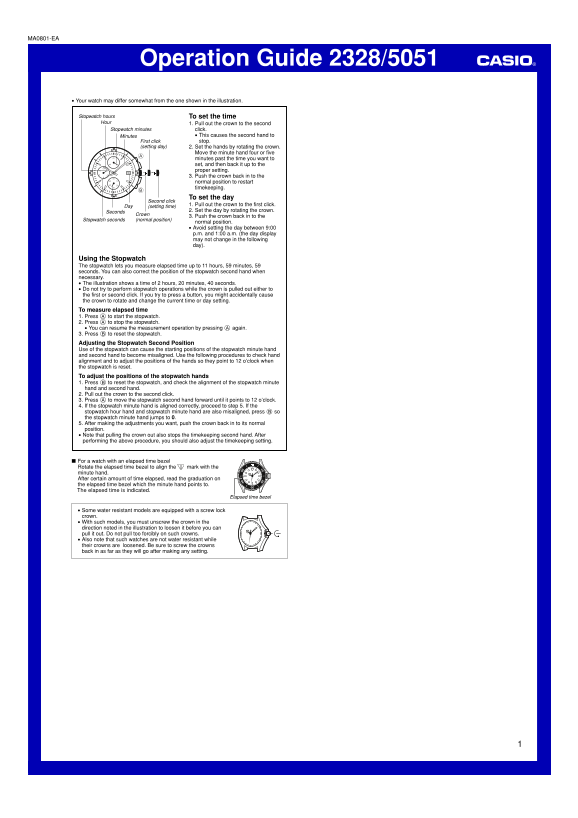
Page 1 Text Content
MA0801-EA
Operation Guide 2328/5051 Your watch may differ somewhat from the one shown in the illustration.
Stopwatch hours To set the time Hour 1. Pull out the crown to the second
Stopwatch minutes click.
Minutes This causes the second hand to First click stop.
(setting day) 2. Set the hands by rotating the crown.
Move the minute hand four or five minutes past the time you want to set, and then back it up to the proper setting. 3. Push the crown back in to the normal position to restart timekeeping.
To set the day
Second click
Day (setting time) 1. Pull out the crown to the first click. Seconds 2. Set the day by rotating the crown.
Crown 3. Push the crown back in to the
Stopwatch seconds (normal position)
normal position. Avoid setting the day between 9:00 p.m. and 1:00 a.m. (the day display may not change in the following day).
Using the Stopwatch The stopwatch lets you measure elapsed time up to 11 hours, 59 minutes, 59 seconds. You can also correct the position of the stopwatch second hand when necessary. The illustration shows a time of 2 hours, 20 minutes, 40 seconds. Do not try to perform stopwatch operations while the crown is pulled out either to the first or second click. If you try to press a button, you might accidentally cause the crown to rotate and change the current time or day setting. To measure elapsed time 1. Press A to start the stopwatch. 2. Press A to stop the stopwatch. You can resume the measurement operation by pressing A again. 3. Press B to reset the stopwatch. Adjusting the Stopwatch Second Position Use of the stopwatch can cause the starting positions of the stopwatch minute hand and second hand to become misaligned. Use the following procedures to check hand alignment and to adjust the positions of the hands so they point to 12 o’clock when the stopwatch is reset. To adjust the positions of the stopwatch hands 1. Press B to reset the stopwatch, and check the alignment of the stopwatch minute hand and second hand. 2. Pull out the crown to the second click. 3. Press A to move the stopwatch second hand forward until it points to 12 o’clock. 4. If the stopwatch minute hand is aligned correctly, proceed to step 5. If the stopwatch hour hand and stopwatch minute hand are also misaligned, press B so the stopwatch minute hand jumps to 0. 5. After making the adjustments you want, push the crown back in to its normal position. Note that pulling the crown out also stops the timekeeping second hand. After performing the above procedure, you should also adjust the timekeeping setting.
For a watch with an elapsed time bezel Rotate the elapsed time bezel to align the mark with the minute hand. After certain amount of time elapsed, read the graduation on the elapsed time bezel which the minute hand points to. The elapsed time is indicated.
Elapsed time bezel
Some water resistant models are equipped with a screw lock crown. With such models, you must unscrew the crown in the direction noted in the illustration to loosen it before you can pull it out. Do not pull too forcibly on such crowns. Also note that such watches are not water resistant while their crowns are loosened. Be sure to screw the crowns back in as far as they will go after making any setting.
Page Summary Contents For Casio 2328 5051 User's Manual
Manual Details
| Brand | Casio |
|---|---|
| Pages | 1 |
| File Size | 58.87 KB |
| Published | June 05, 2026 |
Enter the captcha to get the download link:

Frequently Asked Questions
How do I set the time on this watch?
Pull out the crown to the second click, rotate it to set the hands (moving minute hand 4-5 minutes past and back), then push the crown in.
What is the safe period for setting the day?
Avoid setting the day between 9:00 p.m. and 1:00 a.m., as the display might not change correctly on the following day.
How do I measure elapsed time using the stopwatch function?
Press A to start, press A to stop, or press B to reset the measurement.
What should I do if the stopwatch hands are misaligned after use?
Reset (B), pull the crown to the second click, move the second hand with A until it points to 12 o'clock, and adjust the minute/hour hand if needed.