Canon EOS Series EOS 50DCD-ROM Guide (for EOS 50D)
Summary
This essential software solution disk provides comprehensive tools for Canon EOS photographers, covering every stage of your image workflow. The package includes Digital Photo Professional (DPP) for high-speed RAW editing, ZoomBrowser EX/ImageBrowser for seamless JPEG organization, and the specialized EOS Utility for connecting your camera to your PC for remote shooting and easy transfer. Designed for advanced users, it also features the Picture Style Editor. This comprehensive manual guides installation across multiple operating systems, ensuring every Canon user—regardless of whether you shoot RAW or JPEG—can maximize their photographic potential.
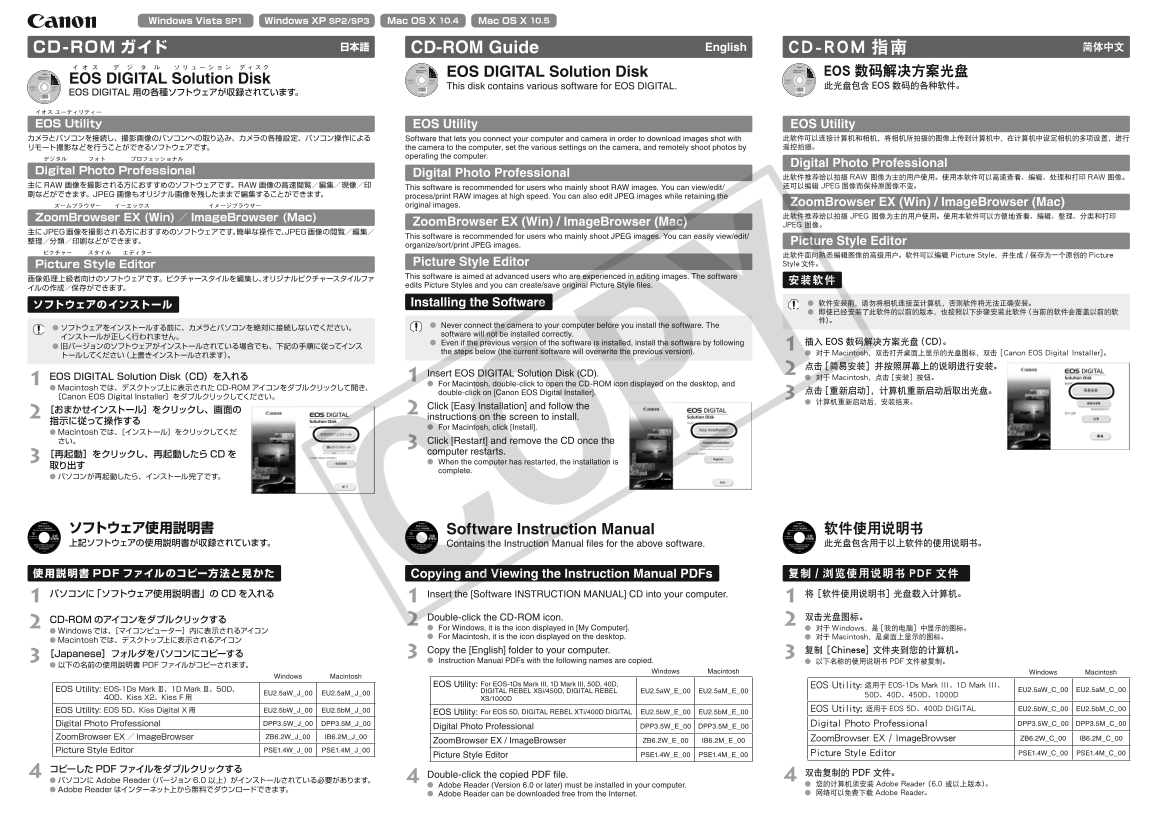
Page 1 Text Content
Windows Vista SP1 Windows XP SP2/SP3 Mac OS X 10.4 Mac OS X 10.5
CD-ROM ガイド 日本語 CD-ROM Guide English CD-ROM 指南 简体中文
EOS DIGITAL Solution Disk EOS 数码解决方案光盘
OS D IGITAL S olution D isk
This disk contains various software for EOS DIGITAL. 此光盘包含 EOS 数码的各种软件。
EOS DIGITAL 用の各種ソフトウェアが収録されています。
OS Utility EOS Utility EOS Utility
カメラとパソコンを接続し、撮影画像のパソコンへの取り込み、カメラの各種設定、パソコン操作による Software that lets you connect your computer and camera in order to download images shot with 此软件可以连接计算机和相机,将相机所拍摄的图像上传到计算机中,在计算机中设定相机的多项设置,进行 リモート撮影などを行うことができるソフトウェアです。 the camera to the computer, set the various settings on the camera, and remotely shoot photos by 遥控拍摄。
operating the computer.
Digital Photo Professional
igital P hoto P rofessional Digital Photo Professional
此软件推荐给以拍摄RAW 图像为主的用户使用。使用本软件可以高速查看、编辑、处理和打印RAW图像。
主にRAW 画像を撮影される方におすすめのソフトウェアです。RAW 画像の高速閲覧/編集/現像/印 还可以编辑 JPEG 图像而保持原图像不变。
This software is recommended for users who mainly shoot RAW images. You can view/edit/
刷などができます。JPEG 画像もオリジナル画像を残したままで編集することができます。 process/print RAW images at high speed. You can also edit JPEG images while retaining the
ズームブラウザー イーエックス イメージブラウザー original images. Zoom Browser EX (Win) / Image Browser (Mac) oom Browser E X (Win) mage Browser (Mac) 此软件推荐给以拍摄 JPEG 图像为主的用户使用。使用本软件可以方便地查看、编辑、整理、分类和打印
Zoom Browser EX (Win) / Image Browser (Mac) JPEG 图像。
主にJPEG画像を撮影される方におすすめのソフトウェアです。簡単な操作で、JPEG画像の閲覧/編集/
This software is recommended for users who mainly shoot JPEG images. You can easily view/edit/
整理/分類/印刷などができます。 Picture Style Editor
organize/sort/print JPEG images.
此软件面向熟悉编辑图像的高级用户。软件可以编辑 Picture Style,并生成 /保存为一个原创的 Picture
icture S tyle E ditor Picture Style Editor Style文件。 This software is aimed at advanced users who are experienced in editing images. The software
edits Picture Styles and you can create/save original Picture Style files.
Installing the Software l 软件安装前,请勿将相机连接至计算机,否则软件将无法正确安装。
l Never connect the camera to your computer before you install the software. The
software will not be installed correctly.
l Even if the previous version of the software is installed, install the software by following 插入 EOS 数码解决方案光盘(CD)。
the steps below (the current software will overwrite the previous version). l 对于Macintosh,双击打开桌面上显示的光盘图标,双击 [Canon EOS Digital Installer]。
Insert EOS DIGITAL Solution Disk (CD).
EOS DIGITAL Solution Disk (CD)を入れる l 对于Macintosh,点击[安装]按钮。
l For Macintosh, double-click to open the CD-ROM icon displayed on the desktop, and
l Macintoshでは、デスクトップ上に表示されたCD-ROMアイコンをダブルクリックして開き、
double-click on [Canon EOS Digital Installer]. 点击[重新启动],计算机重新启动后取出光盘。
[Canon EOS Digital Installer]をダブルクリックしてください。
Click [Easy Installation] and follow the
2[おまかせインストール]をクリックし、画面の instructions on the screen to install. 指示に従って操作する
l For Macintosh, click [Install].
l Macintoshでは、[インストール]をクリックしてくだ さい。 Click [Restart] and remove the CD once the
computer restarts.
3[再起動]をクリックし、再起動したら l When the computer has restarted, the installation is 取り出す
complete.
OP ソフトウェア使用説明書 Software Instruction Manual 软件使用说明书
上記ソフトウェアの使用説明書が収録されています。 Contains the Instruction Manual files for the above software. 此光盘包含用于以上软件的使用说明书。
使用説明書 PDF ファイルのコピー方法と見かた Copying and Viewing the Instruction Manual PDFs 复制 浏览使用说明书 PDF 文件
パソコンに「ソフトウェア使用説明書」の CD を入れる Insert the [Software INSTRUCTION MANUAL] CD into your computer. 将 [软件使用说明书] 光盘载入计算机。
Double-click the CD-ROM icon. 双击光盘图标。
CD-ROM のアイコンをダブルクリックする
l For Windows, it is the icon displayed in [My Computer]. l 对于Windows,是[我的电脑]中显示的图标。
l Windowsでは、[マイコンピューター]内に表示されるアイコン
l For Macintosh, it is the icon displayed on the desktop. l 对于Macintosh,是桌面上显示的图标。
l Macintoshでは、デスクトップ上に表示されるアイコン
Copy the [English] folder to your computer. 复制 [Chinese] 文件夹到您的计算机。
3[Japanese]フォルダをパソコンにコピーする l Instruction Manual PDFs with the following names are copied. l 以下名称的使用说明书PDF文件被复制。 l 以下の名前の使用説明書 PDF ファイルがコピーされます。
Windows Macintosh Windows Macintosh
Windows Macintosh
EOS Utility: For EOS-1Ds Mark III, 1D Mark III, 50D, 40D, EOS Utility: 适用于 EOS-1Ds Mark III、1D Mark III、
EOS Utility: EOS-1Ds Mark Ⅲ、1D Mark Ⅲ、50D、 DIGITAL REBEL XSi/450D, DIGITAL REBEL EU2.5a W_E_00 EU2.5a M_E_00 EU2.5a W_C_00 EU2.5a M_C_00
EU2.5a W_J_00 EU2.5a M_J_00
40D、Kiss X2、Kiss F XS/1000D
EOS Utility: EOS 5D、Kiss Digital X EU2.5b W_J_00 EU2.5b M_J_00 EOS Utility: 适用于 EOS 5D、400D DIGITAL EU2.5b W_C_00 EU2.5b M_C_00
EOS Utility: For EOS 5D, DIGITAL REBEL XTi/400D DIGITAL EU2.5b W_E_00 EU2.5b M_E_00
Digital Photo Professional DPP3.5W_J_00 DPP3.5M_J_00 Digital Photo Professional DPP3.5W_C_00 DPP3.5M_C_00
Digital Photo Professional DPP3.5W_E_00 DPP3.5M_E_00
Zoom Browser EX Image Browser ZB6.2W_J_00 IB6.2M_J_00 Zoom Browser EX / Image Browser ZB6.2W_C_00 IB6.2M_C_00
Zoom Browser EX / Image Browser ZB6.2W_E_00 IB6.2M_E_00
Picture Style Editor PSE1.4W_J_00 PSE1.4M_J_00
PSE1.4W_E_00 PSE1.4M_E_00 Picture Style Editor PSE1.4W_C_00 PSE1.4M_C_00
Picture Style Editor
コピーした PDF ファイルをダブルクリックする
Double-click the copied PDF file. 双击复制的 PDF文件。
l パソコンに Adobe Reader(バージョン 6.0 以上)がインストールされている必要があります。
l Adobe Reader (Version 6.0 or later) must be installed in your computer. l 您的计算机须安装 Adobe Reader (6.0 或以上版本)。
l Adobe Reader はインターネット上から無料でダウンロードできます。
l Adobe Reader can be downloaded free from the Internet. l 网络可以免费下载 Adobe Reader。
Page Summary Contents For Canon EOS Series EOS 50DCD-ROM Guide (for EOS 50D)
Manual Details
| Brand | Canon |
|---|---|
| Pages | 2 |
| File Size | 1.34 MB |
| Published | May 17, 2026 |
Enter the captcha to get the download link:

Frequently Asked Questions
How should I install the software using the CD?
Do not connect the camera to your computer before installation; follow the manual steps and restart the computer when prompted.
What is recommended for RAW image processing?
Digital Photo Professional (DPP) is suggested for users who primarily shoot RAW images, allowing fast viewing, editing, and printing while retaining original quality.
Are there separate tools for JPEG management?
Yes, ZoomBrowser EX / ImageBrowser allows easy viewing, organizing, sorting, and printing of JPEG images, recommended for users who mainly shoot JPEGs.
What if I want to learn advanced edits like custom styles?
Picture Style Editor is aimed at advanced users, enabling them to edit Picture Styles and create/save original Picture Style files.