Canon EOS Series EOS-1Ds Mark IIIEOS-1Ds Mark III Software User Manual CD-ROM Guide
Summary
This comprehensive digital solution disk provides essential software to manage your photography workflow with EOS DIGITAL cameras. It includes tools for device communication, advanced image viewing/editing (supporting RAW files), remote camera control, and creating unique Picture Styles. Whether you're a beginner or a professional, this package helps you import, edit, organize, and print high-quality images efficiently on your computer. The accompanying manual details how to use every function, ensuring a seamless experience from capture to final print.
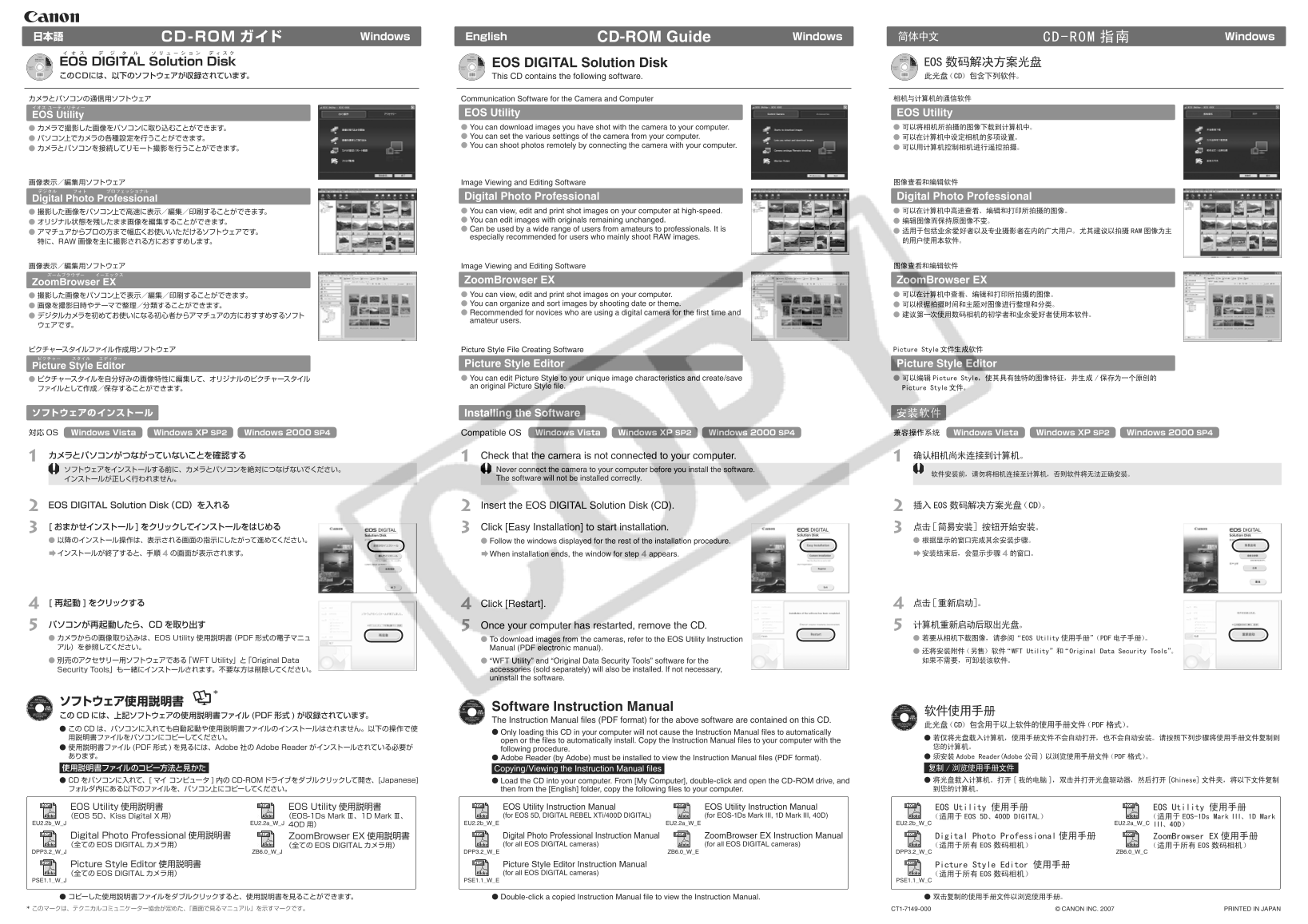
Page 1 Text Content
CD-ROM ガイド Windows English CD-ROM Guide Windows日本語 CD-ROM 指南 Windows简体中文
OS D IGITAL S olution D isk EOS DIGITAL Solution Disk EOS 数码解决方案光盘 このCDには、以下のソフトウェアが収録されています。 This CD contains the following software. 此光盘(CD)包含下列软件。
カメラとパソコンの通信用ソフトウェア Communication Software for the Camera and Computer 相机与计算机的通信软件
OS Utility EOS Utility EOS Utility カメラで撮影した画像をパソコンに取り込むことができます。 You can download images you have shot with the camera to your computer. 可以将相机所拍摄的图像下载到计算机中。 You can set the various settings of the camera from your computer. 可以在计算机中设定相机的多项设置。
You can shoot photos remotely by connecting the camera with your computer.
画像表示/編集用ソフトウェア Image Viewing and Editing Software 图像查看和编辑软件
igital P hoto P rofessional Digital Photo Professional Digital Photo Professional 撮影した画像をパソコン上で高速に表示/編集/印刷することができます。 You can view, edit and print shot images on your computer at high-speed. 可以在计算机中高速查看、编辑和打印所拍摄的图像。 You can edit images with originals remaining unchanged. 编辑图像而保持原图像不变。
Can be used by a wide range of users from amateurs to professionals. It is
アマチュアからプロの方まで幅広くお使いいただけるソフトウェアです。 适用于包括业余爱好者以及专业摄影者在内的广大用户。尤其建议以拍摄 RAW图像为主
especially recommended for users who mainly shoot RAW images.
特に、RAW 画像を主に撮影される方におすすめします。 的用户使用本软件。
画像表示/編集用ソフトウェア Image Viewing and Editing Software 图像查看和编辑软件
oom Browser E Zoom Browser EX Zoom Browser EX 撮影した画像をパソコン上で表示/編集/印刷することができます。 You can view, edit and print shot images on your computer. 可以在计算机中查看、编辑和打印所拍摄的图像。 You can organize and sort images by shooting date or theme. 可以根据拍摄时间和主题对图像进行整理和分类。
Recommended for novices who are using a digital camera for the first time and
amateur users.
ピクチャースタイルファイル作成用ソフトウェア Picture Style File Creating Software Picture Style文件生成软件
icture S tyle E ditor Picture Style Editor Picture Style Editor
ピクチャースタイルを自分好みの画像特性に編集して、オリジナルのピクチャースタイル You can edit Picture Style to your unique image characteristics and create/save 可以编辑 Picture Style,使其具有独特的图像特征,并生成 /保存为一个原创的
an original Picture Style file. Picture Style文件。
ソフトウェアのインストール Installing the Software 安装软件
対応OS Windows Vista Windows XP SP2 Windows 2000 SP4 Windows Vista Windows XP SP2 Windows 2000 SP4Compatible OS 兼容操作系统 Windows XP SP2 Windows 2000 SP4Windows Vista
1 カメラとパソコンがつながっていないことを確認する 1 Check that the camera is not connected to your computer. 1 确认相机尚未连接到计算机。 ソフトウェアをインストールする前に、カメラとパソコンを絶対につなげないでください。
Never connect the camera to your computer before you install the software.
インストールが正しく行われません。 The software will not be installed correctly.
2 EOS DIGITAL Solution Disk(CD)を入れる 2 Insert the EOS DIGITAL Solution Disk (CD). 2 插入 EOS 数码解决方案光盘(CD)。
3 [ おまかせインストール]をクリックしてインストールをはじめる 3 Click [Easy Installation] to start installation. 3 点击[简易安装]按钮开始安装。 以降のインストール操作は、表示される画面の指示にしたがって進めてください。 Follow the windows displayed for the rest of the installation procedure. 根据显示的窗口完成其余安装步骤。
インストールが終了すると、手順 4の画面が表示されます。 When installation ends, the window for step 4 appears. 安装结束后,会显示步骤 4的窗口。
4 [ 再起動 ]をクリックする 4 Click [Restart]. 4 点击[重新启动]。 5 パソコンが再起動したら、CDを取り出す 5 Once your computer has restarted, remove the CD. 5 计算机重新启动后取出光盘。
カメラからの画像取り込みは、EOS Utility 使用説明書(PDF 形式の電子マニュ To download images from the cameras, refer to the EOS Utility Instruction 若要从相机下载图像,请参阅 “EOS Utility 使用手册”(PDF电子手册)。
アル)を参照してください。 Manual (PDF electronic manual).
还将安装附件(另售)软件“WFT Utility”和“Original Data Security Tools”。 別売のアクセサリー用ソフトウェアである「WFT Utility」と「Original Data “WFT Utility” and “Original Data Security Tools” software for the 如果不需要,可卸装该软件。
Security Tools」も一緒にインストールされます。不要な方は削除してください。 accessories (sold separately) will also be installed. If not necessary, uninstall the software.
Software Instruction Manual
このCDには、上記ソフトウェアの使用説明書ファイル (PDF 形式 )が収録されています。
The Instruction Manual files (PDF format) for the above software are contained on this CD.
此光盘(CD)包含用于以上软件的使用手册文件(PDF格式)。
この CDは、パソコンに入れても自動起動や使用説明書ファイルのインストールはされません。以下の操作で使
Only loading this CD in your computer will not cause the Instruction Manual files to automatically
open or the files to automatically install. Copy the Instruction Manual files to your computer with the
使用説明書ファイル (PDF 形式 を見るには、Adobe 社のAdobe Reader がインストールされている必要が 您的计算机。
following procedure.
あります。 Adobe Reader (by Adobe) must be installed to view the Instruction Manual files (PDF format). 须安装 Adobe Reader(Adobe 公司 )以浏览使用手册文件(PDF 格式)。
使用説明書ファイルのコピー方法と見かた Copying/Viewing the Instruction Manual files 复制 /浏览使用手册文件
CDをパソコンに入れて、[ マイ コンピュータ 内の CD-ROMドライブをダブルクリックして開き、[Japanese] Load the CD into your computer. From [My Computer], double-click and open the CD-ROM drive, and 将光盘载入计算机。打开[我的电脑 ],双击并打开光盘驱动器,然后打开[Chinese]文件夹,将以下文件复制
フォルダ内にある以下のファイルを、パソコン上にコピーしてください。 then from the [English] folder, copy the following files to your computer. 到您的计算机。
EOS Utility 使用説明書 EOS Utility 使用説明書 EOS Utility Instruction Manual EOS Utility Instruction Manual EOS Utility 使用手册 EOS Utility 使用手册 (EOS 5D、Kiss Digital X 用) (EOS-1Ds Mark Ⅲ、1D Mark Ⅲ、 (for EOS 5D, DIGITAL REBEL XTi/400D DIGITAL) (for EOS-1Ds Mark III, 1D Mark III, 40D) (适用于 EOS 5D、400D DIGITAL) (适用于 EOS-1Ds Mark III、1D Mark
EU2.2b_W_J EU2.2a_W_J EU2.2b_W_E EU2.2a_W_E EU2.2b_W_C EU2.2a_W_C III、40D)
Digital Photo Professional 使用説明書 Zoom Browser EX 使用説明書 Digital Photo Professional Instruction Manual Zoom Browser EX Instruction Manual Digital Photo Professional 使用手册 Zoom Browser EX 使用手册 (全てのEOS DIGITAL カメラ用) (全てのEOS DIGITAL カメラ用) (for all EOS DIGITAL cameras) (for all EOS DIGITAL cameras) (适用于所有 EOS 数码相机) (适用于所有 EOS 数码相机)
DPP3.2_W_J ZB6.0_W_J DPP3.2_W_E ZB6.0_W_E DPP3.2_W_C ZB6.0_W_C
Picture Style Editor 使用説明書 Picture Style Editor Instruction Manual Picture Style Editor 使用手册 (全てのEOS DIGITAL カメラ用) (for all EOS DIGITAL cameras) (适用于所有 EOS 数码相机)
PSE1.1_W_E PSE1.1_W_CPSE1.1_W_J
Double-click a copied Instruction Manual file to view the Instruction Manual. コピーした使用説明書ファイルをダブルクリックすると、使用説明書を見ることができます。 双击复制的使用手册文件以浏览使用手册。
* このマークは、テクニカルコミュニケーター協会が定めた、「画面で見るマニュアル」を示すマークです。 CT1-7149-000 © CANON INC. 2007 PRINTED IN JAPAN
Page Summary Contents For Canon EOS Series EOS-1Ds Mark IIIEOS-1Ds Mark III Software User Manual CD-ROM Guide
Manual Details
| Brand | Canon |
|---|---|
| Pages | 2 |
| File Size | 3.74 MB |
| Published | May 17, 2026 |
Enter the captcha to get the download link:

Frequently Asked Questions
Before installing the software, should I connect my camera to the computer?
No; never connect the camera to the computer before installation, otherwise the software cannot be correctly installed.
What are the major functions of EOS Utility?
It allows you to download images, set various camera settings remotely via a PC, and perform remote shooting.
Which operating systems are compatible with this CD-ROM suite?
Compatible systems include Windows Vista, Windows XP SP2, and Windows 2000 SP4.
How do I view the Instruction Manual files (PDF)?
Simply loading the CD is not enough; you must copy the manual files to your computer and use Adobe Reader.