ASUS ESC700 G2 Server AI Supercomputer Workstation ESC700 Motherboard Utility Guide - User Manual (12)
Summary
This essential guide provides comprehensive instructions for using the ASUS BIOS Updater utility to manage and upgrade your motherboard firmware in a dedicated DOS environment. The manual details the entire process, from preparing necessary FAT32/16 flash drives and system prerequisites to guiding you through both initial BIOS backup procedures and seamless file upgrades. It is specifically designed for advanced PC users or technicians who require reliable, step-by-step instructions to safely update firmware or recover a corrupted BIOS state, ensuring maximum system stability throughout the process.
Page 1 Text Content
華碩 BIOS Updater 華碩 BIOS Updater 可讓您在 DOS 環境下升級 BIOS 文件。本程序也可讓 您複製現行系統中的 BIOS 文件作為備份,如果在升級 BIOS 過程中遭遇 BIOS 文件損毀或升級失敗的情況,可以重新載入這份複製的文件恢復系統狀態。
以下畫面僅供參考,可能與您所見到的 BIOS 畫面有所差異。
升級 BIOS 之前 1. 準備好主板的驅動程序與應用程序光盤,及一個 FAT32/16 格式單一 分區的 USB 閃存盤。 2. 從華碩網站 http://support.asus.com 下載最新的 BIOS 文件和 BIOS Updater 工具程序,並將它們保存於 USB 閃存盤中。
• DOS 環境中不支持 NTFS 格式。請勿將 BIOS 文件與 BIOS Updater 工具程序保存於 NTFS 格式的硬盤或 USB 閃存盤 中。 • 由於軟盤容量有限,請勿將 BIOS 文件與 BIOS Updater 工具 程序保存於軟盤中。
3. 關閉電腦並移除所有 SATA 硬盤(可選)。
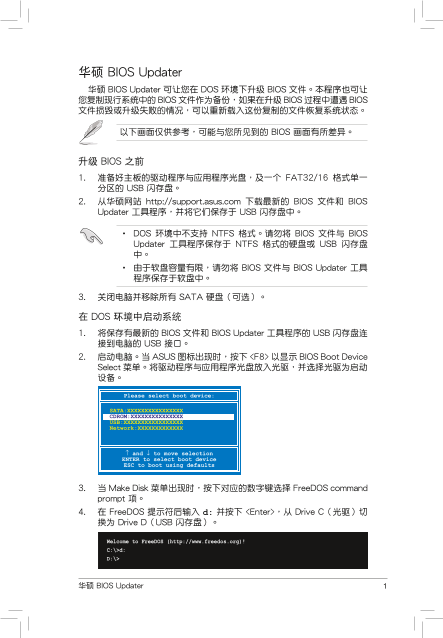
在 DOS 環境中啟動系統 1. 將保存有最新的 BIOS 文件和 BIOS Updater 工具程序的 USB 閃存盤連 接到電腦的 USB 接口。 2. 啟動電腦。當 ASUS 圖標出現時,按下 <F8> 以顯示 BIOS Boot Device Select 菜單。將驅動程序與應用程序光盤放入光驅,並選擇光驅為啟動 設備。
Please select boot device:
SATA:XXXXXXXXXXXXXXXX CDROM:XXXXXXXXXXXXXXX USB:XXXXXXXXXXXXXXXXX Network:XXXXXXXXXXXXX
↑ and ↓ to move selection ENTER to select boot device ESC to boot using defaults
3. 當 Make Disk 菜單出現時,按下對應的數字鍵選擇 Free DOS command prompt 項。 4. 在 Free DOS 提示符後輸入 d: 並按下 <Enter>,從 Drive C(光驅)切 換為 Drive D(USB 閃存盤)。
Welcome to Free DOS (http://www.freedos.org)! C:\>d: D:\>
華碩 BIOS Updater
Page Summary Contents For ASUS ESC700 G2 Server AI Supercomputer Workstation ESC700 Motherboard Utility Guide - User Manual (12)
Manual Details
| Brand | Server |
|---|---|
| Pages | 3 |
| File Size | 255.06 KB |
| Published | June 02, 2026 |
Enter the captcha to get the download link:

Frequently Asked Questions
如何備份目前的BIOS文件?
在FreeDOS提示符後輸入 'bupdater /o[filename]' 並執行按鍵。
如果升級BIOS中斷或失敗該怎麼辦?
程序內建了功能,可以重新載入您用'bupdater /o'[filename]備份的檔案來恢復系統狀態。
在升級BIOS之前需要準備什麼?
至少需要一顆FAT32/16格式分區的USB閃存盤、最新的BIOS文件和BIOS Updater工具程序,以及主板光碟。
請問使用BIOS Updater進行升級後有什麼注意事項?
升級過程中請勿關閉或重置系統;如因更改導致不穩定,需回調廠出廠默認值。