Alienware 14 Quick User Guide by Dell
Summary
This setup and specifications document provides detailed information about Dell laptop features and port configurations. The manual covers hardware components including microphones, camera, USB 3.0 ports with PowerShare, HDMI, Mini DisplayPort, network connectivity, and security features. It also includes backlit keyboard and touchpad specifications. Designed for end users and IT administrators setting up Dell business laptops.
Page 1 Text Content
Features 功能部件 功能 Fitur 機能
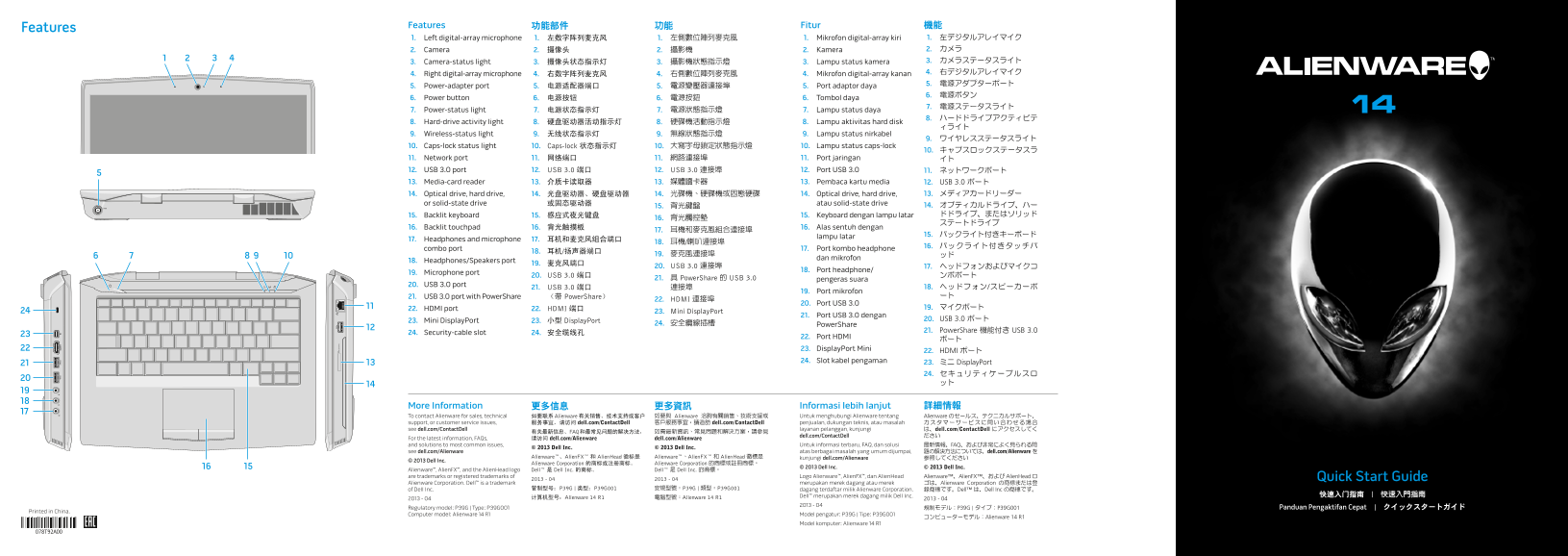
Features
1. Left digital-array microphone 1. 左数字阵列麦克风 1. 左側數位陣列麥克風 1. Mikrofon digital-array kiri 1. 左デジタルアレイマイク 2. Camera 2. 摄像头 2. 攝影機 2. Kamera 2. カメラ 3. Camera-status light 3. 摄像头状态指示灯 3. 攝影機狀態指示燈 3. Lampu status kamera 3. カメラステータスライト 4. Right digital-array microphone 4. 右数字阵列麦克风 4. 右側數位陣列麥克風 4. Mikrofon digital-array kanan 4. 右デジタルアレイマイク 5. 電源アダプターポート
5. Power-adapter port 5. 电源适配器端口 5. 電源變壓器連接埠 5. Port adaptor daya
6. Power button 6. 电源按钮 6. 電源按鈕 6. Tombol daya
7. Power-status light 7. 电源状态指示灯 7. 電源狀態指示燈 7. Lampu status daya
8. Hard-drive activity light 8. 硬盘驱动器活动指示灯 8. 硬碟機活動指示燈 8. Lampu aktivitas hard disk
9. Wireless-status light 9. 无线状态指示灯 9. 無線狀態指示燈 9. Lampu status nirkabel
10. Caps-lock status light 10. Caps-lock 状态指示灯 10. 大寫字母鎖定狀態指示燈 10. Lampu status caps-lock
11. Network port 11. 网络端口 11. 網路連接埠 11. Port jaringan イト 12. USB 3.0 port 12. USB 3.0 端口 12. USB 3.0 連接埠 12. Port USB 3.0 11. ネットワークポート 13. Media-card reader 13. 介质卡读取器 13. 媒體讀卡器 13. Pembaca kartu media 12. USB 3.0 ポート
14. Optical drive, hard drive, 14. 光盘驱动器、硬盘驱动器 14. 光碟機、硬碟機或固態硬碟 14. Optical drive, hard drive, 13. メディアカードリーダー
or solid-state drive 或固态驱动器 atau solid-state drive
15. 背光鍵盤 14. オプティカルドライブ、ハー 15. Backlit keyboard 15. 感应式夜光键盘 15. Keyboard dengan lampu latar ドドライブ、またはソリッド
16. Backlit touchpad 16. 背光触摸板 16. Alas sentuh dengan
lampu latar
17. Headphones and microphone 17. 耳机和麦克风组合端口
combo port 17. Port kombo headphone
dan mikrofon
18. Headphones/Speakers port
20. USB 3.0 連接埠 17. ヘッドフォンおよびマイクコ
18. Port headphone/
19. Microphone port
20. USB 3.0 端口 ンボポート
21. 具 Power Share 的 USB 3.0 pengeras suara
20. USB 3.0 port
21. USB 3.0 端口 連接埠 18. ヘッドフォン/スピーカーポ
19. Port mikrofon
21. USB 3.0 port with Power Share (带 Power Share) ート
22. HDMI 連接埠
20. Port USB 3.0
22. HDMI port 22. HDMI 端口 19. マイクポート
23. Mini Display Port
21. Port USB 3.0 dengan
23. Mini Display Port 23. 小型 Display Port 20. USB 3.0 ポート
24. 安全纜線插槽 Power Share
21. Power Share 機能付き USB 3.0
24. Security-cable slot 24. 安全缆线孔
22. Port HDMI
23. Display Port Mini
22. HDMI ポート
24. Slot kabel pengaman 23. ミニ Display Port
More Information 更多信息 更多資訊 Informasi lebih lanjut 詳細情報 To contact Alienware for sales, technical 如要联系 Alienware 有关销售、技术支持或客户 如要與 Alienware 洽詢有關銷售、技術支援或 Untuk menghubungi Alienware tentang Alienware のセールス、テクニカルサポート、 support, or customer service issues, 服务事宜,请访问 dell.com/Contact Dell 客戶服務事宜,請造訪 dell.com/Contact Dell penjualan, dukungan teknis, atau masalah カスタマーサービスに問い合わせる場合 see dell.com/Contact Dell layanan pelanggan, kunjungi は、dell.com/Contact Dell にアクセスしてく
有关最新信息、FAQ 和最常见问题的解决方法, 如需最新資訊、常見問題和解決方案,請參見
dell.com/Contact Dell ださい
For the latest information, FAQs, 请访问 dell.com/Alienware dell.com/Alienware and solutions to most common issues, Untuk informasi terbaru, FAQ, dan solusi 最新情報、FAQ、および非常によく見られる問
© 2013 Dell Inc. © 2013 Dell Inc.
see dell.com/Alienware atas berbagai masalah yang umum dijumpai, 題の解決方法については、dell.com/Alienware を
Alienware™、Alien FX™ 和 Alien Head 徽标是 Alienware™、Alien FX™ 和 Alien Head 徽標是 kunjungi dell.com/Alienware 参照してください
© 2013 Dell Inc.
Alienware Corporation 的商标或注册商标。 Alienware Corporation 的商標或註冊商標。
© 2013 Dell Inc. © 2013 Dell Inc.
Alienware™, Alien FX™, and the Alien Head logo Dell™ 是 Dell Inc. 的商标。 Dell™ 是 Dell Inc. 的商標。 are trademarks or registered trademarks of Logo Alienware™, Alien FX™, dan Alien Head Alienware™、Alien FX™、および Alien Head ロ Quick Start Guide
Alienware Corporation. Dell™ is a trademark merupakan merek dagang atau merek ゴは、Alienware Corporation の商標または登
of Dell Inc. 管制型号:P39G | 类型:P39G001 安規型號:P39G | 類型︰P39G001 dagang terdaftar milik Alienware Corporation. 録商標です。Dell™ は、Dell Inc の商標です。
Dell™ merupakan merek dagang milik Dell Inc. 快速入门指南 | 快速入門指南
2013 - 04 计算机型号:Alienware 14 R1 電腦型號:Alienware 14 R1 2013 - 04
Regulatory model: P39G | Type: P39G001 規制モデル:P39G | タイプ:P39G001 Panduan Pengaktifan Cepat | クイックスタートガイド
Printed in China.
Computer model: Alienware 14 R1 Model pengatur: P39G | Tipe: P39G001
コンピューターモデル:Alienware 14 R1
Model komputer: Alienware 14 R1
Page Summary Contents For Alienware 14 Quick User Guide by Dell
Manual Details
| Brand | Alienware |
|---|---|
| Pages | 2 |
| File Size | 700.23 KB |
| Published | May 13, 2026 |
Enter the captcha to get the download link:

Frequently Asked Questions
How do I power on the computer?
Press the power button located on the front of the device.
What ports are available for external displays?
You can use the HDMI port or the Mini DisplayPort.
How do I eject a disc from the optical drive?
Use the function key combination to eject the disc from the optical drive.
Can I connect to the internet wirelessly?
Yes, use the function keys to enable or disable the wireless connection.
How do I mute the audio?
Press the function key to mute the audio.