Acer X Series X1235 Quick Guide User Manual
Summary
This guide provides comprehensive instructions for setting up, connecting, and operating your professional video display solution. It is designed for users requiring reliable connectivity between a computer source and a projector via multiple standards, including VGA, S-Video, and audio connections. The manual details step-by-step installation procedures—from cable management to proper power cycling—ensuring smooth operation every time. Ideal for corporate presentations, classrooms, or large meeting room setups that demand seamless digital visualization.
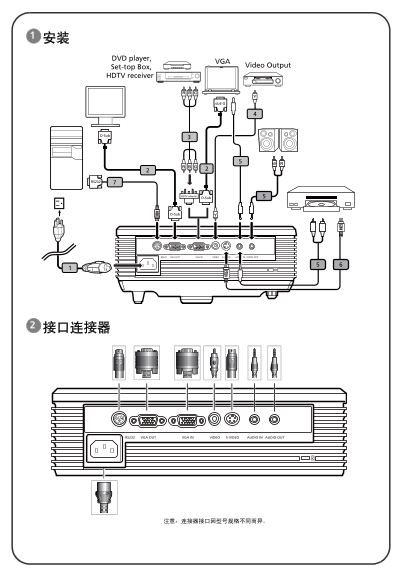
Page 1 Text Content
DVD player,
Set-top Box, Video Output
HDTV receiver
D-Sub
D-Sub
RS232
HDTV adapter D-Sub
D-Sub
E62405SP
Page Summary Contents For Acer X Series X1235 Quick Guide User Manual
Manual Details
| Brand | Acer |
|---|---|
| Pages | 2 |
| File Size | 652.83 KB |
| Published | June 05, 2026 |
Enter the captcha to get the download link:

Frequently Asked Questions
How do I connect my computer to the projector using video cables?
Connect one end of the VGA cable to the "VGA IN" connector on the projector and the other end to your computer.
What is the proper sequence for powering on and off the equipment?
Power On: Turn on the projector first, then turn on the computer. Power Off: Press the power button twice, and wait until the projector fans stop running before disconnecting the AC cord.
Which types of cables are provided or supported by this kit?
The kit supports VGA cables, Composite video cables, Audio cables, S-Video cables, and RS232 cables.