Samsung Smartphone Accessories User Guide WEP460 - Part 2 Product Manual
Summary
This comprehensive guide provides everything you need to operate your Bluetooth headset effectively. It covers initial pairing and connection instructions, guiding you through various operating modes—from standby to active calling. Detailed sections explain usage tips, troubleshooting status indicators, strict warranty coverage terms (one year), and essential safety protocols for optimal performance and longevity. Designed for consumers seeking reliable functionality and responsible product care, this manual ensures you maximize the use of your wireless audio device while maintaining environmental compliance.
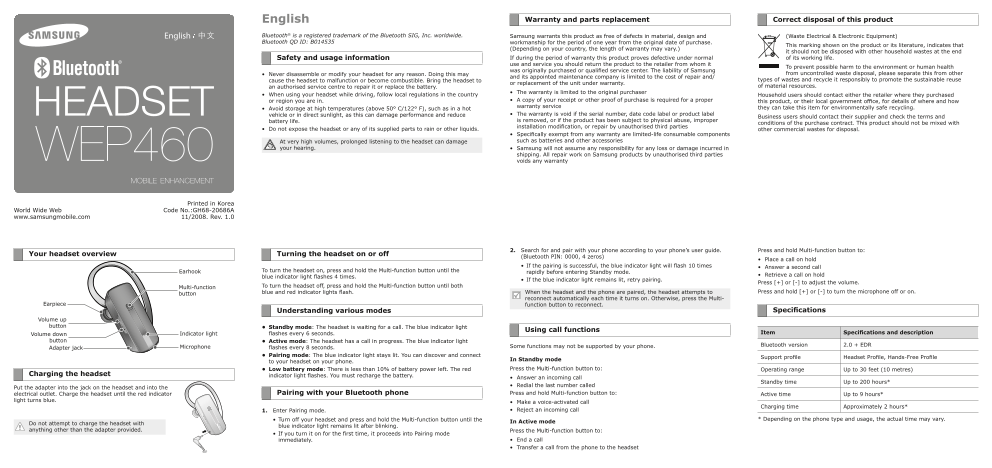
Page 1 Text Content
English Warranty and parts replacement Correct disposal of this product
Bluetooth® is a registered trademark of the Bluetooth SIG, Inc. worldwide. Samsung warrants this product as free of defects in material, design and (Waste Electrical & Electronic Equipment) Bluetooth QD ID: B014535 workmanship for the period of one year from the original date of purchase.
This marking shown on the product or its literature, indicates that
(Depending on your country, the length of warranty may vary.)
it should not be disposed with other household wastes at the end
Safety and usage information If during the period of warranty this product proves defective under normal of its working life. use and service you should return the product to the retailer from whom it
To prevent possible harm to the environment or human health
was originally purchased or qualified service center. The liability of Samsung
Never disassemble or modify your headset for any reason. Doing this may from uncontrolled waste disposal, please separate this from other
and its appointed maintenance company is limited to the cost of repair and/
cause the headset to malfunction or become combustible. Bring the headset to types of wastes and recycle it responsibly to promote the sustainable reuse
or replacement of the unit under warranty.
an authorised service centre to repair it or replace the battery. of material resources.
The warranty is limited to the original purchaser
When using your headset while driving, follow local regulations in the country Household users should contact either the retailer where they purchased
or region you are in. A copy of your receipt or other proof of purchase is required for a proper this product, or their local government office, for details of where and how warranty service they can take this item for environmentally safe recycling.
Avoid storage at high temperatures (above 50° C/122° F), such as in a hot
vehicle or in direct sunlight, as this can damage performance and reduce The warranty is void if the serial number, date code label or product label
Business users should contact their supplier and check the terms and
battery life. is removed, or if the product has been subject to physical abuse, improper
conditions of the purchase contract. This product should not be mixed with
installation modification, or repair by unauthorised third parties
Do not expose the headset or any of its supplied parts to rain or other liquids. other commercial wastes for disposal.
Specifically exempt from any warranty are limited-life consumable components At very high volumes, prolonged listening to the headset can damage such as batteries and other accessories
your hearing. Samsung will not assume any responsibility for any loss or damage incurred in
shipping. All repair work on Samsung products by unauthorised third parties voids any warranty
Printed in Korea
World Wide Web Code No.:GH68-20686A
www.samsungmobile.com 11/2008. Rev. 1.0
2. Search for and pair with your phone according to your phone’s user guide. Press and hold Multi-function button to:
Your headset overview Turning the headset on or off
(Bluetooth PIN: 0000, 4 zeros)
Place a call on hold
If the pairing is successful, the blue indicator light will flash 10 times Answer a second call
Earhook To turn the headset on, press and hold the Multi-function button until the rapidly before entering Standby mode.
blue indicator light flashes 4 times. Retrieve a call on hold
If the blue indicator light remains lit, retry pairing.
Press [+] or [-] to adjust the volume.
Multi-function To turn the headset off, press and hold the Multi-function button until both
blue and red indicator lights flash. When the headset and the phone are paired, the headset attempts to Press and hold [+] or [-] to turn the microphone off or on.
button
reconnect automatically each time it turns on. Otherwise, press the Multi-
Earpiece function button to reconnect.
Understanding various modes Specifications
Volume up button Standby mode: The headset is waiting for a call. The blue indicator light
Using call functions
Volume down Indicator light flashes every 6 seconds. Item Specifications and description
button Active mode: The headset has a call in progress. The blue indicator light
Some functions may not be supported by your phone. Bluetooth version 2.0 + EDR
Adapter jack Microphone flashes every 8 seconds.
Pairing mode: The blue indicator light stays lit. You can discover and connect
Support profile Headset Profile, Hands-Free Profile
In Standby mode
to your headset on your phone.
Low battery mode: There is less than 10% of battery power left. The red Press the Multi-function button to: Operating range Up to 30 feet (10 metres)
Charging the headset indicator light flashes. You must recharge the battery.
Answer an incoming call
Standby time Up to 200 hours*
Redial the last number called
Put the adapter into the jack on the headset and into the
electrical outlet. Charge the headset until the red indicator Pairing with your Bluetooth phone Press and hold Multi-function button to: Active time Up to 9 hours*
light turns blue. Make a voice-activated call
Charging time Approximately 2 hours*
1. Enter Pairing mode. Reject an incoming call
Turn off your headset and press and hold the Multi-function button until the * Depending on the phone type and usage, the actual time may vary.
Do not attempt to charge the headset with In Active mode
blue indicator light remains lit after blinking.
anything other than the adapter provided. Press the Multi-function button to:
If you turn it on for the first time, it proceeds into Pairing mode
immediately. End a call Transfer a call from the phone to the headset
Page Summary Contents For Samsung Smartphone Accessories User Guide WEP460 - Part 2 Product Manual
Manual Details
| Brand | Samsung |
|---|---|
| Pages | 2 |
| File Size | 948.61 KB |
| Published | June 15, 2026 |
Enter the captcha to get the download link:

Frequently Asked Questions
如何處理舊的耳機產品?
它不得與其他家庭或商業垃圾一起丟棄,應透過指定的資源回收點進行環保處理。
耳機的電池壽命耗材是否在保固範圍內?
否,電池和其他配件等有使用期限的消耗品不在保固範圍涵蓋內。
如果我正在驾驶时使用耳机的安全措施是什么?
您必須遵守您所在国家或地区的当地法律法规要求。
什么情况下我的设备可能会失去保修资格?
移除序列号、日期代码标签,或产品标签;或製品曾遭受物理滥用、不当安装、未经授权的改装/修理等情况下。
如何为耳机充电到正常使用状态?
将电源适配器插入插孔并连接电源,直到红灯变为蓝灯即可达到充电目标。