Roland SH-201 Synthesizer MIDI Implementation User's Manual
Summary
This technical manual offers a deep dive into the comprehensive MIDI implementation of the SH-201 system, making it an essential guide for sound designers and programmers. It meticulously details functional specifications for every aspect of message processing, covering everything from basic Note On/Off to advanced functions like Program Change, Pitch Bend, Bank Selection, Master Fine Tuning, and all common control change messages (Volume, Panpot). Use this technical resource to ensure proper integration and maximize the device's powerful and sophisticated musical functionality with custom synthesizers or electronic setups.
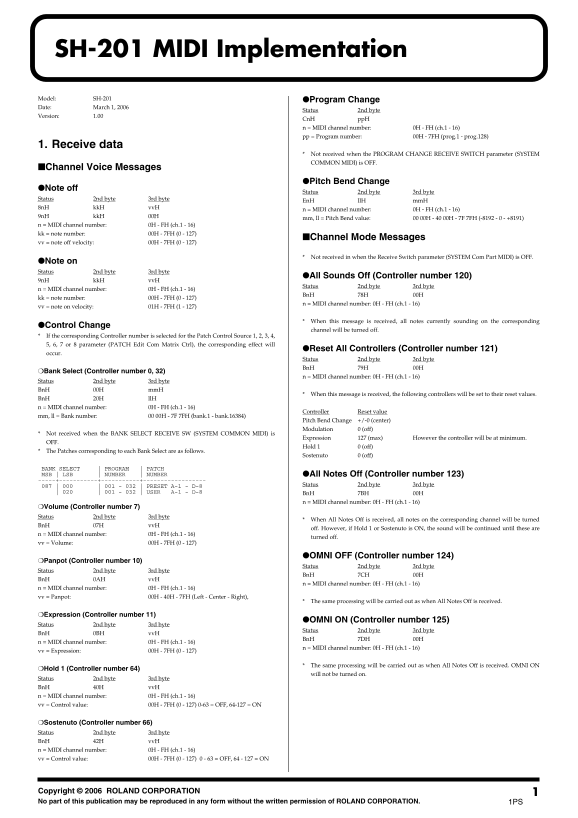
Page 1 Text Content
SH-201 MIDI Implementation Model: SH-201 ●Program Change Date: March 1, 2006
Status 2nd byte
Version: 1.00
Cn H pp H n = MIDI channel number: 0H - FH (ch.1 - 16) pp = Program number: 00H - 7FH (prog.1 - prog.128)
1. Receive data
Not received when the PROGRAM CHANGE RECEIVE SWITCH parameter (SYSTEM COMMON MIDI) is OFF.
■Channel Voice Messages
●Pitch Bend Change
●Note off
Status 2nd byte 3rd byte
Status 2nd byte 3rd byte
En H ll H mm H
8n H kk H vv H
n = MIDI channel number: 0H - FH (ch.1 - 16)
9n H kk H 00H
mm, ll = Pitch Bend value: 00 00H - 40 00H - 7F 7FH (-8192 - 0 - +8191)
n = MIDI channel number: 0H - FH (ch.1 - 16) kk = note number: 00H - 7FH (0 - 127)
■Channel Mode Messages
vv = note off velocity: 00H - 7FH (0 - 127)
Not received in when the Receive Switch parameter (SYSTEM Com Part MIDI) is OFF.
●Note on Status 2nd byte 3rd byte
●All Sounds Off (Controller number 120)
9n H kk H vv H
Status 2nd byte 3rd byte
n = MIDI channel number: 0H - FH (ch.1 - 16)
Bn H 78H 00H
kk = note number: 00H - 7FH (0 - 127)
n = MIDI channel number: 0H - FH (ch.1 - 16)
vv = note on velocity: 01H - 7FH (1 - 127)
When this message is received, all notes currently sounding on the corresponding
●Control Change
channel will be turned off.
If the corresponding Controller number is selected for the Patch Control Source 1, 2, 3, 4, 5, 6, 7 or 8 parameter (PATCH Edit Com Matrix Ctrl), the corresponding effect will
●Reset All Controllers (Controller number 121)
occur.
Status 2nd byte 3rd byte Bn H 79H 00H
❍Bank Select (Controller number 0, 32)
n = MIDI channel number: 0H - FH (ch.1 - 16)
Status 2nd byte 3rd byte Bn H 00H mm H
When this message is received, the following controllers will be set to their reset values.
Bn H 20H ll H n = MIDI channel number: 0H - FH (ch.1 - 16)
Controller Reset value
mm, ll = Bank number: 00 00H - 7F 7FH (bank.1 - bank.16384)
Pitch Bend Change +/-0 (center) Modulation 0 (off)
Not received when the BANK SELECT RECEIVE SW (SYSTEM COMMON MIDI) is
Expression 127 (max) However the controller will be at minimum.
Hold 1 0 (off)
The Patches corresponding to each Bank Select are as follows.
Sostenuto 0 (off)
BANK SELECT | PROGRAM | PATCH MSB | LSB | NUMBER | NUMBER ●All Notes Off (Controller number 123)
087 | 000 | 001 - 032 | PRESET A-1 - D-8 Status 2nd byte 3rd byte
| 020 | 001 - 032 | USER A-1 - D-8 Bn H 7BH 00H
n = MIDI channel number: 0H - FH (ch.1 - 16)
❍Volume (Controller number 7) Status 2nd byte 3rd byte
When All Notes Off is received, all notes on the corresponding channel will be turned
Bn H 07H vv H
off. However, if Hold 1 or Sostenuto is ON, the sound will be continued until these are
n = MIDI channel number: 0H - FH (ch.1 - 16)
turned off.
vv = Volume: 00H - 7FH (0 - 127)
●OMNI OFF (Controller number 124)
❍Panpot (Controller number 10)
Status 2nd byte 3rd byte
Status 2nd byte 3rd byte
Bn H 7CH 00H
Bn H 0AH vv H
n = MIDI channel number: 0H - FH (ch.1 - 16)
n = MIDI channel number: 0H - FH (ch.1 - 16) vv = Panpot: 00H - 40H - 7FH (Left - Center - Right),
The same processing will be carried out as when All Notes Off is received.
❍Expression (Controller number 11)
●OMNI ON (Controller number 125)
Status 2nd byte 3rd byte
Status 2nd byte 3rd byte
Bn H 0BH vv H
Bn H 7DH 00H
n = MIDI channel number: 0H - FH (ch.1 - 16)
n = MIDI channel number: 0H - FH (ch.1 - 16)
vv = Expression: 00H - 7FH (0 - 127)
The same processing will be carried out as when All Notes Off is received. OMNI ON
❍Hold 1 (Controller number 64)
will not be turned on.
Status 2nd byte 3rd byte Bn H 40H vv H n = MIDI channel number: 0H - FH (ch.1 - 16) vv = Control value: 00H - 7FH (0 - 127) 0-63 = OFF, 64-127 = ON
❍Sostenuto (Controller number 66) Status 2nd byte 3rd byte Bn H 42H vv H n = MIDI channel number: 0H - FH (ch.1 - 16) vv = Control value: 00H - 7FH (0 - 127) 0 - 63 = OFF, 64 - 127 = ON
Co pyright © 2006 ROLAND CORPORATION No part of this publication may be reproduced in any form without the written permission of ROLAND CORPORATION. 1PS
Page Summary Contents For Roland SH-201 Synthesizer MIDI Implementation User's Manual
Manual Details
| Brand | Roland |
|---|---|
| Pages | 9 |
| File Size | 178.34 KB |
| Published | June 02, 2026 |
Enter the captcha to get the download link:

Frequently Asked Questions
Does the SH-201 support all MIDI channels?
Yes, it supports MIDI channels 1 through 16 (0x0H - 0xFH).
How can I reset all global controllers like Bank Select or Patch control?
Send a BnH 79H message. This will reset the controlling parameters to their default values.
What happens if I send an 'All Notes Off' command?
When All Notes Off (Controller number 123) is received, all notes on that channel are turned off unless Hold 1 or Sostenuto are active.