Roland RD-2000 Stage Digital Piano - High-Quality RD-2000 Version 1.50 Supplementary Manual
Summary
Enhance your performance capabilities with this supplementary guide for the RD-2000 digital organ workstation. This manual details crucial functions added in version 1.50, specifically focusing on advanced control of Harmonic Bar and Percussion features. It guides users through utilizing external MIDI devices to manage complex tone settings, expand rotary effects, and integrate new virtual instrument libraries. Perfect for professional musicians and sound designers looking to maximize their compositional depth and sonic versatility.
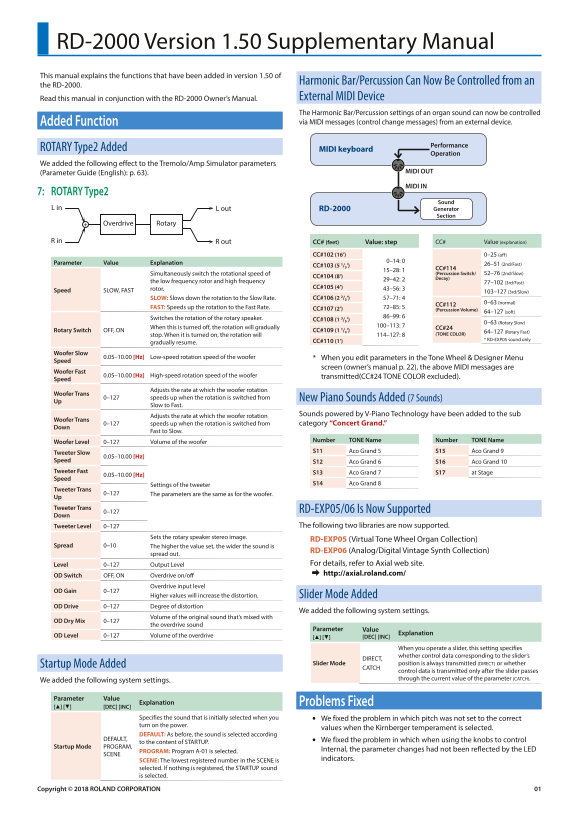
Page 1 Text Content
RD-2000 Version 1.50 Supplementary Manual This manual explains the functions that have been added in version 1.50 of
Harmonic Bar/Percussion Can Now Be Controlled from an
the RD-2000.
Read this manual in conjunction with the RD-2000 Owner’s Manual. External MIDI Device The Harmonic Bar/Percussion settings of an organ sound can now be controlled Added Function via MIDI messages (control change messages) from an external device.
Performance
ROTARY Type2 Added MIDI keyboard
Operation
We added the following effect to the Tremolo/Amp Simulator parameters
(Parameter Guide (English): p. 63). MIDI OUT
MIDI IN
7: ROTARY Type2
Sound
L in L out RD-2000 Generator
Section
Overdrive Rotary
R in R out CC# (feet) Value: step CC# Value (explanation)
CC#102 (16’) 0–25 (off
Parameter Value Explanation 0–14: 0
CC#103 (5 1/3’) 26–51 (2nd/Fast)
15–28: 1 CC#114 Simultaneously switch the rotational speed of (Percussion Switch/ 52–76 (2nd/Slow)
CC#104 (8’) Decay)
the low frequency rotor and high frequency 29–42: 2
77–102 (3rd/Fast)
rotor. CC#105 (4’) 43–56: 3
Speed SLOW, FAST 103–127 (3rd/Slow)
SLOW: Slows down the rotation to the Slow Rate. CC#106 (2 2/3’) 57–71: 4
0–63 (normal)
CC#112
FAST: Speeds up the rotation to the Fast Rate. CC#107 (2’) 72–85: 5
(Percussion Volume)
64–127 (soft)
Switches the rotation of the rotary speaker. 86–99: 6
CC#108 (1 3/5’)
0–63 (Rotary Slow)
When this is turned off, the rotation will gradually 100–113: 7
CC#24
Rotary Switch OFF, ON CC#109 (1 1/3’) 64–127 (Rotary Fast)
stop. When it is turned on, the rotation will 114–127: 8 (TONE COLOR)
CC#110 (1’) * RD-EXP05 sound only
gradually resume.
Woofer Slow
0.05–10.00 [Hz] Low-speed rotation speed of the woofer * When you edit parameters in the Tone Wheel & Designer Menu
Speed
screen (owner’s manual p. 22), the above MIDI messages are
Woofer Fast
0.05–10.00 [Hz] High-speed rotation speed of the woofer transmitted(CC#24 TONE COLOR excluded).
Speed
Adjusts the rate at which the woofer rotation
Woofer Trans
0–127 speeds up when the rotation is switched from New Piano Sounds Added (7 Sounds)
Slow to Fast.
Adjusts the rate at which the woofer rotation Sounds powered by V-Piano Technology have been added to the sub
Woofer Trans
0–127 speeds up when the rotation is switched from category “Concert Grand.”
Fast to Slow.
Woofer Level 0–127 Volume of the woofer Number TONE Name Number TONE Name Tweeter Slow S11 Aco Grand 5 S15 Aco Grand 9
0.05–10.00 [Hz]
Speed S12 Aco Grand 6 S16 Aco Grand 10 Tweeter Fast S13 Aco Grand 7 S17 at Stage
0.05–10.00 [Hz]
Speed
Settings of the tweeter S14 Aco Grand 8
Tweeter Trans
0–127 The parameters are the same as for the woofer.
Up Tweeter Trans RD-EXP05/06 Is Now Supported
Tweeter Level 0–127 The following two libraries are now supported.
Sets the rotary speaker stereo image.
RD-EXP05 (Virtual Tone Wheel Organ Collection)
Spread 0–10 The higher the value set, the wider the sound is
RD-EXP06 (Analog/Digital Vintage Synth Collection)
spread out.
Level 0–127 Output Level For details, refer to Axial web site. & http://axial.roland.com/
OD Switch OFF, ON Overdrive on/off
Overdrive input level
OD Gain 0–127
Higher values will increase the distortion. Slider Mode Added
OD Drive 0–127 Degree of distortion
We added the following system settings.
Volume of the original sound that’s mixed with
OD Dry Mix 0–127
the overdrive sound
Parameter Value
OD Level 0–127 Volume of the overdrive [H] [I] [DEC] [INC] Explanation
When you operate a slider, this setting specifies whether control data corresponding to the slider’s
DIRECT,
Startup Mode Added Slider Mode position is always transmitted (DIRECT) or whether
CATCH
control data is transmitted only after the slider passes through the current value of the parameter (CATCH).
We added the following system settings.
Parameter Value
Problems Fixed
[H] [I] [DEC] [INC] Explanation
Specifies the sound that is initially selected when you We fixed the problem in which pitch was not set to the correct turn on the power.
values when the Kirnberger temperament is selected.
DEFAULT: As before, the sound is selected according
DEFAULT, We fixed the problem in which when using the knobs to control
to the content of STARTUP.
Startup Mode PROGRAM,
PROGRAM: Program A-01 is selected. Internal, the parameter changes had not been reflected by the LED
SCENE
SCENE: The lowest registered number in the SCENE is indicators.
selected. If nothing is registered, the STARTUP sound is selected.
Copyright © 2018 ROLAND CORPORATION
Page Summary Contents For Roland RD-2000 Stage Digital Piano - High-Quality RD-2000 Version 1.50 Supplementary Manual
Manual Details
| Brand | Roland |
|---|---|
| Pages | 1 |
| File Size | 91.56 KB |
| Published | June 02, 2026 |
Enter the captcha to get the download link:

Frequently Asked Questions
How can I control the Harmonic Bar/Percussion of the organ sound?
It can now be controlled via MIDI messages (control change messages) from an external device.
What system allows for rotary speaker image adjustment and level setting?
The RD-EXP05/06 libraries support a 'Spread' parameter to set the stereo imaging width, along with a dedicated 'Level' output control.
Which MIDI message controls the rotational speed of the low frequency rotor and high frequency rotor simultaneously?
CC#103 (5 / ') is used to switch the rotational speed between 2nd/Fast (1) or 2nd/Slow (2).
What does the 'OD Dry Mix' setting control in Overdrive mode?
It specifies the volume of the original sound that is mixed with the overdrive sound.