Philips Electric Shaver HQ851 16 Product Support & User Manual
Summary
Master your grooming routine with this comprehensive guide for your Philips electric shaver. This manual provides detailed instructions on initial setup, proper operating techniques, and achieving optimal shaving results. It covers crucial safety warnings, maintenance procedures (including weekly cleaning and bi-monthly head replacement), and optimal charging guidelines. Designed for new users, this resource ensures you can confidently use your appliance while understanding best practices for care and hygiene.
Page 1 Text Content
Register your product and get support at
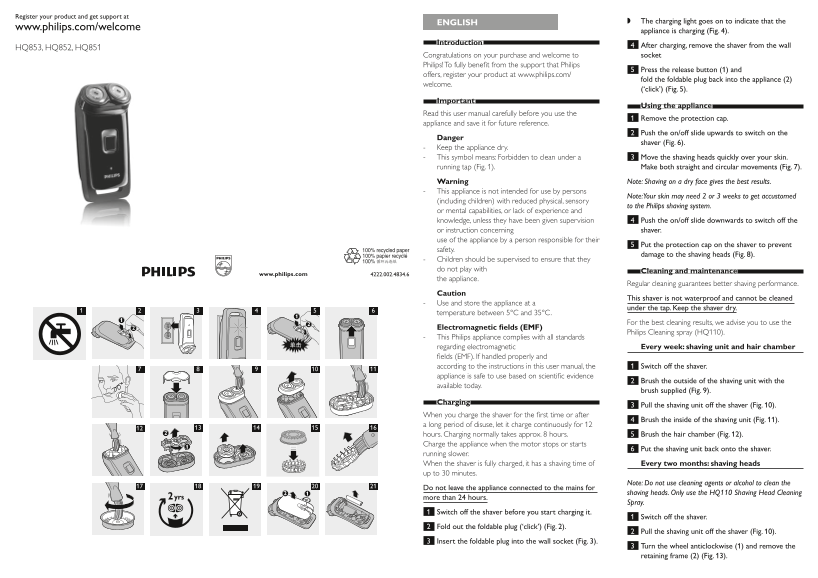
ENGLISH The charging light goes on to indicate that the
www.philips.com/welcome
appliance is charging (Fig. 4) .
Introduction
4 After charging, remove the shaver from the wall
HQ853, HQ852, HQ851
Congratulations on your purchase and welcome to socket
Philips! To fully benefi t from the support that Philips
5 Press the release button (1) and
offers, register your product at www.philips.com/
fold the foldable plug back into the appliance (2)
welcome.
(‘click’) (Fig. 5) .
Important
Using the appliance
Read this user manual carefully before you use the
1 Remove the protection cap.
appliance and save it for future reference.
2 Push the on/off slide upwards to switch on the
Danger
shaver (Fig. 6) .
Keep the appliance dry. This symbol means: Forbidden to clean under a 3 Move the shaving heads quickly over your skin. running tap (Fig. 1) . Make both straight and circular movements (Fig. 7) . Warning Note: Shaving on a dry face gives the best results. This appliance is not intended for use by persons
Note: Your skin may need 2 or 3 weeks to get accustomed
(including children) with reduced physical, sensory
to the Philips shaving system.
or mental capabilities, or lack of experience and knowledge, unless they have been given supervision 4 Push the on/off slide downwards to switch off the or instruction concerning shaver. use of the appliance by a person responsible for their
5 Put the protection cap on the shaver to prevent
safety.
damage to the shaving heads (Fig. 8) .
Children should be supervised to ensure that they do not play with
Cleaning and maintenance
the appliance.
Regular cleaning guarantees better shaving performance.
Caution
This shaver is not waterproof and cannot be cleaned
Use and store the appliance at a
under the tap. Keep the shaver dry.
temperature between 5°C and 35°C.
For the best cleaning results, we advise you to use the
Electromagnetic fi elds (EMF)
Philips Cleaning spray (HQ110).
This Philips appliance complies with all standards regarding electromagnetic Every week: shaving unit and hair chamber fi elds (EMF). If handled properly and according to the instructions in this user manual, the 1 Switch off the shaver. appliance is safe to use based on scientifi c evidence
2 Brush the outside of the shaving unit with the
available today.
brush supplied (Fig. 9) .
Charging
3 Pull the shaving unit off the shaver (Fig. 10) .
When you charge the shaver for the fi rst time or after
4 Brush the inside of the shaving unit (Fig. 11) .
a long period of disuse, let it charge continuously for 12 hours. Charging normally takes approx. 8 hours. 5 Brush the hair chamber (Fig. 12) . Charge the appliance when the motor stops or starts
6 Put the shaving unit back onto the shaver.
running slower. When the shaver is fully charged, it has a shaving time of Every two months: shaving heads up to 30 minutes.
Note: Do not use cleaning agents or alcohol to clean the
Do not leave the appliance connected to the mains for
shaving heads. Only use the HQ110 Shaving Head Cleaning
more than 24 hours.
Spray.
1 Switch off the shaver before you start charging it.
1 Switch off the shaver.
2 Fold out the foldable plug (‘click’) (Fig. 2) .
2 Pull the shaving unit off the shaver (Fig. 10) .
3 Insert the foldable plug into the wall socket (Fig. 3) .
3 Turn the wheel anticlockwise (1) and remove the retaining frame (2) (Fig. 13) .
Page Summary Contents For Philips Electric Shaver HQ851 16 Product Support & User Manual
Manual Details
| Brand | Philips |
|---|---|
| Pages | 7 |
| File Size | 926.62 KB |
| Published | May 31, 2026 |
Enter the captcha to get the download link:
