Nikon Mirrorless Cameras Z SeriesZ 9 Custom Controls Available Roles for English User Guide
Summary
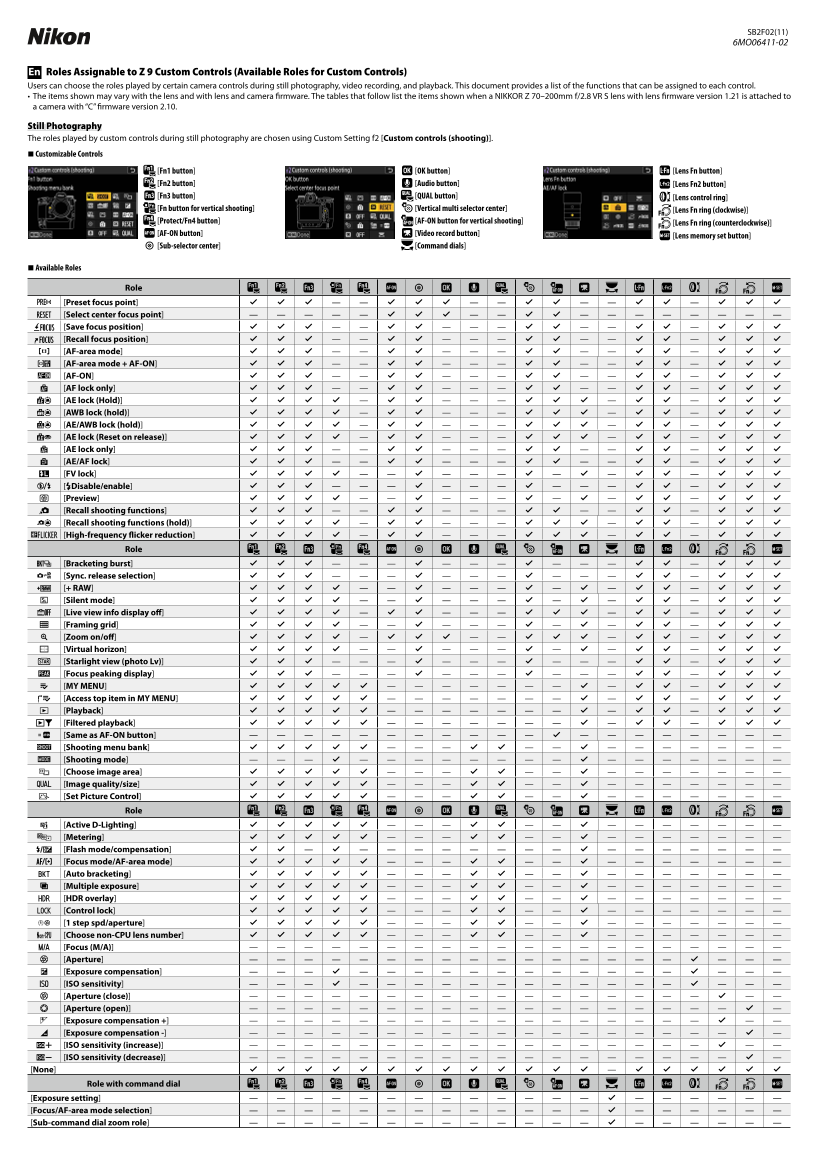
Take mastery of your camera system with this comprehensive guide to assigning custom controls. This manual provides detailed instructions for customizing every physical button and dial across three critical modes: Still Photography, Video Recording, and Playback review. Users can optimize advanced settings—including focus acquisition, exposure locking, bracketing, and technical parameters—to ensure professional-grade precision. Ideal for expert photographers and advanced visual creators who demand granular, intuitive control over their camera’s performance in every shooting scenario.
Manual Details
| Brand | Nikon |
|---|---|
| Pages | 3 |
| File Size | 328.32 KB |
| Published | May 30, 2026 |
Enter the captcha to get the download link:

Frequently Asked Questions
How can I customize the function of custom controls during stills?
Use Custom Setting f2 [Custom controls (shooting)] to assign specific roles to your customizable controls for still photography.
What functions are available in "Play" mode?
In playback, you can select options like Zoom on/off, Filtered playback, Voice memo, and direct file transfer to a computer or via FTP.
Can I lock certain camera settings during shooting?
Yes, the manual lists options such as AE lock (Hold), AWB lock (hold), BF lock, and general control locking.
Does the device support vertical shooting modes?
Yes, there are specific buttons and roles listed for [Fn button for vertical shooting] and related controls in both stills and video mode.