LG S310.ACHNSV Product Specifications - PAKISTAN
Summary
This comprehensive user guide provides detailed instructions for your mobile phone, covering essential setup tasks including SIM card installation, battery replacement, and optional memory card integration. Learn how to utilize core features such as making calls, composing multimedia messages (MMS), managing contacts, and connecting to email services like Hotmail. The manual also details advanced functions like SOS alerts and viewing call logs, making it an ideal resource for new owners seeking a thorough understanding of the device's capabilities.
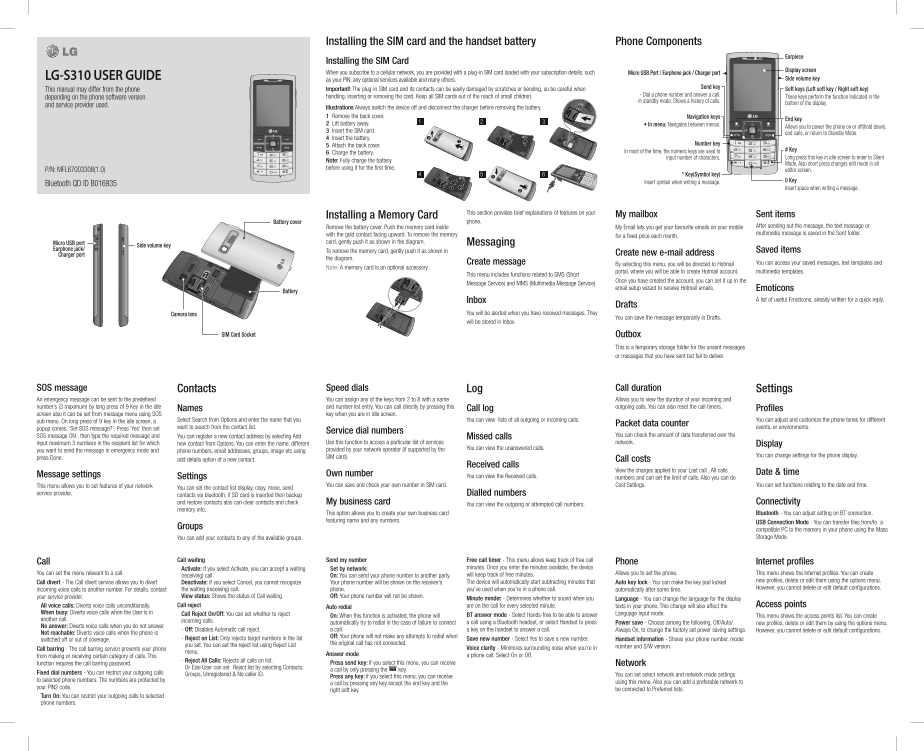
Page 1 Text Content
Installing the SIM card and the handset battery Phone Components
Earpiece
Installing the SIM Card
Display screen
When you subscribe to a cellular network, you are provided with a plug-in SIM card loaded with your subscription details, such Micro USB Port / Earphone jack / Charger port
LG-S310 USER GUIDE Side volume key
as your PIN, any optional services available and many others.
Send key
This manual may differ from the phone Important! The plug-in SIM card and its contacts can be easily damaged by scratches or bending, so be careful when Soft keys (Left soft key / Right soft key)
handling, inserting or removing the card. Keep all SIM cards out of the reach of small children. - Dial a phone number and answer a call.
depending on the phone software version These keys perform the function Indicated in the
- In standby mode: Shows a history of calls.
bottom of the display.
and service provider used.
Illustrations Always switch the device off and disconnect the charger before removing the battery. 1 Remove the back cover. Navigation keys
End key
2 Lift battery away. • In menu: Navigates between menus.
Allows you to power the phone on or off(hold down),
3 Insert the SIM card.
end calls, or return to Standby Mode.
4 Insert the battery.
5 Attach the back cover. Number key
In most of the time, the numeric keys are used to # Key
6 Charge the battery.
input number of characters. Long press this key in idle screen to enter to Silent
Note: Fully charge the battery
Mode. Also short press changes edit mode in all
before using it for the first time.
P/N: MFL67003308(1.0) editor screen.
* Key(Symbol key)
Insert symbol when writing a message. 0 Key
Bluetooth QD ID B016935
Insert space when writing a message.
This section provides brief explanations of features on your My mailbox Sent items
Installing a Memory Card
Battery cover phone.
Remove the battery cover. Push the memory card inside My Email lets you get your favourite emails on your mobile After sending out the message, the text message or with the gold contact facing upward. To remove the memory multimedia message is saved in the Sent folder.
for a fixed price each month.
Micro USB port card, gently push it as shown in the diagram. Messaging
Side volume key
Earphone jack/ Saved items
To remove the memory card, gently push it as shown in
Charger port Create new e-mail address
the diagram.
Create message By selecting this menu, you will be directed to Hotmail You can access your saved messages, text templates and
Note: A memory card is an optional accessory.
portal, where you will be able to create Hotmail account. multimedia templates.
This menu includes functions related to SMS (Short
Once you have created the account, you can set it up in the
Message Service) and MMS (Multimedia Message Service).
email setup wizard to receive Hotmail emails. Emoticons
Battery
Inbox A list of useful Emoticons, already written for a quick reply.
Drafts
Camera lens You will be alerted when you have received messages. They
You can save the message temporarily in Drafts.
will be stored in Inbox.
SIM Card Socket Outbox
This is a temporary storage folder for the unsent messages or messages that you have sent but fail to deliver.
SOS message Contacts Speed dials Log Call duration Settings An emergency message can be sent to the predefined You can assign any of the keys from 2 to 8 with a name Allows you to view the duration of your incoming and number’s (3 maximum) by long press of 9 Key in the idle and number list entry. You can call directly by pressing this outgoing calls. You can also reset the call timers.
Names Call log Profiles
screen also it can be set from message menu using SOS key when you are in idle screen.
sub menu. On long press of 9 key in the idle screen, a Select Search from Options and enter the name that you You can view lists of all outgoing or incoming calls. You can adjust and customize the phone tones for different
Packet data counter
popup comes, ‘Set SOS message?’. Press ‘Yes’ then set want to search from the contact list. events, or environments.
Service dial numbers
SOS message ON , then type the required message and You can register a new contact address by selecting Add You can check the amount of data transferred over the
Missed calls
input maximum 3 numbers in the recipient list for which new contact from Options. You can enter the name, different Use this function to access a particular list of services network.
Display
provided by your network operator (if supported by the You can view the unanswered calls.
you want to send the message in emergency mode and phone numbers, email addresses, groups, image etc using
SIM card). You can change settings for the phone display.
press Done. add details option of a new contact. Call costs
Received calls
View the charges applied to your Last call , All calls
Own number Date & time
Message settings Settings You can view the Received calls.
numbers and can set the limit of calls. Also you can do
This menu allows you to set features of your network You can save and check your own number in SIM card. Cost Settings. You can set functions relating to the date and time.
You can set the contact list display, copy, move, send
service provider. contacts via bluetooth, if SD card is inserted then backup Dialled numbers
and restore contacts also can clear contacts and check My business card You can view the outgoing or attempted call numbers. Connectivity memory info.
This option allows you to create your own business card Bluetooth - You can adjust setting on BT connection.
featuring name and any numbers. USB Connection Mode - You can transfer files from/to a
Groups
compatible PC to the memory in your phone using the Mass You can add your contacts to any of the available groups. Storage Mode.
Call Call waiting Send my number Free call timer - This menu allows keep track of free call Phone Internet profiles
Activate: If you select Activate, you can accept a waiting Set by network: minutes. Once you enter the minutes available, the device
You can set the menu relevant to a call. will keep track of free minutes. Allows you to set the phone. This menu shows the Internet profiles. You can create
(receiving) call. On: You can send your phone number to another party.
Call divert - The Call divert service allows you to divert The device will automatically start subtracting minutes that Auto key lock - You can make the key pad locked new profiles, delete or edit them using the options menu.
Deactivate: If you select Cancel, you cannot recognize Your phone number will be shown on the receiver’s
incoming voice calls to another number. For details, contact the waiting (receiving) call. phone. you’ve used when you’re in a phone call. automatically after some time. However, you cannot delete or edit default configurations.
your service provider. View status: Shows the status of Call waiting. Off: Your phone number will not be shown.
Minute minder - Determines whether to sound when you Language - You can change the language for the display
All voice calls: Diverts voice calls unconditionally. Call reject Auto redial are on the call for every selected minute. texts in your phone. This change will also affect the Access points
When busy: Diverts voice calls when the User is in Call Reject On/Off: You can set whether to reject Language Input mode.
On: When this function is activated, the phone will BT answer mode - Select Hands-free to be able to answer This menu shows the access points list. You can create
another call. incoming calls.
automatically try to redial in the case of failure to connect a call using a Bluetooth headset, or select Handset to press Power save - Choose among the following, Off/Auto/ new profiles, delete or edit them by using the options menu.
No answer: Diverts voice calls when you do not answer.
- Off: Disables Automatic call reject. a call. a key on the handset to answer a call. Always On, to change the factory set power saving settings. However, you cannot delete or edit default configurations.
Not reachable: Diverts voice calls when the phone is
Off: Your phone will not make any attempts to redial when
switched off or out of coverage. - Reject on List: Only rejects target numbers in the list Save new number - Select Yes to save a new number. Handset information - Shows your phone number, model
the original call has not connected.
you set. You can set the reject list using Reject List number and S/W version.
Call barring - The call barring service prevents your phone Voice clarity - Minimizes surrounding noise when you’re in
menu.
Answer mode a phone call. Select On or Off.
from making or receiving certain category of calls. This
- Reject All Calls: Rejects all calls on list.
function requires the call barring password. Press send key: If you select this menu, you can receive Network
Or Else User can set Reject list by selecting Contacts,
a call by only pressing the key.
Fixed dial numbers - You can restrict your outgoing calls Groups, Unregistered & No caller ID. You can set select network and network mode settings
Press any key: If you select this menu, you can receive
to selected phone numbers. The numbers are protected by using this menu. Also you can add a preferable network to
a call by pressing any key except the end key and the
your PIN2 code. be connected to Preferred lists.
right soft key.
Turn On: You can restrict your outgoing calls to selected phone numbers.
Page Summary Contents For LG S310.ACHNSV Product Specifications - PAKISTAN
Manual Details
| Brand | LG |
|---|---|
| Pages | 2 |
| File Size | 1.06 MB |
| Published | May 29, 2026 |
Enter the captcha to get the download link:
