LG DVD Recorder GP08NU20. AWTE1L Product Specifications English
Summary
This comprehensive guide provides everything needed to operate your External Super Multi Drive, enabling high-speed reading and writing of various optical media, including CD, DVD, DVD±R DL, and more. Learn how to safely install and connect the unit using USB 2.0, understand all controls, and meet optimal performance specifications. This manual is designed for users seeking reliable multimedia storage and management capabilities in a PC environment.
Page 1 Text Content
Installation Hardware Installation
NOTES
• Please pay attention to handling Electrostatic Sensitive Devices, you may use anti-static products such as wrist straps, heel straps, mats to protect your body from electrostatic. • Make sure you have a personal computer with one or two open USB ports before connecting the drive to your computer. • Power for all other devices should be turn off before attaching the cables.
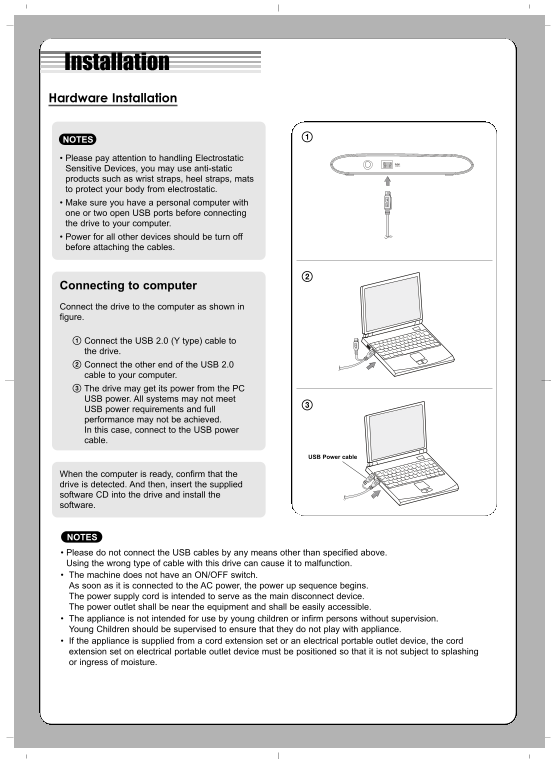
Connecting to computer Connect the drive to the computer as shown in figure.
Connect the USB 2.0 (Y type) cable to the drive. Connect the other end of the USB 2.0 cable to your computer. The drive may get its power from the PC USB power. All systems may not meet USB power requirements and full performance may not be achieved. In this case, connect to the USB power cable.
USB Power cable
When the computer is ready, confirm that the drive is detected. And then, insert the supplied software CD into the drive and install the software.
NOTES • Please do not connect the USB cables by any means other than specified above. Using the wrong type of cable with this drive can cause it to malfunction. • The machine does not have an ON/OFF switch. As soon as it is connected to the AC power, the power up sequence begins. The power supply cord is intended to serve as the main disconnect device. The power outlet shall be near the equipment and shall be easily accessible. • The appliance is not intended for use by young children or infirm persons without supervision. Young Children should be supervised to ensure that they do not play with appliance. • If the appliance is supplied from a cord extension set or an electrical portable outlet device, the cord extension set on electrical portable outlet device must be positioned so that it is not subject to splashing or ingress of moisture.
Page Summary Contents For LG DVD Recorder GP08NU20. AWTE1L Product Specifications English
Manual Details
| Brand | LG |
|---|---|
| Pages | 4 |
| File Size | 265.19 KB |
| Published | June 06, 2026 |
Enter the captcha to get the download link:

Frequently Asked Questions
What type of computer is required for optimal performance?
A PC with a minimum system memory of 256MB or larger (Recommended: 512MB) and 20GB or more free hard disk space.
How do I safely remove the USB cable from the drive?
Stop running applications, click the taskbar icon for 'Safely Remove USB Mass Storage Device', and then physically remove the converter cable.
Is AC power adapter needed to use the drive?
No, the unit is designed to be PC USB powered, meaning no AC adapter is needed.
What cables are recommended for best results?
Mitsubishi Kagaku Media, Verbatim, TDK, LG discs are generally recommended for CD-R, DVD-RW, and other types of media.