Lenovo IdeaPad Y650 Setup Poster V1.0 User Guide
Summary
Master your Lenovo IdeaPad Y650 SP with this comprehensive guide. This technical manual provides detailed instructions covering initial setup, operation of advanced features like VeriFace biometric security, OneKey Rescue System recovery tools, and Energy Management settings. It equips new users with the knowledge needed to optimize performance, secure data, and troubleshoot common issues effectively. Essential reading for maximizing your productivity and enjoying seamless computing experiences.
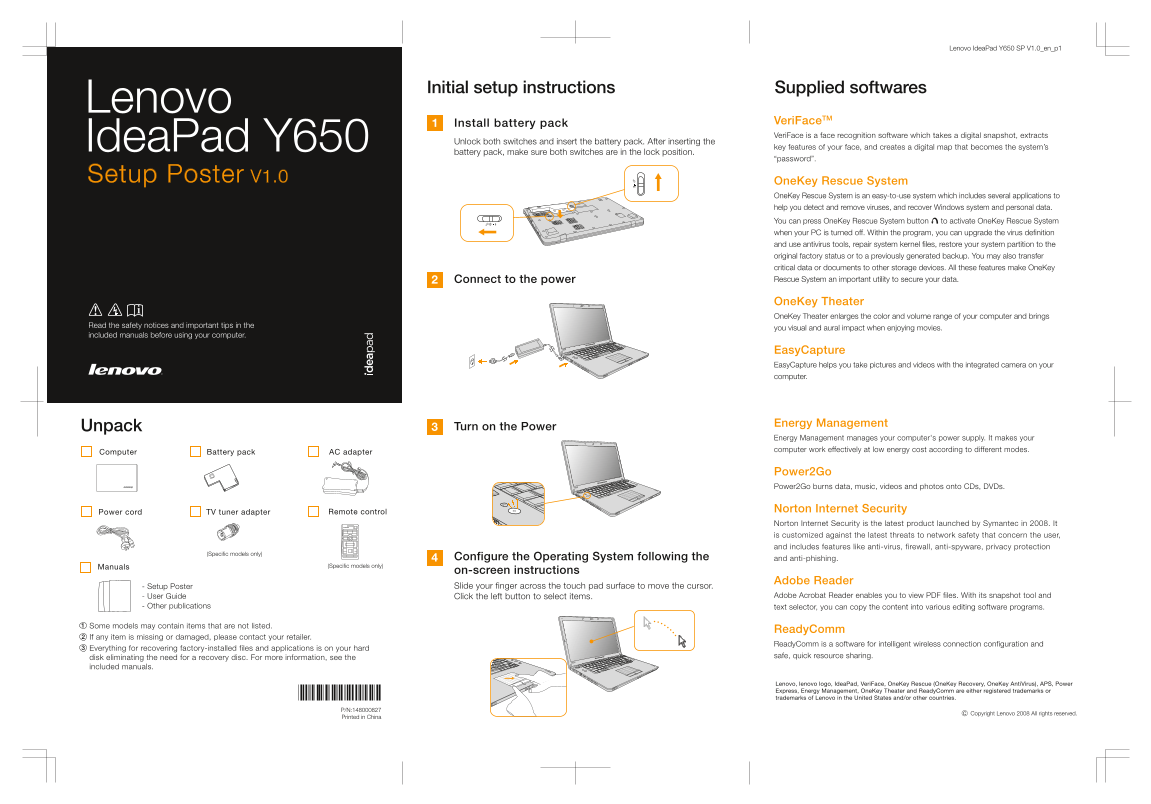
Page 1 Text Content
Lenovo Idea Pad Y650 SP V1.0_en_p1
Initial setup instructions Supplied softwares
Lenovo
Install battery pack Veri Face TM Veri Face is a face recognition software which takes a digital snapshot, extracts
Unlock both switches and insert the battery pack. After inserting the
Idea Pad Y650 key features of your face, and creates a digital map that becomes the system’s
battery pack, make sure both switches are in the lock position.
“password”.
Setup Poster V1.0 One Key Rescue System
One Key Rescue System is an easy-to-use system which includes several applications to help you detect and remove viruses, and recover Windows system and personal data.
You can press One Key Rescue System button to activate One Key Rescue System when your PC is turned off. Within the program, you can upgrade the virus definition and use antivirus tools, repair system kernel files, restore your system partition to the original factory status or to a previously generated backup. You may also transfer critical data or documents to other storage devices. All these features make One Key Connect to the power Rescue System an important utility to secure your data.
One Key Theater One Key Theater enlarges the color and volume range of your computer and brings
Read the safety notices and important tips in the
you visual and aural impact when enjoying movies.
included manuals before using your computer.
Easy Capture Easy Capture helps you take pictures and videos with the integrated camera on your computer.
Energy Management
Unpack Turn on the Power
Energy Management manages your computer's power supply. It makes your computer work effectively at low energy cost according to different modes.
Computer Battery pack AC adapter
Power2Go Power2Go burns data, music, videos and photos onto CDs, DVDs.
Norton Internet Security
Power cord TV tuner adapter Remote control
Norton Internet Security is the latest product launched by Symantec in 2008. It is customized against the latest threats to network safety that concern the user, and includes features like anti-virus, firewall, anti-spyware, privacy protection
(Specific models only)
Configure the Operating System following the and anti-phishing.
Manuals (Specific models only)
on-screen instructions
Adobe Reader
- Setup Poster Slide your finger across the touch pad surface to move the cursor.
- User Guide Click the left button to select items. Adobe Acrobat Reader enables you to view PDF files. With its snapshot tool and
- Other publications text selector, you can copy the content into various editing software programs.
Some models may contain items that are not listed.
Ready Comm
If any item is missing or damaged, please contact your retailer.
Ready Comm is a software for intelligent wireless connection configuration and
Everything for recovering factory-installed files and applications is on your hard
disk eliminating the need for a recovery disc. For more information, see the safe, quick resource sharing.
included manuals.
Lenovo, lenovo logo, Idea Pad, Veri Face, One Key Rescue (One Key Recovery, One Key Anti Virus), APS, Power Express, Energy Management, One Key Theater and Ready Comm are either registered trademarks or trademarks of Lenovo in the United States and/or other countries.
Copyright Lenovo 2008 All rights reserved.
Printed in China
Page Summary Contents For Lenovo IdeaPad Y650 Setup Poster V1.0 User Guide
Manual Details
| Brand | Lenovo |
|---|---|
| Pages | 2 |
| File Size | 351.91 KB |
| Published | June 03, 2026 |
Enter the captcha to get the download link:

Frequently Asked Questions
What can I do if my Windows system encounters an unrecoverable error?
Use the OneKey Rescue System button to repair Windows system kernel files or restore the entire system partition to its original factory status or a previously generated backup.
Are there specific steps when setting up the VeriFace software?
After successfully taking and mapping your face key features, ensure that both switches on the battery pack are in the lock position.
How does OneKey Theater enhance multimedia consumption?
It enriches the user experience by enlarging the color and volume range of the computer, giving a better visual and aural impact when enjoying movies.
What is ReadyComm software primarily used for?
ReadyComm provides intelligent wireless connection configuration, allowing for safe and quick resource sharing without needing a recovery disk.