KORG TRTK MIDI Chart E Parameter Guide
Summary
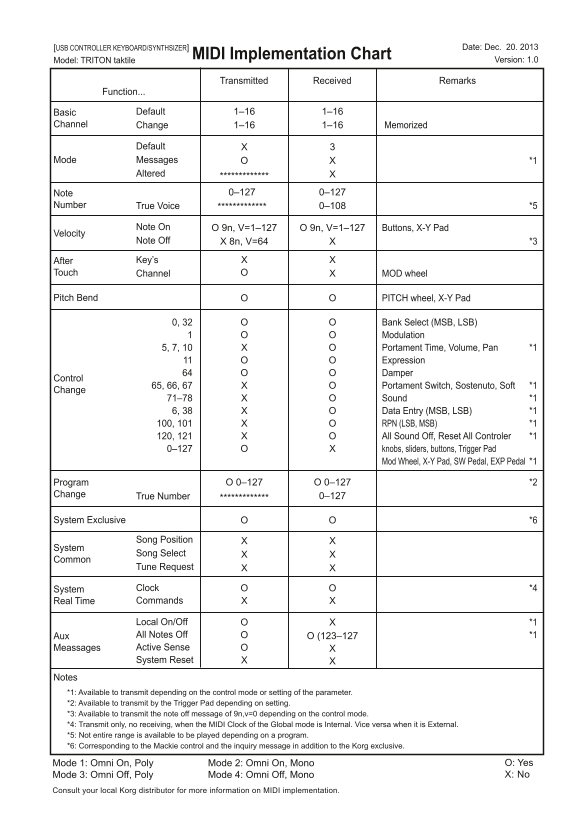
Maximize your setup with this comprehensive guide detailing the MIDI functionality of the TRITON keyboard/synthesizer. This resource provides detailed charts covering a wide range of controls—from basic note data and velocity to complex system exclusive messages, bank selection, and modulation wheel parameters. Whether you are an advanced musician or audio professional, this manual ensures you fully understand how every knob, slider, button, and pad can interact with external MIDI equipment for powerful sound design and seamless studio integration.
Page 1 Text Content
[USB CONTROLLER KEYBOARD/SYNTHSIZER] Date: Dec. 20. 2013
MIDI Implementation Chart
Model: TRITON taktile Version: 1.0
Transmitted Received Remarks
Function...
Basic Default 1–16 1–16
Channel Change 1–16 1–16 Memorized
Default
Mode Messages *1
Altered
Note 0–127 0–127
Number True Voice 0–108 *5
Note On O 9n, V=1–127 O 9n, V=1–127 Buttons, X-Y Pad
Velocity
Note Off X 8n, V=64 *3
After Key’s
Touch Channel MOD wheel
Pitch Bend PITCH wheel, X-Y Pad
0, 32 Bank Select (MSB, LSB) Modulation 5, 7, 10 Portament Time, Volume, Pan *1 Expression Damper
Control
65, 66, 67 Portament Switch, Sostenuto, Soft *1
Change
71–78 Sound *1 6, 38 Data Entry (MSB, LSB) *1 100, 101 RPN (LSB, MSB) *1 120, 121 All Sound Off, Reset All Controler *1 0–127 knobs, sliders, buttons, Trigger Pad Mod Wheel, X-Y Pad, SW Pedal, EXP Pedal *1
Program O 0–127 O 0–127 *2
Change True Number 0–127
System Exclusive *6
Song Position
System
Song Select
Common
Tune Request
System Clock *4 Real Time Commands
Local On/Off *1 Aux All Notes Off O (123–127 *1 Meassages Active Sense System Reset
Notes *1: Available to transmit depending on the control mode or setting of the parameter. *2: Available to transmit by the Trigger Pad depending on setting. *3: Available to transmit the note off message of 9n,v=0 depending on the control mode. *4: Transmit only, no receiving, when the MIDI Clock of the Global mode is Internal. Vice versa when it is External. *5: Not entire range is available to be played depending on a program. *6: Corresponding to the Mackie control and the inquiry message in addition to the Korg exclusive.
Mode 1: Omni On, Poly Mode 2: Omni On, Mono O: Yes Mode 3: Omni Off, Poly Mode 4: Omni Off, Mono X: No
Consult your local Korg distributor for more information on MIDI implementation.
Page Summary Contents For KORG TRTK MIDI Chart E Parameter Guide
Manual Details
| Brand | KORG |
|---|---|
| Pages | 1 |
| File Size | 644.90 KB |
| Published | May 24, 2026 |
Enter the captcha to get the download link:

Frequently Asked Questions
What are the supported MIDI message ranges?
Basic channels support Note Change (1-16), Channel Change (1-16), and various mode messages.
How does Pitch Bend function in this unit?
Knobs, sliders, buttons, Trigger Pad, Mod Wheel, X-Y Pad, SW Pedal, EXP Pedal, etc., support transmitting data from 0–127.
Are there dedicated functions for System Exclusive messages?
Yes, the table details various commands like Song Select (0–127), Clock, and Real Time Commands through System Exclusive messaging.