Hytera PCN005 X1e Series Carrying Case Mounting Instructions Card V00_ Chinese-English User Guide and Installation Manual
Summary
This essential guide provides instructions for maximizing the performance and portability of your X1 series radio equipment. It covers how to use the specialized carrying case, detailing the clip attachment process to ensure it is securely fastened where needed. The manual offers clear, step-by-step procedures for safely inserting and removing your radio from the carrier, preventing damage and guaranteeing ease of use. This resource is mandatory reading for all owners seeking optimum efficiency and dependable carrying solutions for their radios.
Page 1 Text Content
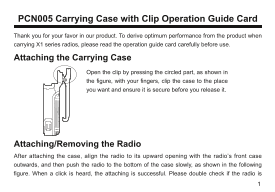
PCN005 Carrying Case with Clip Operation Guide Card Thank you for your favor in our product. To derive optimum performance from the product when carrying X1 series radios, please read the operation guide card carefully before use.
Attaching the Carrying Case
Open the clip by pressing the circled part, as shown in the figure, with your fingers, clip the case to the place you want and ensure it is secure before you release it.
Attaching/Removing the Radio After attaching the case, align the radio to its upward opening with the radio’s front case outwards, and then push the radio to the bottom of the case slowly, as shown in the following figure. When a click is heard, the attaching is successful. Please double check if the radio is
Page Summary Contents For Hytera PCN005 X1e Series Carrying Case Mounting Instructions Card V00_ Chinese-English User Guide and Installation Manual
Manual Details
| Brand | Hytera |
|---|---|
| Pages | 4 |
| File Size | 1005.28 KB |
| Published | May 22, 2026 |
Enter the captcha to get the download link:

Frequently Asked Questions
如何使用携带夹?
用手指按压环形部分打开弹簧扣,将其固定在所需位置即可。
如何将对讲机放入携带夹内?
将对讲机的电池侧朝里,平行推进,直到听到“嗒”声再松手。
取出对讲机应如何操作?
只需用手握住对讲机从弹簧扣的上方将其拉出即可。
使用携带夹时需要注意哪些事项?
需确保每次放入和取出的过程,对讲机都已稳固固定,以防跌落损坏。